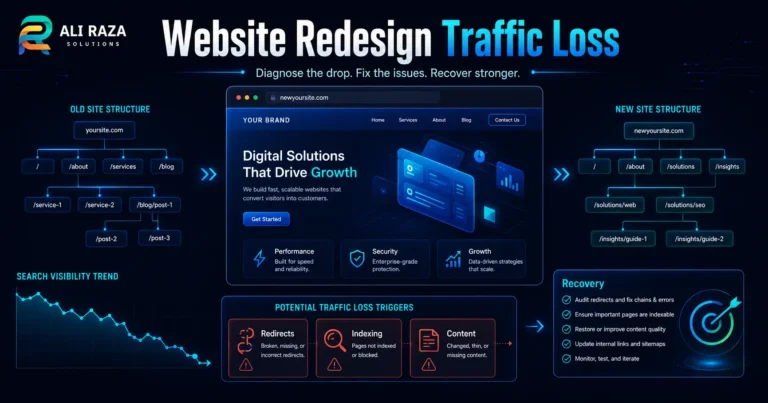
Rankings Dropped Overnight? 8 Causes to Check First
A sudden visibility loss can feel like an algorithm penalty, but the real cause may be technical, editorial, competitive or simply a reporting pattern. Use this diagnostic sequence before making site-wide changes.
Updated: August 14, 2026 · Approximate reading time: 15 minutes
Start diagnosis
If your rankings dropped overnight, do not immediately rewrite every page, buy links or reverse recent work. First confirm whether you have a genuine Google ranking drop, identify exactly which pages and queries changed, and then test the most plausible cause against Search Console and site evidence.
Google’s own guidance says Search traffic can decline because of technical issues, security or spam problems, ranking changes, seasonality and changing interests, or site moves. The fastest recovery usually starts with narrowing the pattern rather than guessing at a single cause.
Quick Diagnosis: What a Sudden Google Ranking Drop Usually Means
A ranking decline is a symptom, not a diagnosis. Match the pattern to the most likely source before changing the site.
| Pattern | Likely area | First check |
|---|---|---|
| Many pages fall on the same date | Ranking update or site-wide technical change | Google status, deployments and Search Console |
| One directory disappears | Indexing, robots, template or internal-link issue | URL Inspection and Page indexing |
| Pages vanish from Google | Noindex, canonical, removal or access problem | Rendered HTML, headers and canonical signals |
| Drop begins after redesign or migration | URL mapping, redirects, architecture or content changes | Old-to-new URL map and redirects |
| Positions fall but pages remain indexed | Relevance, competition or ranking reassessment | Page/query comparison |
| Clicks fall but positions are stable | Demand, SERP appearance or CTR change | Impressions, CTR and Trends |
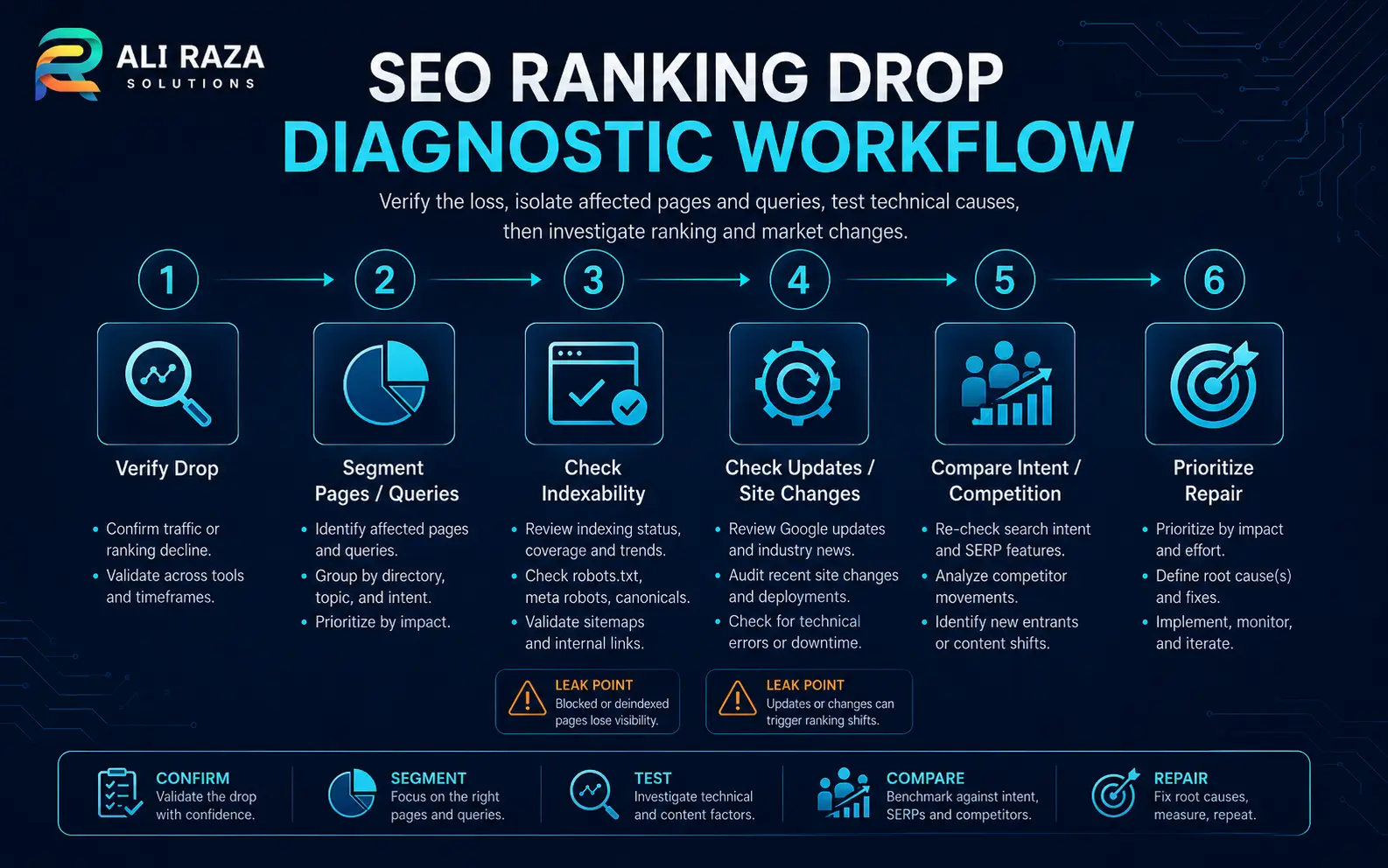
Before the 8 Causes: Confirm the Ranking Drop Is Real
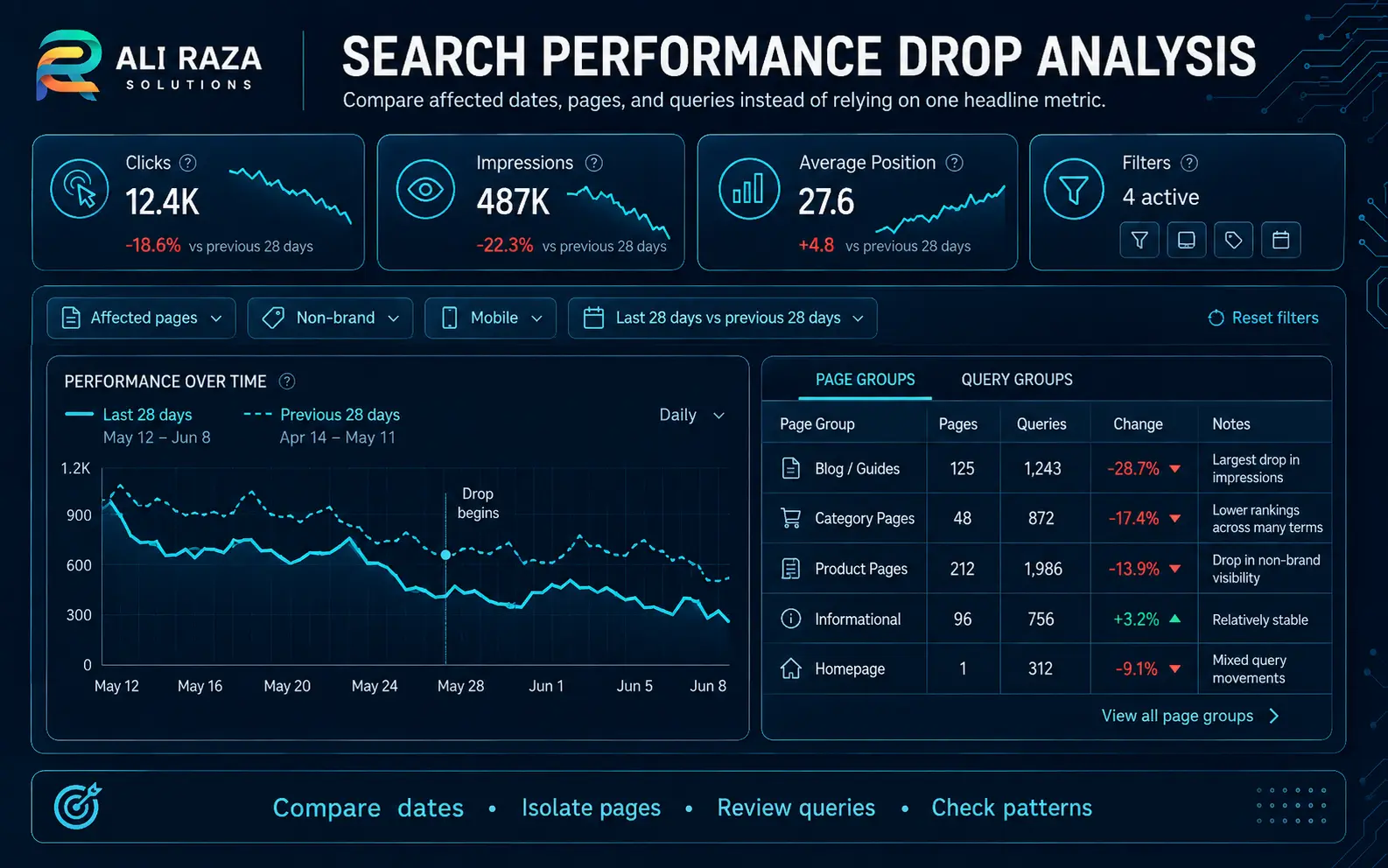
Open the Google Search Console Performance report and compare the decline against a meaningful previous period. Segment by page, query, country, device and search appearance so you can tell a site-wide event from a narrow problem.
Check impressions
If impressions and average position both fall, you may have lost visibility. If impressions fall while position stays similar, demand may have changed.
Check clicks and CTR
Stable positions with fewer clicks can indicate changing snippets, richer competing results or lower demand rather than lost ranking.
Find affected URLs
Separate a site-wide event from a template, directory or page-specific issue. Each pattern needs a different repair.
Record the date
Match the first clear change to releases, migrations, plugin changes, outages and confirmed Google updates.
Google’s traffic-drop debugging guide recommends using Search Console to analyze the shape of the decline and distinguish technical, security, spam, ranking and demand-related causes.
1. A Google Ranking System or Spam Update Reassessed Your Pages
If many pages change around the same date, compare that timing with the official Google Search Status Dashboard. As of August 14, 2026, the dashboard lists a June 2026 spam update and May and March 2026 core updates among the most recent completed ranking incidents.
A timing match is a clue, not proof. For core updates, Google recommends confirming rollout completion, waiting at least a full week before detailed comparison, and then reviewing the pages and queries that changed.
2. Google Cannot Reliably Crawl, Render or Index Important URLs
Technical failures can remove otherwise strong pages from consideration. Google specifically lists server availability, robots.txt fetching, “page not found” responses and related crawl or indexing failures among causes of Search drops.
- Spikes in Page indexing exclusions or Crawl stats errors
- 5xx responses, timeouts or intermittent hosting problems
- Important pages returning 404, soft 404 or redirect chains
- Critical content missing from rendered HTML
- Large sections becoming orphaned after navigation changes
Inspect representative losing URLs. If the same failure appears across the affected group, you have a strong root-cause signal.
3. A Noindex, Robots or Canonical Change Sent the Wrong Signal
Accidental directives can produce dramatic losses. A page carrying noindex can be removed from Search after Google crawls it, while canonical changes can consolidate signals to a different URL.
Meta robots
Check live HTML and HTTP headers for accidental noindex values introduced by an SEO plugin, staging setting or template.
robots.txt
Confirm Googlebot can reach the pages and resources it needs. robots.txt is not a canonicalization tool.
Canonicals
Verify the declared canonical points to the intended indexable URL and that sitemaps and internal links reinforce the same preference.
Removals
Check whether someone used Search Console removals or changed access controls during a launch, staging cleanup or incident.
Google’s canonical guidance warns against using noindex to influence canonical selection because it blocks that page from Search.
4. A Redesign, Migration or URL Change Broke Search Signals
Rankings can fluctuate while Google recrawls and reindexes a moved site. Problems become more serious when migrations lose equivalent redirects, alter internal linking, remove useful copy, change canonicals or create redirect loops.
Google’s site-move documentation recommends an old-to-new URL map, redirects, and monitoring both old and new URLs. For permanent moves, permanent server-side redirects such as 301 or 308 are generally appropriate.
- Domain, protocol, subdomain or URL-path changes
- WordPress permalink changes
- Theme or page-builder replacement
- Navigation and internal-link restructuring
- Deleted service, category or location pages
- Hosting, CDN, firewall or caching changes
5. Your Content No Longer Matches the Query as Well as It Did
A page can remain technically healthy and still lose rank because its relevance is weaker than the results Google now selects. Search intent can evolve, competitors can answer the need more completely, and outdated facts or thin sections can make a previously competitive page less useful.
- Did the query shift from informational to transactional, local or another result type?
- Does your page answer the primary need early and clearly?
- Are examples, dates or instructions outdated?
- Did a redesign remove a section that matched a useful subtopic?
- Are multiple pages on your own site competing for the same intent?
6. A Manual Action, Spam Issue or Security Problem Is Affecting Visibility
Google says spam-policy violations can result in content ranking lower or not appearing in results, through automated systems and, when needed, human review. Search Console’s Manual Actions report shows whether a manual action has been issued.
Also check Security Issues. Malware, phishing, hacked content and other threats can trigger warnings and reduce Search traffic. If you find a compromise, treat it as a security incident rather than an ordinary SEO task.
- Search Console → Manual Actions
- Search Console → Security Issues
- Unexpected indexed pages or injected topics
- Unknown administrators or access changes
- Hosting malware or abuse notifications
Ali Raza Solutions also provides website maintenance services for ongoing security, updates and monitoring.
7. Competitors or the Search Results Page Changed Around You
Sometimes your page did not become technically worse; the result set became more competitive. New authoritative pages, fresher local results, product modules, video, forums, news, AI features or other result formats can change both rank and click opportunity.
Compare the current top results with a documented baseline if you have one. Look for changes in page type, freshness, depth and dominant search intent. Then decide whether the page needs improvement, repositioning or simply monitoring.
For a broader diagnosis, Ali Raza Solutions’ SEO services cover technical SEO, on-page optimization, content strategy and visibility audits.
8. Search Demand, Seasonality or Reporting Made the Drop Look Worse
Not every traffic decline is a ranking decline. Google recommends checking seasonality and changing interests when search demand falls. If impressions and clicks decline while average position remains broadly stable, investigate query demand before changing the page.
Reporting also needs context. A rank tracker may use a different location or device than your customers. Search Console average position is aggregated across impressions and should be interpreted alongside clicks, impressions, CTR, page and query data.
SEO Recovery Plan: What to Do After You Find the Cause
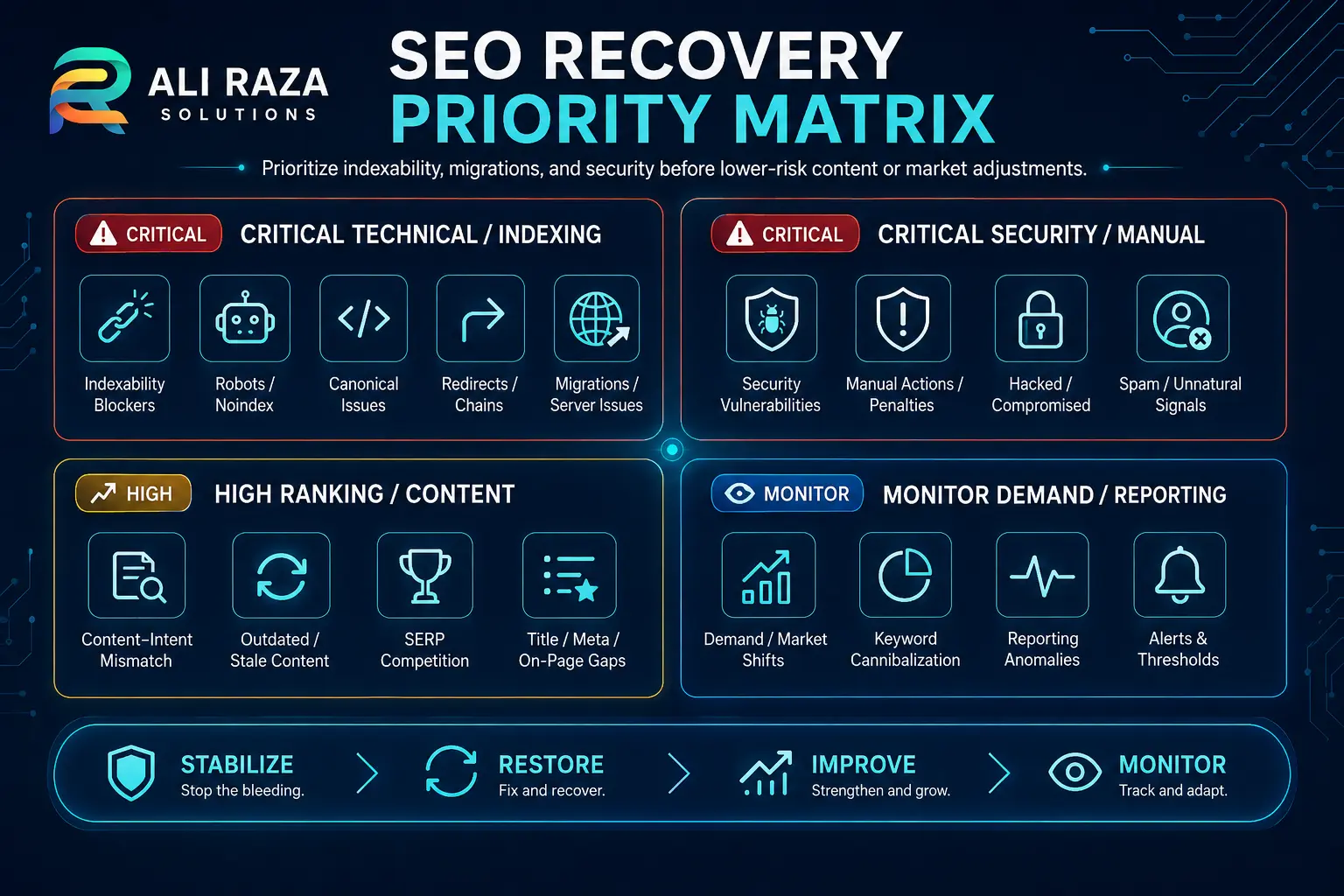
Recovery should follow evidence and risk. Fix issues that can remove pages from the index before spending time on speculative content or link changes.
Freeze unnecessary changes
Record deployments and avoid stacking new edits on top of an unresolved decline.
Segment the loss
Identify affected pages, queries, countries, devices, directories and dates.
Test indexability
Inspect status codes, robots directives, canonicals, rendered content and indexing reports.
Check Google and site events
Compare the date with confirmed updates, releases, migrations, outages and security events.
Repair the root cause
Correct access, redirects or canonicals, recover internal links, or improve content where evidence supports it.
Validate and monitor
Confirm representative URLs, annotate the fix date and monitor subsequent crawls and visibility.
| Finding | Priority | Response |
|---|---|---|
| Important pages are noindexed or inaccessible | Critical | Correct access/indexing signals and validate live URLs. |
| Migration redirects are missing | Critical | Repair mappings and key internal links. |
| Manual action or security issue confirmed | Critical | Resolve the stated issue and follow the relevant review process. |
| Drop aligns with completed core update | High | Assess affected pages and queries after rollout. |
| Intent or competitors changed | Medium–High | Reassess page purpose, usefulness and format. |
| Demand fell but positions stayed stable | Monitor | Adjust forecasting and content strategy rather than treating it as a technical penalty. |
Do not change everything at once
Mass edits make it difficult to identify which change solved or worsened the problem.
Do not assume “penalty”
A decline can come from normal ranking changes, technical errors, competition or demand without a manual action.
Do not delete losing pages blindly
Some URLs may still earn impressions, links, conversions or support stronger pages internally.
Do not chase exact old positions
The goal is durable relevance and qualified visibility, not recreating one historical screenshot.
A Practical Website SEO Audit Checklist for a Sudden Drop
- Confirm the first date of sustained decline in Search Console.
- Compare clicks, impressions, CTR and average position.
- Export pages and queries with the largest losses.
- Check Page indexing, Crawl stats, Manual Actions and Security Issues.
- Inspect representative URLs for status, indexability, canonical and rendered content.
- Review deployments, migrations, plugin changes and hosting incidents.
- Check Google’s ranking-status history for overlapping updates.
- Compare current search intent and competitive result types.
- Check demand when impressions changed.
- Fix one root-cause group at a time and annotate the change date.
If you need a second set of eyes, contact Ali Raza Solutions with the affected domain, approximate drop date and Search Console screenshots.
Frequently Asked Questions About Google Ranking Drops
Use these answers as a triage guide, then validate the cause against your own Search Console and website data.
Why did my Google rankings drop overnight?
An overnight Google ranking drop can come from a ranking-system update, crawl or indexing problems, a site change, a manual or security issue, stronger competing results, changing search intent, or normal reporting and demand variation. Diagnose the pattern in Search Console before making broad changes.
How do I know if a Google algorithm update caused the drop?
Compare the date of the decline with Google’s Search Status Dashboard and then segment Search Console by page, query, country and device. A timing match is a clue, not proof. Google recommends reviewing affected pages and queries after an update has finished rolling out.
Can a noindex tag cause rankings to disappear?
Yes. If Google crawls a page carrying a noindex directive, that page can be removed from Google Search. Accidental robots directives, canonical changes and access problems should be checked when important URLs suddenly lose visibility.
Can a website redesign hurt SEO rankings?
It can if the redesign changes URLs, removes content or internal links, alters canonicals, introduces crawl problems, or weakens page relevance. A well-planned redesign or migration can minimize disruption by mapping URLs, using appropriate redirects and monitoring indexing.
Should I rewrite all my content after a ranking drop?
No. First identify which pages and queries actually declined and why. Large reactive rewrites can make diagnosis harder. Update content when the evidence shows that relevance, usefulness, accuracy or search intent has changed.
How long does SEO recovery take after rankings fall?
There is no fixed recovery time. Technical fixes can be reflected after Google recrawls and reprocesses affected URLs, while broader ranking changes may take longer. Site size, crawl frequency, the cause of the drop and the scope of changes all matter.
Does losing backlinks always cause an overnight ranking drop?
Not always. Link changes can matter, but a sudden decline should be investigated alongside technical, indexing, content, competitive and Google update signals. Avoid assuming links are the cause without page- and query-level evidence.
What should I check first when rankings drop?
Start with Google Search Console: confirm the date and scope of the decline, compare clicks, impressions and average position, review Page indexing, Crawl stats, Manual Actions and Security Issues, and inspect representative affected URLs before changing the site.

About Ali Raza Solutions
Ali Raza Solutions provides SEO, WordPress development, website maintenance and digital marketing services for businesses in Pakistan and international markets.
Search performance can change for multiple overlapping reasons. This guide provides a diagnostic framework, not a guarantee of ranking recovery or a prediction of Google’s future ranking behavior.