
About Ali Raza Solutions
Ali Raza Solutions provides WordPress development, web development, SEO and website maintenance services for businesses in the United Kingdom, United States and international markets.
Webflow vs WordPress 2026: Which Platform Should You Choose?
Webflow vs WordPress 2026 is no longer a simple no-code-versus-CMS debate. Webflow has become a managed visual development platform with built-in hosting, CMS tools, AI features and controlled publishing. WordPress remains the more open, extensible and widely adopted content platform, but it places more responsibility on the owner or development team.
The practical answer is straightforward: choose Webflow for a design-led marketing site with a relatively controlled feature set; choose WordPress for content growth, advanced SEO, ecommerce, memberships, integrations or long-term platform ownership. This guide explains where each platform wins, where it creates risk and how to make the decision based on your business rather than platform hype.
- 12 decision factors
- 2026 pricing update
- SEO and performance
- Ownership and scalability
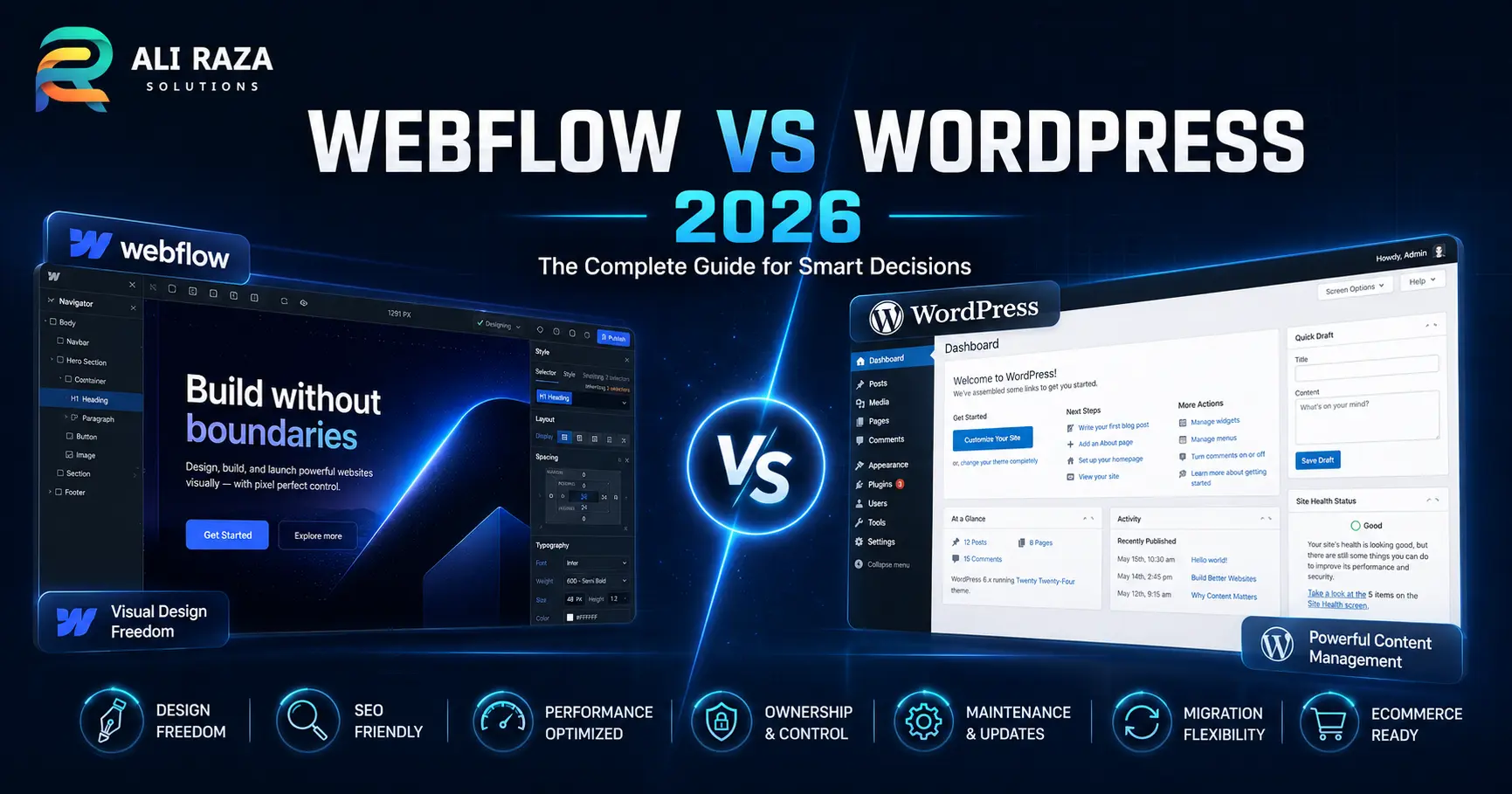
Webflow vs WordPress 2026: the practical answer
For a polished brochure site, landing-page system or brand website maintained by a design and marketing team, Webflow can reduce operational friction. Hosting, deployment, backups and core platform updates are handled inside one managed environment.
For a publication, lead-generation ecosystem, multilingual content operation, advanced store, directory, membership platform or website that must integrate deeply with business systems, WordPress normally provides the stronger long-term foundation. Its flexibility is also why it needs disciplined development, security and maintenance.
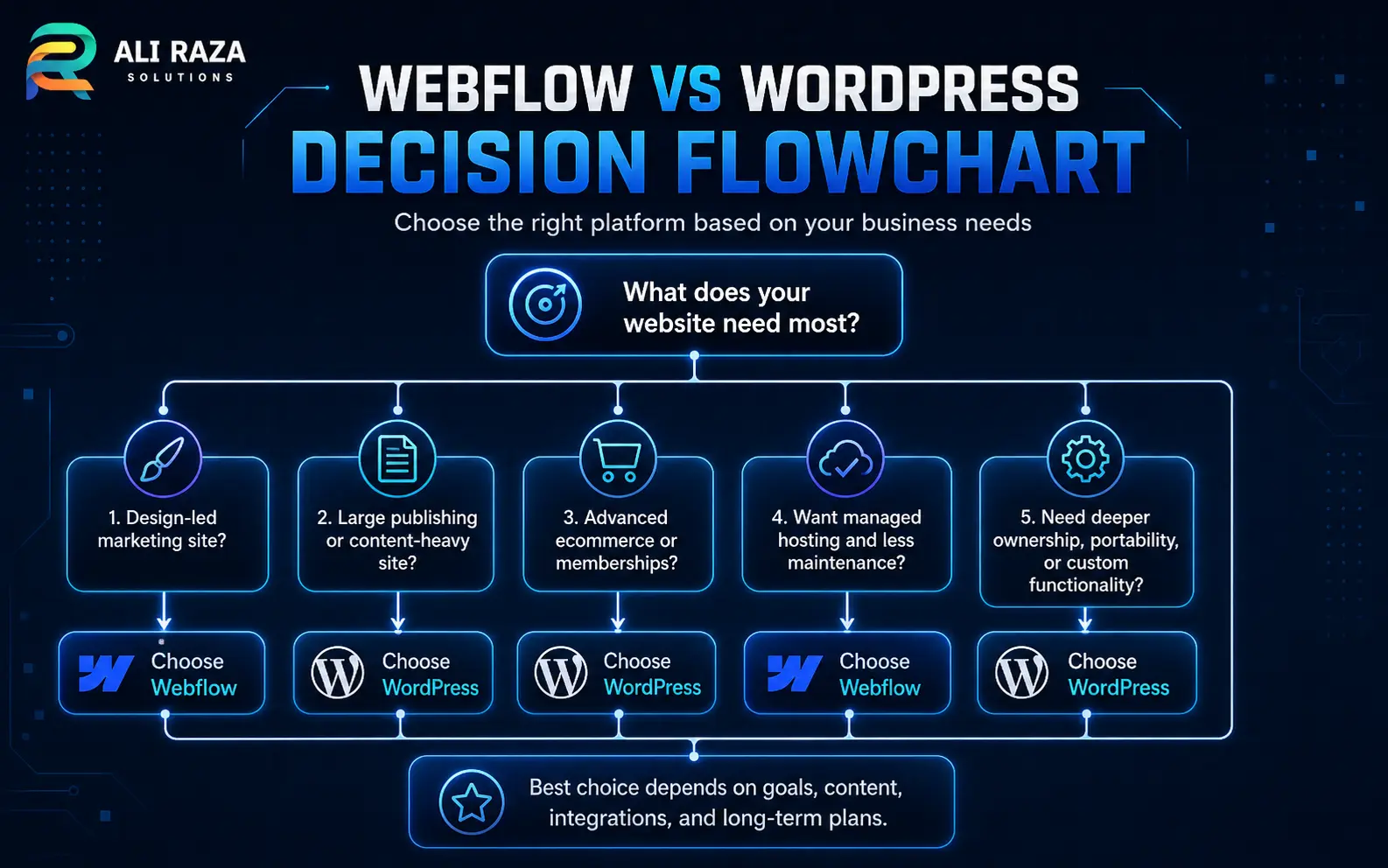
Choose Webflow when
Visual control, fast campaign publishing, managed infrastructure and a smaller feature surface matter more than deep extensibility.
Choose WordPress when
Content scale, custom functionality, ecommerce depth, data ownership and freedom to change hosts or developers matter most.
What is the real difference between Webflow and WordPress?
Webflow is a proprietary, hosted website platform. You design visually, manage structured content through Collections and publish to Webflow’s infrastructure. The environment is tightly integrated, which simplifies deployment and reduces the number of technical decisions a site owner must make.
WordPress is open-source software that you install on a compatible hosting environment. The software itself is free, and you can modify it, extend it with plugins, build custom themes, expose content through its REST API or move the site to another suitable host. WordPress.org describes this model as control over your code and data, not merely access to a hosted service.
That distinction shapes every Webflow vs WordPress 2026 decision. Webflow gives you convenience through a controlled platform. WordPress gives you freedom through an open ecosystem. Neither is automatically better; the right trade-off depends on the website’s future complexity.
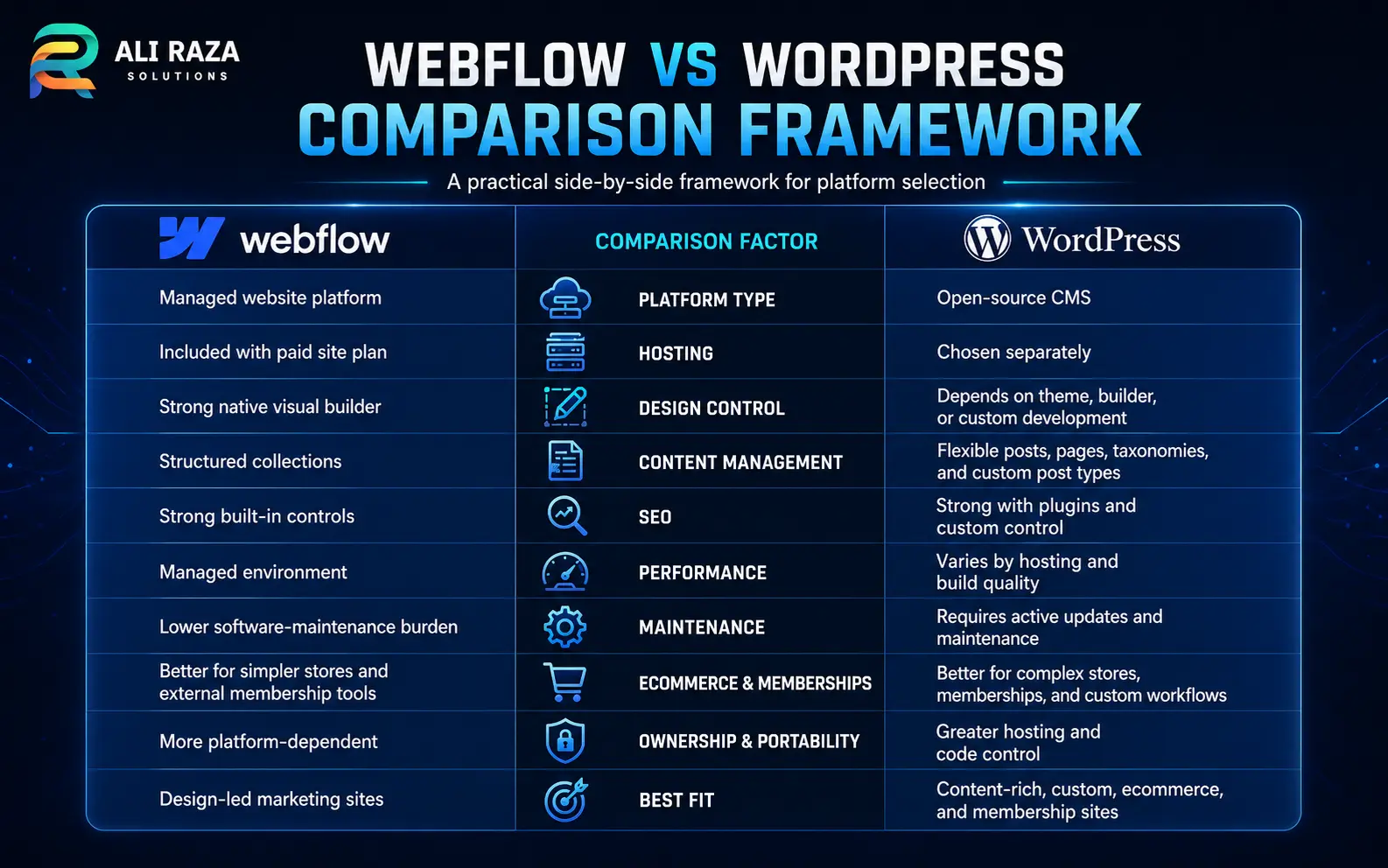
Webflow vs WordPress 2026 comparison table
This table summarizes the most important differences before we examine each one in detail.
| Decision factor | Webflow | WordPress | Typical winner |
|---|---|---|---|
| Initial setup | Integrated visual builder and hosting | Hosting, theme and plugin stack must be selected | Webflow |
| Visual design control | Excellent visual CSS and interaction controls | Depends on theme, blocks, builder or custom development | Webflow for designers |
| Content scale | Structured CMS with plan-based limits | Highly extensible posts, fields, taxonomies and workflows | WordPress |
| SEO tooling | Strong native technical controls | Broader plugins, automation and editorial workflows | WordPress for advanced SEO |
| Maintenance | Core infrastructure is managed | Updates, backups and security need ownership | Webflow |
| Ecommerce | Design-led stores with simpler requirements | Deep catalog, checkout and integration flexibility | WordPress/WooCommerce |
| Ownership and portability | Static export has important functional exclusions | Open-source code, database and host portability | WordPress |
| Custom applications | Possible through code, APIs and platform services | Extensive PHP, REST API and plugin architecture | WordPress |
Ease of use and learning curve
Webflow feels easier after the designer understands HTML and CSS concepts, but it is not necessarily beginner-simple. Its visual interface exposes layout, spacing, positioning, breakpoints, classes and interactions in a way that rewards design-system thinking. A marketer can edit approved content safely, while a trained designer can build complex responsive pages without managing a server.
WordPress is easier for basic publishing. The block editor makes posts and pages familiar to non-technical users, but the overall experience varies because themes, plugins and page builders add different interfaces. A poorly assembled WordPress stack can feel inconsistent; a carefully designed custom block system can be extremely simple for editors.
In Webflow vs WordPress 2026, Webflow wins for a design team that wants one controlled interface. WordPress wins for organizations that prioritize routine publishing and can invest in a clean editorial setup.
Winner: depends on the teamDesign freedom and responsive control
Webflow’s strongest advantage is visual frontend control. Designers can build reusable classes, components, responsive layouts and sophisticated interactions while seeing the page as they work. For a brand site where layout precision is the main requirement, Webflow can shorten the gap between design and production.
WordPress can match or exceed that design quality, but the implementation method matters. A custom theme or block system provides clean, purposeful output. A generic multipurpose theme with a heavy page builder may add unnecessary markup, scripts and styling conflicts. WordPress is not visually limited; it simply gives you more ways to build, including some poor ones.
The design winner in Webflow vs WordPress 2026 is Webflow for visual production speed. WordPress is stronger when the design must connect to custom content logic, complex templates or application-level features.
Winner: Webflow for visual designCMS, blogging and editorial workflows
Webflow Collections are clear and structured. They work well for blogs, case studies, team members, locations, resources and other repeatable content types. The managed model helps teams avoid plugin conflicts, and the 2026 Premium plan substantially increased included CMS capacity compared with older plans.
WordPress was built around publishing and remains more adaptable for large editorial operations. It supports posts, pages, custom post types, taxonomies, custom fields, revisions, scheduled publishing, user roles and a huge range of workflow extensions. It is also easier to shape around unusual relationships between content types.
For Webflow vs WordPress 2026, Webflow is sufficient for many marketing websites. WordPress wins when content is the core business asset, multiple teams publish regularly or the information architecture will keep expanding.
Winner: WordPress for content scaleSEO controls and content optimization
Webflow includes the technical controls most marketing sites need: editable titles and descriptions, canonical settings, redirects, sitemap controls, image alt text, Open Graph data and the ability to add structured data. Its clean publishing environment reduces the chance that an unreviewed plugin changes critical SEO behavior.
WordPress also has a solid SEO foundation, then extends much further through tools such as Rank Math, custom fields, editorial checklists, schema automation, redirect management, internal-link workflows and programmatic templates. That depth is valuable for sites publishing hundreds or thousands of search-focused pages.
No platform guarantees rankings. Search performance depends on intent, content quality, architecture, internal links, authority and technical execution. In Webflow vs WordPress 2026, Webflow is excellent for standard on-page SEO; WordPress wins for sophisticated and scalable SEO operations. Ali Raza Solutions also explains how technical structure connects with strategy in its SEO services overview.
Winner: WordPress for advanced SEOPerformance and Core Web Vitals
Webflow handles hosting, CDN delivery and core platform infrastructure, which removes many common server configuration mistakes. A disciplined Webflow site can be fast. It can also become slow when it uses oversized media, excessive animations, third-party scripts, complex interactions or unrestrained visual effects.
WordPress performance varies more because the owner controls the host, theme, plugins, database, caching and media pipeline. That creates risk, but it also creates room for deep optimization. A lightweight custom build on quality hosting can perform extremely well; a crowded plugin stack on underpowered hosting can struggle.
The performance lesson in Webflow vs WordPress 2026 is that platform choice sets the operating environment, not the final score. For WordPress-specific diagnosis, read Why Is My WordPress Site Slow?, which covers hosting, caching, plugins, images, JavaScript and database causes.
Winner: Webflow for consistency; WordPress for controlWebflow vs WordPress 2026 pricing and total cost
The cost section of Webflow vs WordPress 2026 becomes misleading when it compares a Webflow subscription with WordPress software alone. Webflow bundles platform access and hosting. WordPress is free software, but a production site still needs hosting, a domain, development, maintenance and sometimes premium tools.
Current annual-billing price for a simple custom-domain site without CMS requirements.
Current annual-billing price for a content-rich site, with plan limits and add-ons still relevant.
Hosting, domain, development, licenses and maintenance vary by the chosen stack.
Webflow’s May 2026 plan changes made its main CMS-oriented plan more generous, including a 20,000-item CMS allowance, while bandwidth and add-on requirements still need review. Check the current Webflow pricing page before approving a budget because prices and limits can change.
A small WordPress site can have a low recurring cost, but the cheapest hosting is rarely the best business decision. Budget for backups, security, updates and professional support. The better question is not “Which subscription is cheaper?” but “Which platform produces the lowest total cost for the functionality, publishing pace and ownership model we need?”
Pricing checked against Webflow’s public plans on July 28, 2026. Taxes, Workspace seats, ecommerce plans, localization, analytics, optimization and other add-ons may change the final total.
Maintenance, security and operational responsibility
Webflow manages the core hosting platform, deployment system, backups and platform updates. That does not remove every risk—account security, access permissions, custom code and third-party integrations still matter—but it narrows the operational surface.
Self-hosted WordPress gives the owner more responsibility. Core, plugins and themes must be updated; backups must be tested; user permissions must be controlled; and the hosting environment must meet modern requirements. WordPress currently recommends PHP 8.3 or greater, MariaDB 10.11+ or MySQL 8.0+, and HTTPS.
From an operational perspective, Webflow vs WordPress 2026 gives Webflow the clearest maintenance advantage. However, managed WordPress hosting plus a professional maintenance process can make WordPress predictable without sacrificing its flexibility.
Winner: Webflow for lower maintenanceEcommerce and transaction complexity
Webflow Ecommerce allows designers to create branded product, cart and checkout experiences inside the same visual environment. It can work well for smaller, design-focused stores with straightforward catalogs and operations.
WordPress with WooCommerce is usually the better fit when ecommerce requirements become detailed: complex product types, subscriptions, local payment gateways, shipping rules, wholesale roles, custom checkout logic, marketplace features, accounting connections or unusual tax and fulfillment workflows. That flexibility requires more setup and maintenance, but it prevents the platform from becoming the limit too early.
For stores evaluating Webflow vs WordPress 2026, Webflow wins on visual cohesion and managed simplicity. WordPress wins on operational depth and integration range.
Winner: WordPress for advanced ecommerceMemberships, user accounts and gated content
This category changed materially in 2026. Webflow disabled its native User Accounts functionality on January 29, 2026. A Webflow site can still connect to third-party membership or application services, but the architecture and ongoing dependency need to be evaluated carefully.
WordPress has native users and roles, plus mature options for memberships, learning systems, communities, subscriptions and protected content. Developers can also create custom permissions and integrate external identity providers.
For customer-account projects, Webflow vs WordPress 2026 favors WordPress unless a separate specialist membership platform is intentionally part of the Webflow architecture. Review Webflow’s official User Accounts notice before relying on older tutorials.
Winner: WordPressCustom integrations and application features
Webflow supports custom code, APIs, integrations and newer platform capabilities, so it is more than a static site builder. It can serve as the marketing layer for a broader technology stack. The key question is whether the required functionality lives comfortably inside Webflow or depends on multiple external services.
WordPress has a mature plugin system, thousands of hooks, custom post types, taxonomies, metadata and a REST API that can send content to separate applications. It can act as a traditional CMS, a headless content source or the backend for custom workflows.
When teams compare Webflow vs WordPress 2026 for unusual business logic, WordPress generally gives developers more freedom inside the platform. Webflow remains attractive when the website is primarily a presentation and publishing layer connected to dedicated external tools.
Winner: WordPress for extensibilityOwnership, export and platform lock-in
Webflow allows code export on eligible paid Workspace plans, but the export is not a complete portable copy of every hosted feature. Its documentation states that CMS and ecommerce databases and functionality, localized content, code components, site search and forms are not included or will not work as they did on the hosted platform. CMS content can be exported separately, but migration still requires planning and redevelopment.
WordPress is released under the GPL and gives you access to the application code and database. You can export content, create backups and move the installation between compatible hosts. Third-party premium tools may have their own licenses, but the core platform is not tied to one hosting vendor.
Ownership is therefore a decisive point in Webflow vs WordPress 2026. Webflow offers meaningful export options, yet WordPress offers stronger whole-site portability and long-term independence. Read the Webflow code export limitations and WordPress feature and ownership overview before making a platform commitment.
Winner: WordPress for ownershipTeam collaboration and governance
Webflow’s controlled environment can be easier for design and marketing teams to govern. Components, classes, staging and publishing controls help protect brand consistency, while higher-tier plans add more advanced roles and workflows. Pricing for seats and governance features must be included in the total platform budget.
WordPress includes established user roles and can be extended with custom editorial permissions, approval workflows and audit tools. It is more configurable, but governance quality depends on how the system is designed. Giving every editor unrestricted page-builder access often creates inconsistency; a structured block library and carefully assigned roles produce a much safer experience.
The collaboration result in Webflow vs WordPress 2026 depends on organizational maturity, and a second Webflow vs WordPress 2026 review should involve the actual editors who will use the system. Webflow provides more guardrails by default. WordPress can support more specialized workflows when configured intentionally.
Winner: Webflow by default; WordPress when customizedAI features and future flexibility
Webflow has integrated AI-assisted site building, section generation, copy support, CMS content assistance and SEO/AEO tooling into its platform direction. This can accelerate production, especially when a team already uses a defined Webflow design system.
WordPress’s AI ecosystem is less centralized. AI features come from hosting providers, plugins, editors, external services and custom integrations. That creates more choice but less consistency. The advantage is that a WordPress owner can change tools or build a proprietary workflow without waiting for one platform vendor’s roadmap.
AI should not decide Webflow vs WordPress 2026 by itself. A responsible Webflow vs WordPress 2026 evaluation still begins with requirements. The generated output still needs editorial review, accessible markup, performance control and factual QA. Choose the underlying platform for ownership, functionality and workflow; treat AI as an accelerator rather than the foundation.
Winner: Webflow for integrated AI; WordPress for choiceWebflow vs WordPress 2026: which platform fits your project?
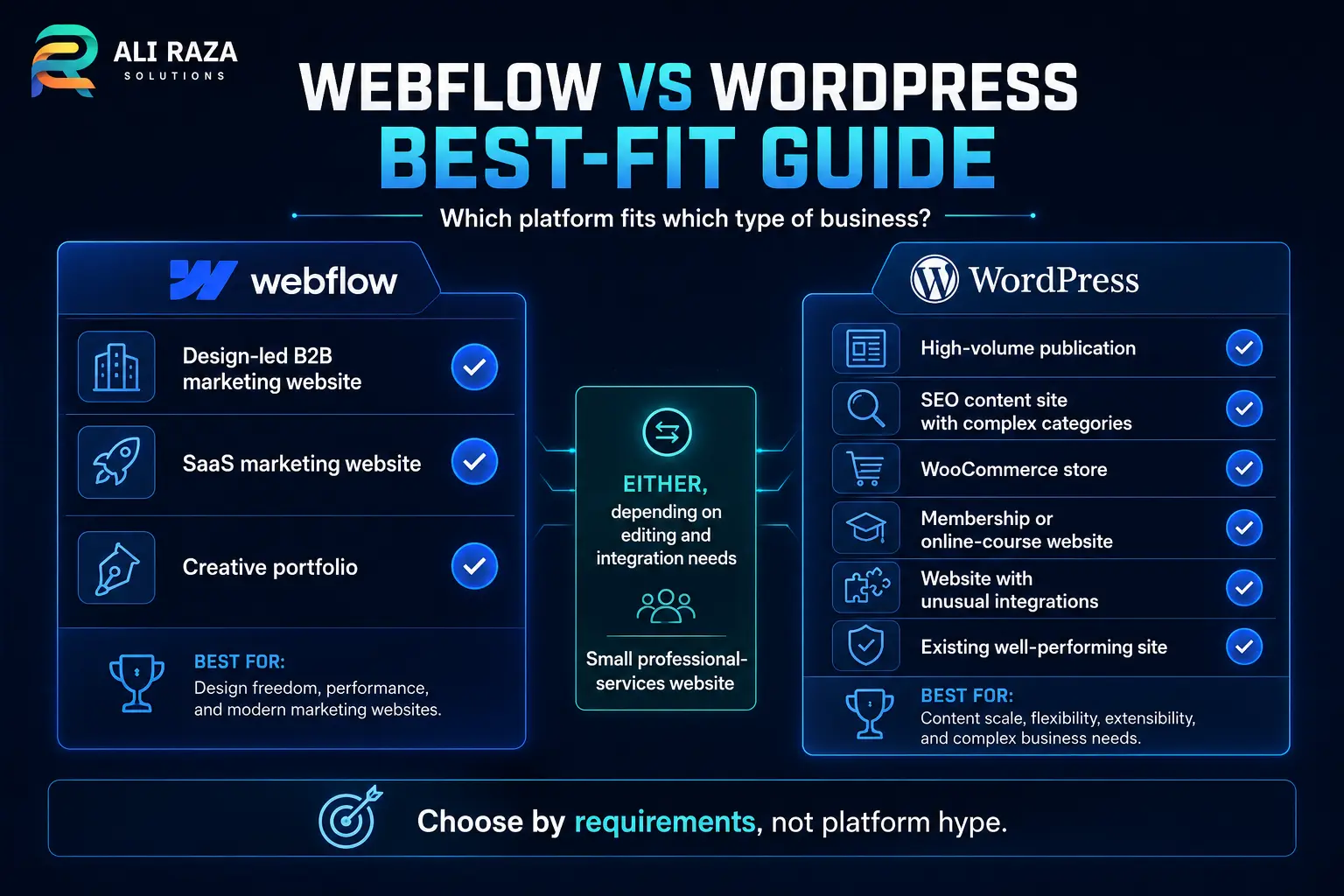
The safest Webflow vs WordPress 2026 platform decision starts with requirements, not a preferred tool. A simple marketing site and a multi-author ecommerce publication may look similar in a design mockup, but they have completely different content, data and maintenance needs.
Webflow is usually the better choice for:
- Design-led brochure and brand websites
- Campaign landing pages maintained by a visual design team
- Small to medium marketing sites with structured but limited CMS needs
- Organizations that prefer managed infrastructure and fewer technical vendors
- Projects where interaction design matters more than backend customization
WordPress is usually the better choice for:
- SEO-led websites with a long-term publishing strategy
- Large blogs, magazines, directories and resource libraries
- WooCommerce stores with complex products or operations
- Memberships, courses, communities and customer portals
- Custom integrations, data workflows and application features
- Businesses that require code, database and hosting portability
For many small businesses, the deciding factor is not the number of features available today. It is the likely shape of the website two or three years from now. A platform that feels slightly easier at launch can become expensive if the business later needs to rebuild core functionality. Conversely, choosing the most extensible platform is unnecessary when a small managed site will remain simple.
Choose the platform in six steps
- Define the website’s business job. Decide whether it mainly presents a brand, publishes content, sells products, manages members or connects business systems.
- Map content types and publishing volume. Count expected pages, posts, authors, languages, locations, products and reusable data relationships.
- List non-negotiable integrations. Include CRM, payments, analytics, booking, email, accounting, search and authentication requirements.
- Model three-year cost. Compare plans, hosting, premium tools, development, maintenance, seats, add-ons and future migration risk.
- Test the editorial workflow. Let the actual marketing or content team create, review and publish sample content before committing.
- Plan ownership and exit. Document who controls the domain, hosting, code, database, accounts, backups and migration process.
Final verdict: Webflow or WordPress?
Webflow vs WordPress 2026 comes down to controlled convenience versus open flexibility. Webflow is a strong choice for teams that want visual design power, managed hosting and a predictable marketing-site environment. WordPress is the stronger choice when the website must grow into a substantial content, commerce or application platform.
For Ali Raza Solutions’ typical work—SEO-ready business sites, custom content structures, WooCommerce, performance optimization and integrations—WordPress often provides the better long-term base. That does not make Webflow a poor product. It means platform selection should follow the project’s operating model and future requirements.
Before rebuilding, use the Webflow vs WordPress 2026 comparison to measure the complete system, not only the first-year subscription. The best Webflow vs WordPress 2026 result is a site your team can publish confidently, your developers can maintain cleanly and your business can evolve without an avoidable migration.
Choose a website platform that still fits in three years
Ali Raza Solutions can assess your content, SEO, ecommerce, integration and maintenance requirements before development begins. You receive a practical recommendation based on the project—not a platform-first sales pitch.
- Platform and requirements review
- SEO-ready information architecture
- WordPress, Shopify or custom build planning
- Performance and Core Web Vitals strategy
Webflow vs WordPress 2026 FAQs
These answers cover the questions businesses most often ask before choosing a platform.
Is Webflow better than WordPress in 2026?
Webflow is often better for visually led marketing sites that need a controlled design system and minimal server maintenance. WordPress is usually better for content-heavy websites, advanced SEO workflows, ecommerce, memberships, custom integrations and long-term platform flexibility.
Is Webflow or WordPress better for SEO?
Both can rank well when the site is technically sound and the content matches search intent. Webflow provides strong built-in controls for metadata, redirects, sitemaps and schema. WordPress offers broader SEO tooling, publishing workflows and plugin integrations, but it requires more careful configuration.
Which costs less, Webflow or WordPress?
Webflow has clearer recurring platform pricing, while WordPress software is free and its total cost depends on hosting, development, premium tools and maintenance. A simple WordPress site may cost less, but a poorly maintained setup can become more expensive over time.
Can I migrate from Webflow to WordPress later?
Yes, but it is not always a one-click migration. Webflow can export static code on eligible Workspace plans and CMS content can be exported separately, but dynamic CMS, ecommerce, forms, search and other hosted functionality may need to be rebuilt in WordPress.
Is WordPress harder to maintain than Webflow?
Usually, yes. A self-hosted WordPress site requires hosting management, backups, updates, security monitoring and compatibility testing. Managed WordPress hosting and a disciplined maintenance process can reduce that workload substantially.
Which platform is better for ecommerce and memberships?
WordPress is generally the stronger choice when a store or membership platform needs complex products, subscriptions, customer roles, custom checkout logic or deep integrations. Webflow Ecommerce suits design-led stores with simpler operational requirements, while native Webflow User Accounts were disabled in January 2026.