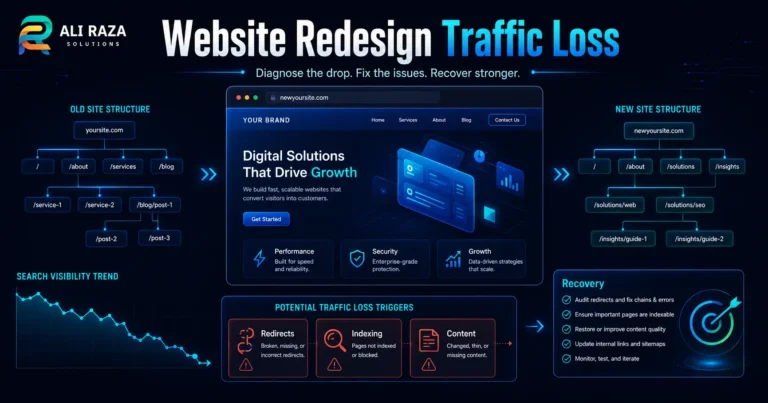
Traffic but No Leads? A Complete Website Diagnostic
A practical 12-point investigation for separating tracking problems, weak traffic, landing-page friction and broken lead handling before you spend more on acquisition.
Published: August 6, 2026 · Approximate reading time: 16 minutes
Start the diagnostic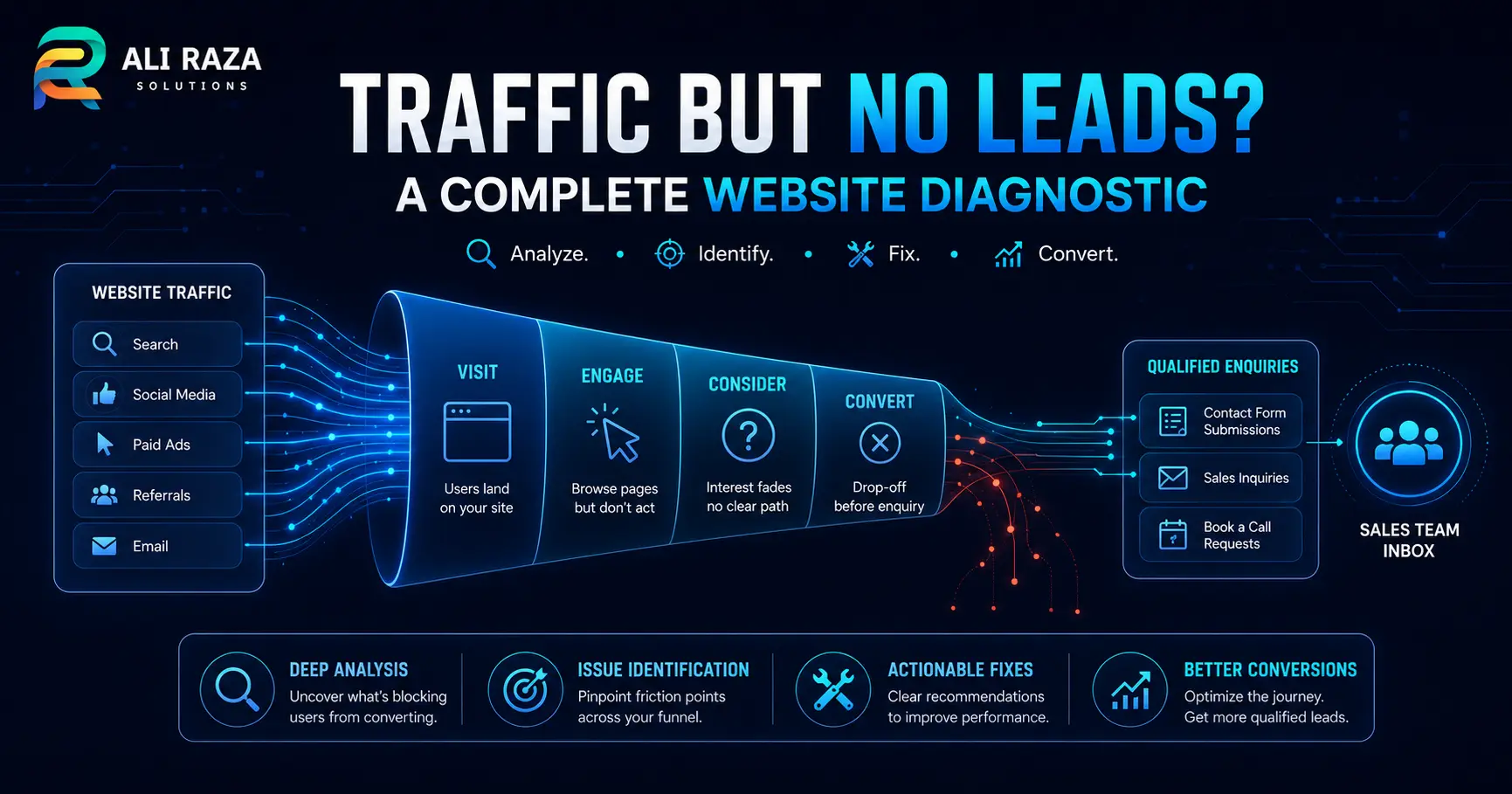
When you have website traffic but no leads, do not assume the answer is simply “get more traffic” or “redesign the website.” First verify that lead tracking works. Then examine traffic intent, landing-page relevance, the offer, trust, usability, technical performance and follow-up as one connected journey.
A website can attract thousands of visits and still produce little commercial value when the wrong people arrive, the right people land on the wrong page, the next step is unclear, or genuine enquiries disappear between the form and the sales team. A disciplined diagnostic identifies the failed stage before money and effort are applied to the wrong fix.
Quick Answer: Diagnose Website Traffic but No Leads
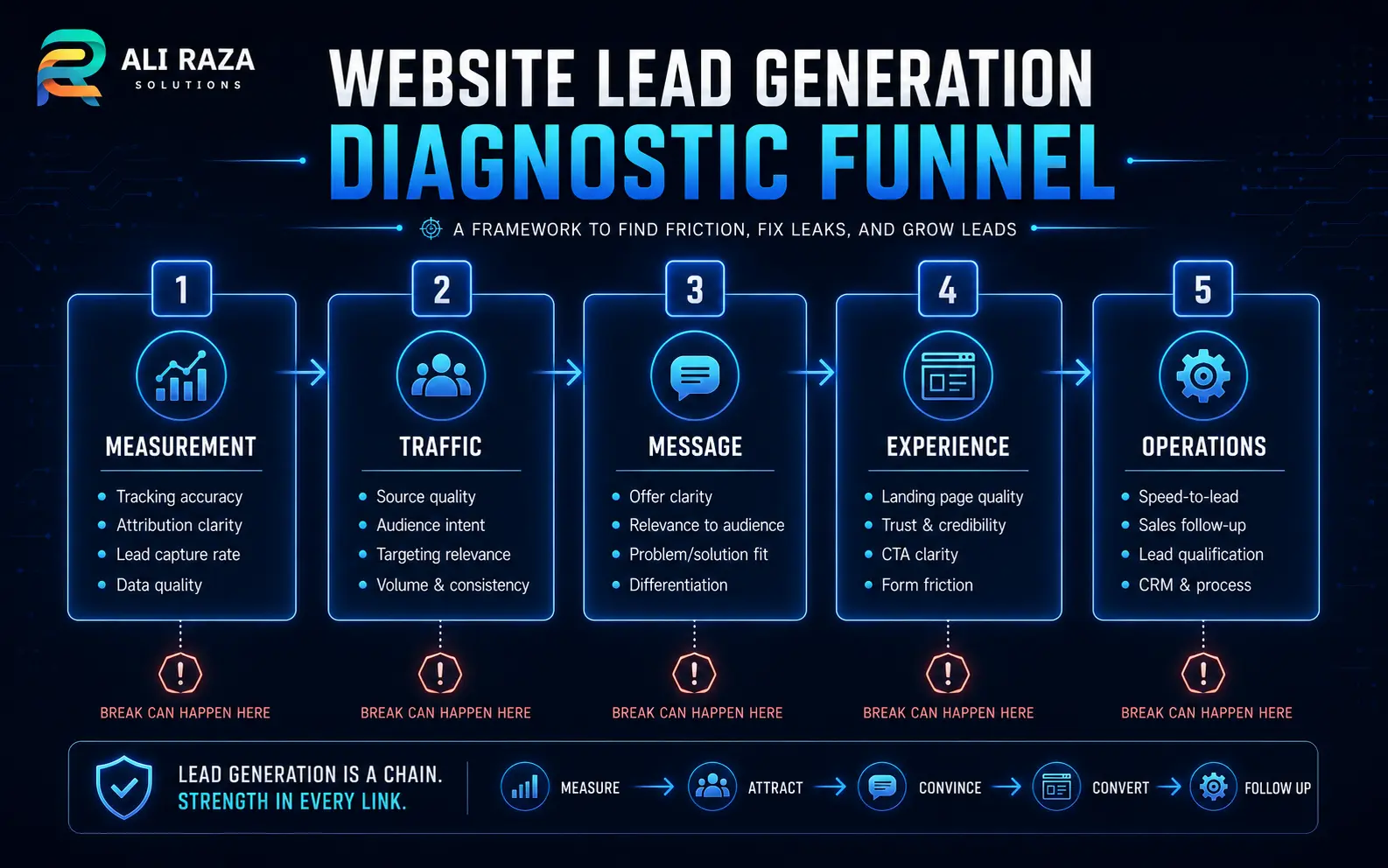
Use the following sequence. It moves from measurement to acquisition, experience and operations, which prevents a design change from hiding a tracking problem or a new campaign from sending more visitors into a broken journey.
| Stage | Question | Evidence to inspect | Typical response |
|---|---|---|---|
| 1. Measurement | Are real leads being recorded correctly? | Form tests, call tracking, CRM records, key events and thank-you states | Repair tracking and integrations before judging performance. |
| 2. Traffic | Are the right people arriving with suitable intent? | Source, campaign, query, location, device and landing page | Reduce irrelevant acquisition and align keywords and audiences. |
| 3. Message | Does the page immediately answer the visitor’s need? | Headline, offer, proof, page intent and CTA | Improve message match and page-specific relevance. |
| 4. Experience | Can visitors understand, trust and complete the next step? | Mobile usability, speed, forms, navigation and errors | Remove friction and make the primary action obvious. |
| 5. Operations | Are captured enquiries reaching a responsive owner? | Email delivery, CRM routing, notifications and response records | Fix routing, ownership and follow-up. |
1. Verify That the “No Leads” Problem Is Real
Begin with a controlled enquiry test. Submit each important form on desktop and mobile, click the main phone and messaging links, complete any booking process, and confirm that the result appears in every system that should receive it.
Test the visitor experience
Check validation, confirmation messages, thank-you pages, calendar availability, file uploads and error states. Repeat the test in a private browser window so an administrator session does not hide a problem.
Test delivery
Confirm that the enquiry reaches the expected inbox, CRM, spreadsheet or ticketing tool. Inspect spam folders, forwarding rules, API failures and duplicate suppression.
Test analytics
Verify that a meaningful lead action is recorded once and attached to the correct page, source and campaign. Avoid treating scrolls or button clicks as completed leads.
Reconcile totals
Compare analytics with form records, call logs, booking data and CRM entries. Differences reveal lost tracking, lost delivery or inconsistent lead definitions.
Google Analytics’ Landing page report shows the first page visitors entered through, while its source and medium dimensions help connect those pages to acquisition. For paid campaigns, Google’s web conversion measurement guidance explains how website actions can be measured after an ad interaction.
Write one shared definition for a lead. A completed quote request, booked consultation or qualified call may be a lead; a page view, generic button click or accidental form start usually is not. Keep micro-conversions visible, but separate them from genuine sales opportunities.
2. Segment Traffic Before Calling It “Qualified”
Top-line traffic hides important differences. Separate visitors by source, campaign, query, landing page, location, device and new-versus-returning status. A total of 10,000 visits can contain several completely different audiences.
Search intent
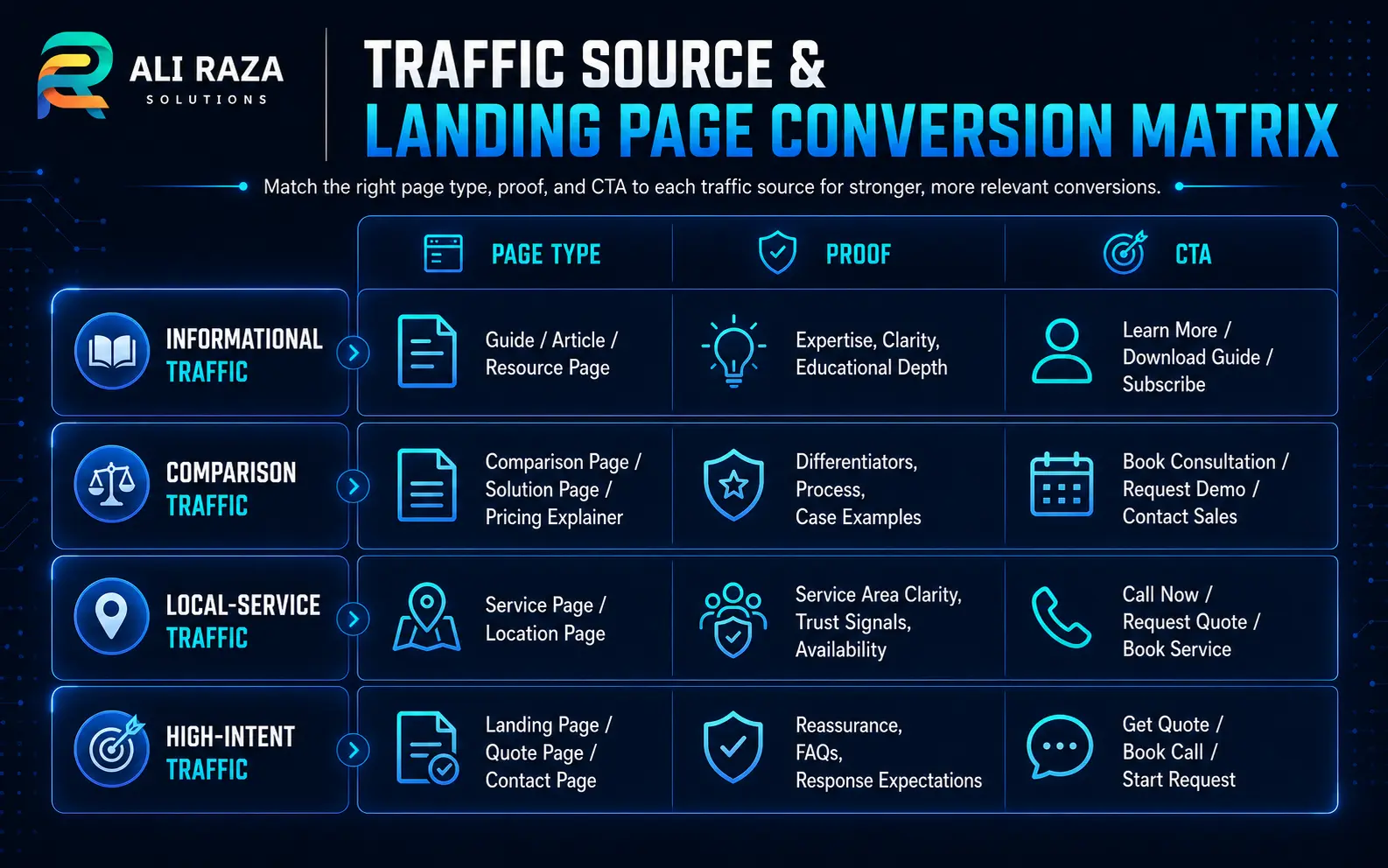
Informational queries may bring readers who want an explanation, not an immediate quote. Commercial and local queries usually need service details, proof and a direct next step.
Geography
Traffic outside your service area may increase sessions without increasing opportunities. Check city, country and language against the markets you can actually serve.
Campaign promise
An advertisement or search snippet can attract clicks with wording that the landing page does not fulfil. Compare the acquisition message with the first screen of the destination page.
Referral quality
Automated, irrelevant or incentive-driven visits can create volume without commercial intent. Inspect unusual engagement patterns and referral sources before treating them as demand.
For organic search, review the queries and pages that attract impressions and clicks. For paid search, compare search terms—not only the keywords you selected—with qualified lead outcomes. For social campaigns, distinguish awareness traffic from retargeting and direct-response traffic.
3. Check the Match Between Traffic and Landing Page
A visitor should be able to confirm within the first screen that the page addresses the same problem, service, location or product promised before the click. Sending every campaign to the homepage often forces people to restart their search.
Inspect landing pages individually. A site-wide conversion rate can hide one strong service page, one broken campaign page and several blog posts that were never designed to produce immediate enquiries.
A high-traffic page does not need a harder sales pitch. It needs the most relevant next step for the reason visitors arrived.
4. Make the Value Proposition Specific
Generic claims such as “quality service,” “innovative solutions” or “we care about customers” rarely help a visitor choose. The page should make four points easy to identify:
- Who it is for: the business type, audience, location or situation.
- What problem it solves: the result or obstacle addressed.
- How the service is different: method, specialization, delivery model or practical advantage.
- What to do next: one clear, low-confusion action.
Specificity is not the same as making unsupported promises. Replace empty superlatives with verifiable details: what is included, who performs the work, what the process looks like, what information is needed, and what the visitor receives after making contact.
5. Evaluate the Offer and Call to Action
“Contact us” asks the visitor to take action without explaining the value of that action. A stronger CTA describes the next step and sets expectations, such as requesting a website assessment, booking a discovery call or receiving a tailored quote.
High commitment, low clarity
The visitor is asked for many details, but the page does not explain who will respond, what will happen next or whether the service fits their situation.
Clear exchange of value
The CTA names the outcome, the form requests only useful information, and the confirmation tells the visitor what response to expect.
Match the offer to the buying stage. A visitor reading an early educational article may prefer a related guide or service checklist. A visitor on a location-specific service page may be ready to request an assessment. Do not force every visitor into the same CTA.
6. Strengthen Trust Without Inventing Proof
Visitors hesitate when they cannot verify who operates the business, what the service includes or whether the provider has relevant experience. Useful trust signals can include:
- A clear company identity, physical or service location, and genuine contact information
- Named processes, deliverables and boundaries
- Relevant project examples or case studies with permission and context
- Client testimonials that are authentic and attributable
- Privacy, security, refund or service policies where applicable
- Professional profiles, credentials or partnerships that can be verified
7. Remove Form, Navigation and Mobile Friction
Review the page on a real phone, not only in a desktop page builder. Check whether the headline wraps cleanly, the CTA is visible, buttons are easy to tap, the form fits the viewport, error messages explain the problem, and sticky elements do not cover important controls.
Audit the enquiry path field by field
- Remove fields that are not required for the first response.
- Use labels that remain visible after typing.
- Choose the correct input type for email, phone and numeric fields.
- Explain required formats before an error occurs.
- Preserve entered data when one field fails.
- Provide a confirmation and a realistic next-step message.
- Offer an alternative contact method when appropriate.
Also inspect intrusive pop-ups, cookie banners, chat widgets and multiple competing CTAs. Each can be useful, but together they can make the primary journey harder to understand.
8. Test Speed, Stability and Technical Reliability
A page can appear functional while failing for part of the audience. Test important landing pages across mobile and desktop, common browsers, slower connections and logged-out sessions. Watch for scripts that block forms, buttons that do not respond, layout shifts that move controls and resources that fail to load.
Google’s Core Web Vitals report uses real-world usage data to group page experiences, while Google’s Core Web Vitals guidance describes loading performance, interactivity and visual stability as user-experience measurements. These reports support the diagnosis, but lead-path testing should still include the actual form, booking and contact actions.
Browser and script errors
Check whether validation, analytics, consent tools or third-party widgets create console or network failures.
Email and API delivery
Inspect form mail, CRM webhooks, calendar connections and authentication failures after updates.
Indexing and canonical signals
Confirm that the intended landing page can be indexed and is not replaced by an irrelevant duplicate or redirect.
Accessibility barriers
Test keyboard navigation, focus visibility, labels, contrast, errors and screen-reader-friendly form structure.
9. Connect Informational Content to Commercial Demand
SEO traffic often begins with a question rather than a purchase. That is not automatically a failure. The problem is a content dead end: the article answers the question but provides no relevant path to a service, comparison, assessment or deeper resource.
Map each high-traffic article to the likely next question. Then add a contextual internal link or CTA where it genuinely helps. For example, an article about ranking without enquiries can lead to an SEO services assessment; a page about slow or confusing site behavior can lead to web development services.
Use assisted journeys, not only last-click leads
A visitor may read an article, return through branded search, review a service page and contact the business later. Preserve campaign information where possible and review common page paths. This helps distinguish content that introduces qualified prospects from content that attracts unrelated attention.
10. Inspect What Happens After the Form
A website may be generating enquiries that are not becoming visible opportunities. Review the operational path from submission to first response.
| Checkpoint | Failure to look for | Evidence | Corrective action |
|---|---|---|---|
| Notification | Email blocked, routed to spam or sent to a former employee | Mail logs and test submissions | Use authenticated delivery and monitored recipients. |
| CRM capture | Webhook, integration or field mapping failed | Form records versus CRM records | Repair the integration and create failure alerts. |
| Ownership | No person or team is responsible | Unassigned leads and delayed records | Set routing rules and a visible owner. |
| Qualification | Useful enquiries rejected by inconsistent criteria | Lost reasons and call notes | Define qualification and escalation rules. |
| Response | Slow, generic or incomplete first contact | Timestamps and message templates | Set a response process and useful context. |
| Reporting | Sales outcomes never return to marketing | Missing status and revenue fields | Connect qualified outcomes to source and landing page. |
The website team, marketing team and sales team should use the same lead definitions. Without feedback from actual outcomes, campaigns may be optimized for easy form submissions instead of qualified business.
11. Read the Pattern of the Data
Different symptoms point to different likely causes. Use patterns to choose the next investigation, not to declare a cause without testing.
| Observed pattern | Likely area to inspect first | Next test |
|---|---|---|
| Traffic increased after new informational rankings, but enquiries stayed flat | Intent and content journey | Review queries, page paths and contextual service CTAs. |
| Paid clicks are strong, but one campaign has no qualified leads | Search terms, audience and message match | Compare campaign promise, landing page and lead quality. |
| Desktop converts, mobile does not | Mobile layout, speed and form friction | Complete the journey on real devices and inspect errors. |
| Forms show completions, but sales sees nothing | Delivery, CRM integration and ownership | Trace a controlled submission through every system. |
| Visitors reach the contact page but abandon it | Offer clarity, trust and form requirements | Review fields, expectations, proof and alternative contact methods. |
| Traffic and engagement look normal, but analytics records zero leads | Measurement setup | Test the event, consent state and reporting configuration. |
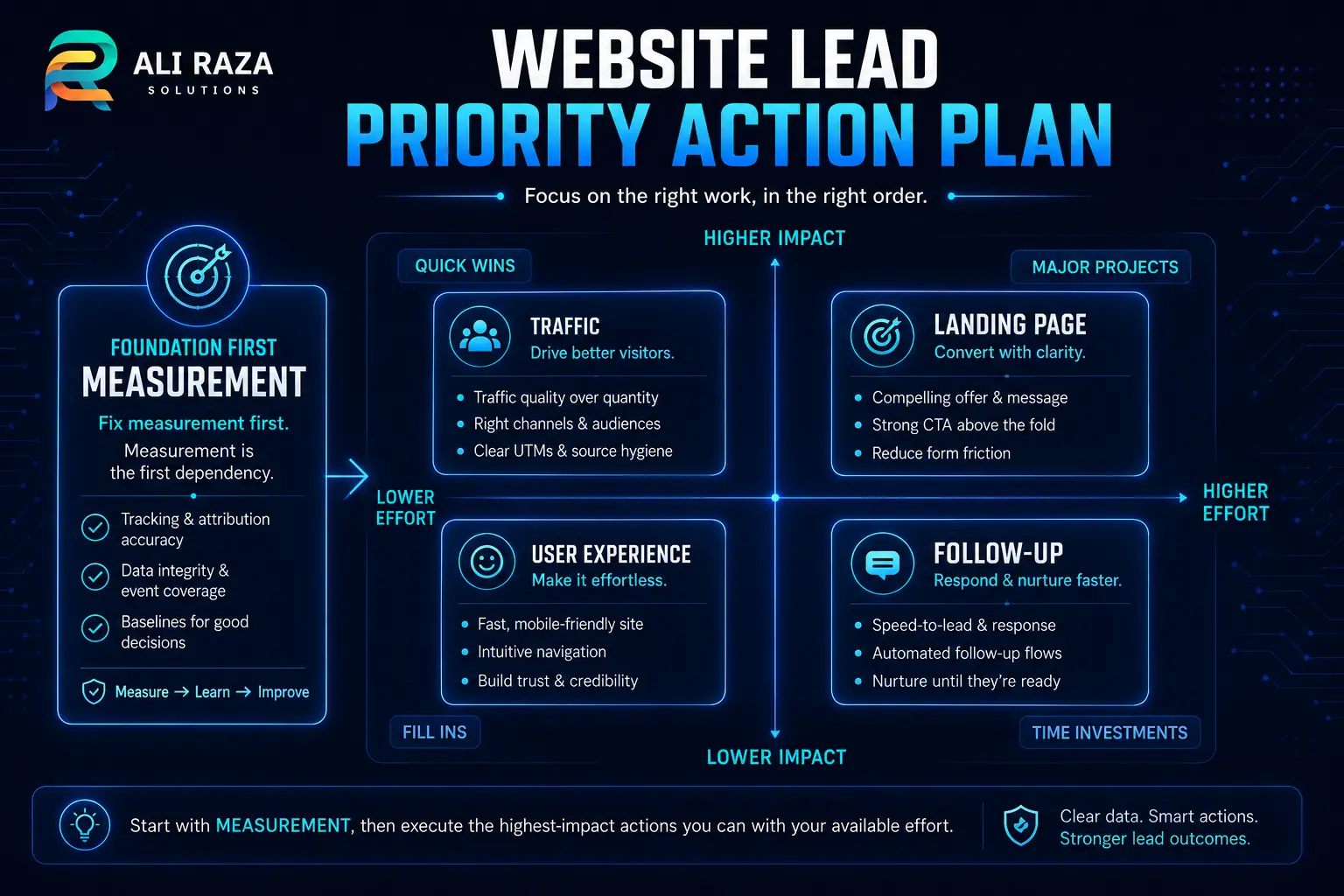
12. Turn the Diagnostic Into a Prioritized Action Plan
Do not change the traffic source, headline, layout, form and follow-up process at the same time. You will not know which change helped. Create a backlog based on evidence, business impact, effort and confidence.
Repair measurement and delivery
Fix broken forms, key events, call tracking, CRM capture and notifications. Establish a baseline that can be trusted.
Protect high-intent demand
Prioritize service, location, pricing, product and campaign pages that already attract visitors close to a decision.
Fix major friction
Resolve mobile blockers, unclear CTAs, unnecessary fields, missing trust and technical failures before cosmetic changes.
Improve traffic and content alignment
Refine keywords, audiences, internal links and landing-page messages using qualified lead outcomes rather than clicks alone.
Test one clear hypothesis
State the expected cause, the change, the success measure and the period required for a fair comparison.
Document decisions, not just screenshots
- The lead definition and current tracking map
- Traffic and qualified-lead performance by source and landing page
- Controlled form, call and booking test results
- High-intent page issues across desktop and mobile
- Top hypotheses ranked by evidence, impact and effort
- Owners, target dates and the measure used to confirm each fix
A strong audit should make the next action clearer. It should not overwhelm the team with a long list of equally weighted observations.
Frequently Asked Questions About Website Traffic but No Leads
These answers summarize the decisions businesses commonly face when traffic is not producing enough qualified enquiries.
Why am I getting website traffic but no leads?
The usual causes are inaccurate tracking, low-intent or poorly targeted traffic, a mismatch between the visitor’s need and the landing page, weak trust signals, excessive form friction, technical problems, or slow lead follow-up. Diagnose the journey in that order instead of redesigning the whole site at once.
How do I know whether the problem is traffic quality or the landing page?
Compare conversion behavior by source, campaign, search query, landing page, device and location. If one source sends engaged visitors who convert while another does not, traffic quality is likely involved. If qualified sources fail on the same page, inspect the page offer, message, proof and contact path.
What should I track as a website lead?
Track the actions that represent genuine business interest, such as a completed enquiry form, booked call, qualified phone call, WhatsApp conversation, quote request or account application. Keep minor interactions separate so they do not inflate the lead total.
Is a low conversion rate always a website design problem?
No. Design can create confusion or friction, but low conversion can also come from the wrong audience, informational search intent, an uncompetitive offer, broken tracking, poor sales follow-up or a long buying cycle. The diagnostic should test each layer.
Should every blog visitor be expected to become a lead?
No. Many blog visitors are researching, learning or comparing options. Give them a relevant next step, such as a service guide, checklist, consultation or email resource, and measure assisted journeys rather than judging every article only by immediate form submissions.
How can I improve leads without increasing traffic?
Start with the highest-traffic pages that already attract relevant visitors. Clarify the value proposition, strengthen the primary call to action, add specific proof, reduce unnecessary form fields, fix mobile and technical problems, and connect each page to a suitable offer.
How long should I wait before judging a website change?
Judge the change only after enough relevant visits and lead opportunities have accumulated for a fair comparison. The required period depends on traffic volume, seasonality, sales cycle and channel mix, so avoid declaring a winner from a small or unrepresentative sample.
When should I request a professional website audit?
Professional help is useful when tracking cannot be trusted, several channels and landing pages are involved, forms or integrations fail intermittently, paid traffic is being wasted, or the team cannot isolate whether the problem is acquisition, user experience, the offer or lead handling.

About Ali Raza Solutions
Ali Raza Solutions provides SEO, web development, digital marketing and website support for businesses that need measurable online performance from one in-house team.
This article provides a general diagnostic framework. Analytics configuration, visitor consent requirements, accessibility obligations and lead-handling processes vary by website, market and organization. Validate changes against your own systems and applicable requirements.