
Restaurant Website and Google Business Profile: 7 Essential Steps for Better Local Visibility
A practical setup guide for connecting your restaurant website, menu, opening hours, ordering links and Google Business Profile into one consistent local customer journey.
Published: August 17, 2026 · Approximate reading time: 12 minutes
Start the setup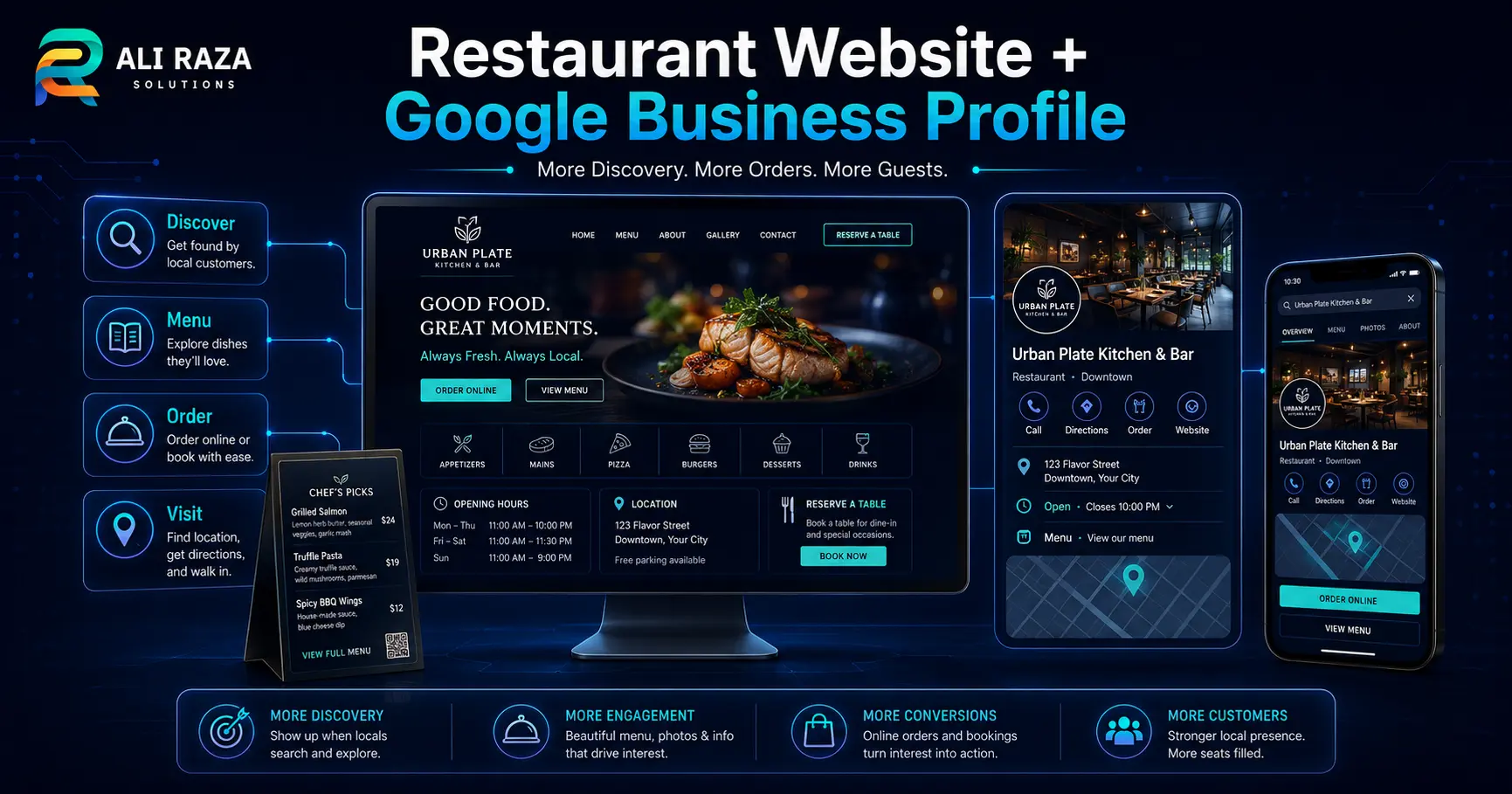
Restaurant Website and Google Business Profile: The Short Answer
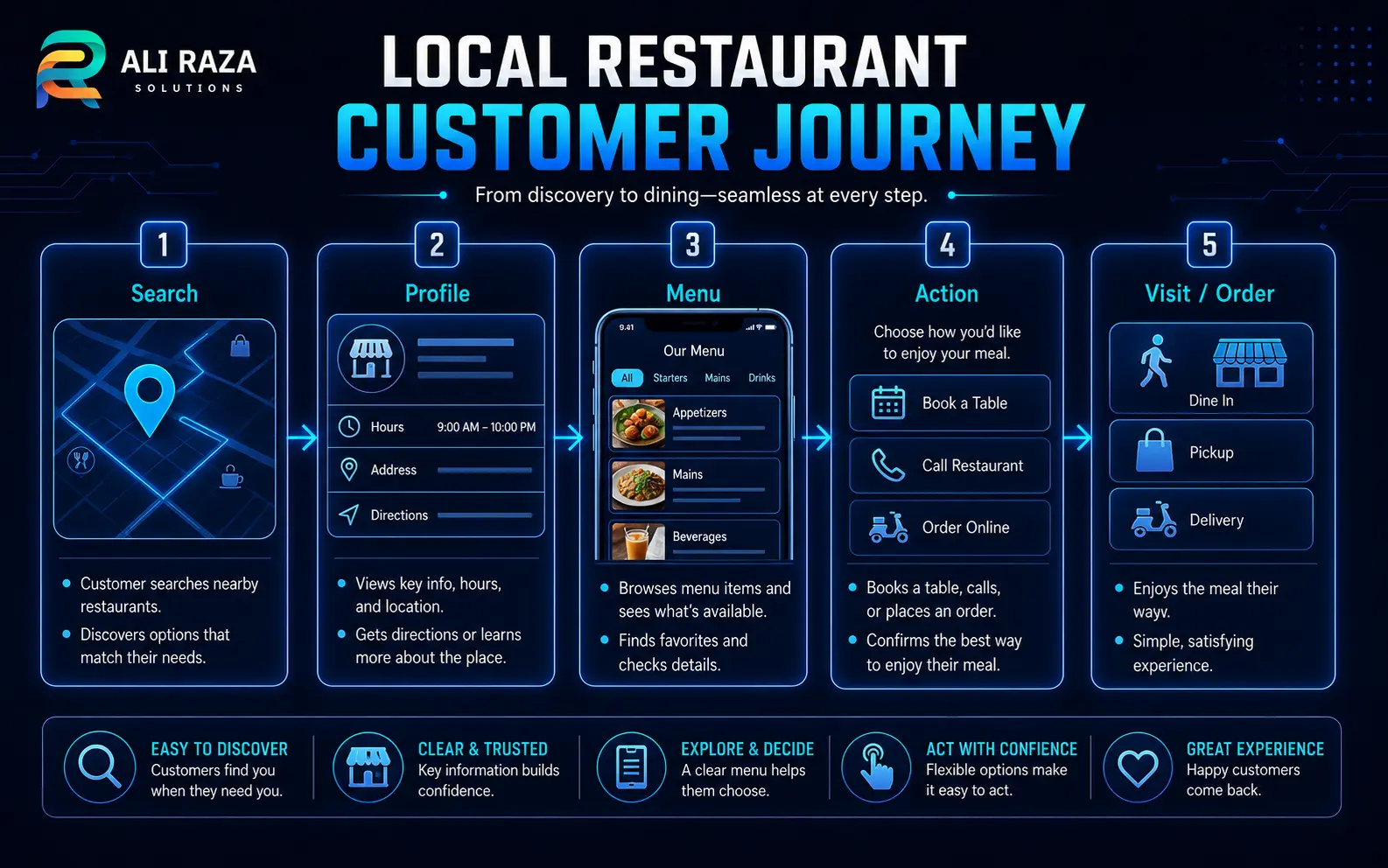
A restaurant website and Google Business Profile work best as connected parts of the same customer journey. The profile helps people discover your restaurant, check essential information and reach action links, while the website gives you more room for menus, brand presentation, location details, reservations, online ordering, events and other information that helps a diner decide what to do next.
The two destinations should not contradict each other. A customer who sees one closing time on Google, another on the website and a broken order link has to decide which source to trust. Consistent information reduces that friction, but it does not guarantee a higher local ranking.
7 Essential Restaurant Website and Google Business Profile Setup Steps
A dependable restaurant website and Google Business Profile setup starts with customer information, not design effects. Work through these seven steps so the website and profile support the same destination, opening hours, menu and conversion paths.
Build the mobile journey
Make the restaurant website easy to use on a phone, with menu, directions, calling, reservations and ordering visible without unnecessary searching.
Add or claim the profile
Use the owner or manager workflow Google provides, then complete the available verification method for the business.
Complete core information
Use the real business name, suitable restaurant category, address, phone, website, regular hours and special hours.
Connect the menu
Point customers to a current, mobile-friendly menu and use restaurant menu features in Business Profile where they are available.
Configure actions
Test ordering, pickup, delivery, reservation or booking links before promoting them to searchers.
Align local SEO
Keep location and restaurant information consistent while building useful pages that explain what the restaurant offers and where it is located.
Maintain both systems
Recheck hours, menu URLs, seasonal changes, booking providers and ordering destinations whenever the restaurant operation changes.
What a Restaurant Website Should Include
For a restaurant website and Google Business Profile strategy to work, the site needs to answer the questions that often follow a local search. What food do you serve? Where are you? When are you open? Can someone reserve, order, call or get directions without fighting the interface?
Clear homepage
Explain the cuisine, location and most important action quickly. A customer should not have to decode the brand before finding the menu.
Mobile-friendly menu
Use readable text, useful categories and current information. If a PDF is necessary, keep an accessible webpage path available where practical.
Location and hours
Show the physical address, phone number, opening times, special-hour information and a clear directions path.
Customer actions
Make reservation, calling, ordering, pickup or delivery actions easy to understand and confirm where each link sends the visitor.
Additional sections may include private dining, catering, events, dietary information, parking guidance or multiple-location navigation when those are real customer needs. Keep the structure focused: every prominent element should either answer a useful question or help the visitor complete an appropriate action.
Ali Raza Solutions can build these flows as part of its WordPress development service, with the website architecture planned around both customer actions and search visibility.
Set Up Google Business Profile for a Restaurant Carefully
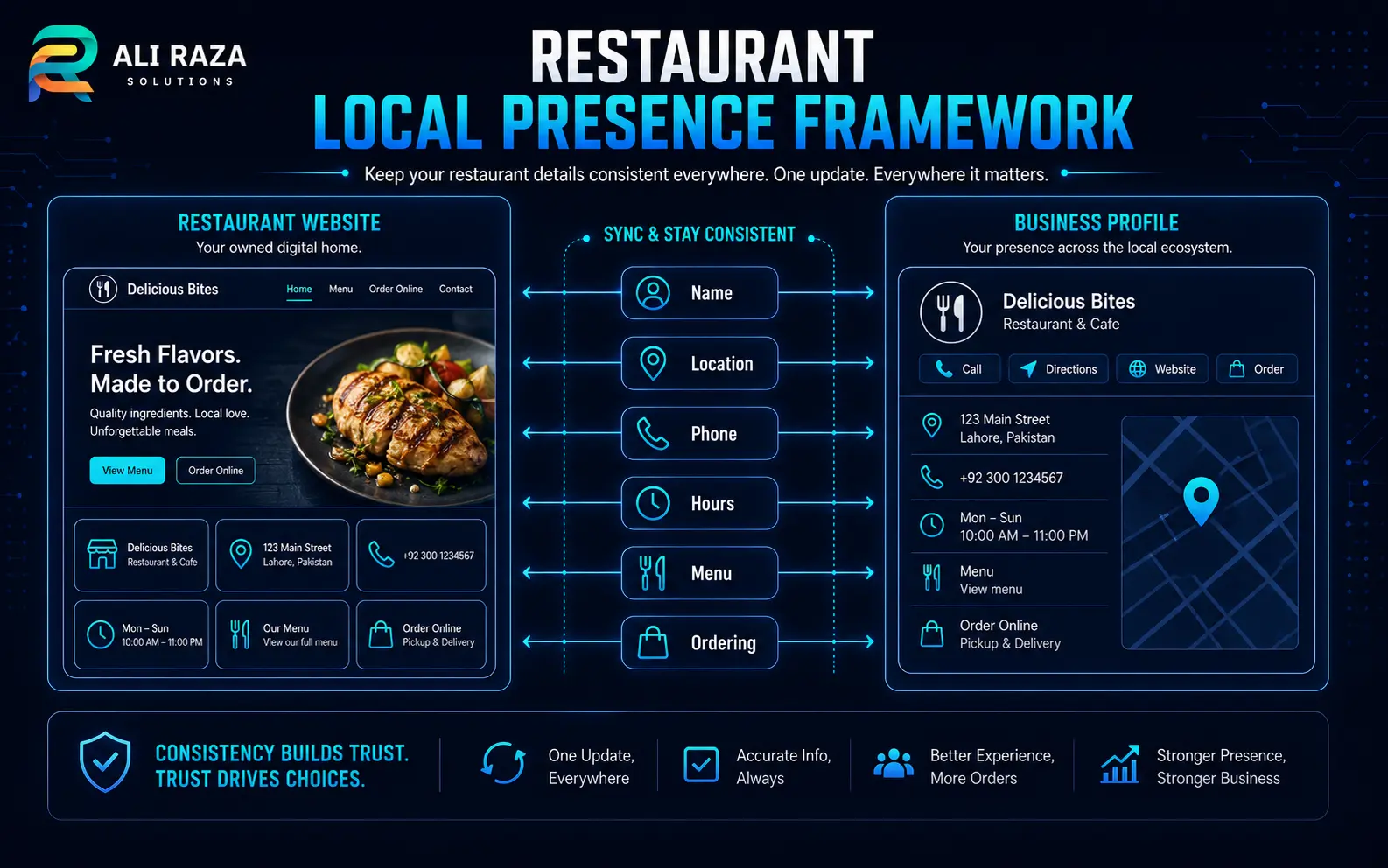
The restaurant website and Google Business Profile should identify the same real-world business. Use the restaurant’s actual name rather than inserting promotional keywords, select the most appropriate category, and keep the address, phone and hours accurate.
For a restaurant website and Google Business Profile plan, Google’s restaurant guidance includes restaurant-specific features for menus, online ordering, bookings and waitlists where supported. Profile owners should only enable features that match the restaurant’s real operation and available providers.
| Profile item | What to verify | Website connection |
|---|---|---|
| Business name | Use the real-world restaurant name. | Match the primary brand identity shown on the website. |
| Category | Select the category that best describes the restaurant. | Website copy should clearly explain the cuisine and offering. |
| Address | Confirm the customer-facing location is correct. | Show the same location on contact/directions content. |
| Hours | Maintain regular and special hours. | Update website hours when holidays or service times change. |
| Phone | Use a monitored business number. | Make the same primary number easy to tap on mobile. |
| Website | Point to the intended official site. | Ensure the landing experience immediately confirms the restaurant. |
Google’s official restaurant Business Profile guide is the right reference for current restaurant-specific controls because available features can change by market or provider.
Connect Menus, Online Ordering and Reservations
A strong restaurant website and Google Business Profile setup makes the route from discovery to action predictable. The menu link should reach a current menu, and an order or reservation button should reach the exact service the customer expects.
Within a restaurant website and Google Business Profile workflow, Google currently allows eligible restaurants to manage food-ordering providers or links and designate preferred providers for pickup or delivery. Restaurants can also add local business links for supported actions such as bookings, food ordering, pickup and delivery.
Use the official food-ordering guidance and local business links documentation when configuring these actions.
Use the Restaurant Website and Google Business Profile Together for Local SEO
The restaurant website and Google Business Profile contribute different information to the local search experience. The profile gives Google structured business information and direct local actions, while the website can provide richer context about cuisine, location, menus, events, catering and other relevant topics.
Google says local results are mainly based on relevance, distance and popularity. That means you can improve completeness, clarity and usefulness, but you cannot control how far a searcher is from the restaurant or guarantee a specific local-pack position.
Practical local SEO work includes descriptive page titles, useful restaurant/location copy, crawlable navigation, sensible internal links, current contact information, accessible menus, helpful images, and a profile that accurately reflects the business. Avoid keyword stuffing the Business Profile name or producing thin location pages simply to target more queries.
For restaurants that need ongoing technical and content work, Ali Raza Solutions provides SEO services including local, on-page and technical SEO.
Add Restaurant Structured Data to the Restaurant Website
In a restaurant website and Google Business Profile strategy, structured data belongs on the restaurant’s own website when the markup accurately represents that restaurant. Google supports `LocalBusiness` structured data and restaurant-specific subtypes so site owners can provide machine-readable details such as business information and opening hours.
For a real restaurant implementation, use appropriate `Restaurant` or `LocalBusiness` properties for information that is visible and accurate on the page. Do not invent ratings, review counts, prices or other attributes merely because schema supports those fields.
The authoritative implementation reference is Google Search Central’s LocalBusiness structured data documentation. This Ali Raza Solutions article itself uses Article and FAQPage schema—not Restaurant schema—because the article is guidance about restaurants rather than the webpage of a restaurant.
Common Restaurant Website and Google Business Profile Mistakes
Most restaurant website and Google Business Profile setup problems are not dramatic technical failures. They are small inconsistencies that create uncertainty at the moment a customer wants to act.
Different opening hours
Website, profile and ordering providers show conflicting service times, particularly around holidays.
Broken or outdated menu
The profile links to an old PDF, expired menu page or document that is difficult to use on mobile.
Wrong order destination
An old provider or location remains linked after operations change.
Weak mobile experience
The menu or booking path technically works but requires zooming, scrolling sideways or repeated navigation.
Incomplete location context
The website makes it difficult to confirm the address, directions, parking or which branch the customer is viewing.
No maintenance owner
Everyone assumes someone else will update hours, menus and profile links when the restaurant changes.
Restaurant Website and Google Business Profile Launch Checklist
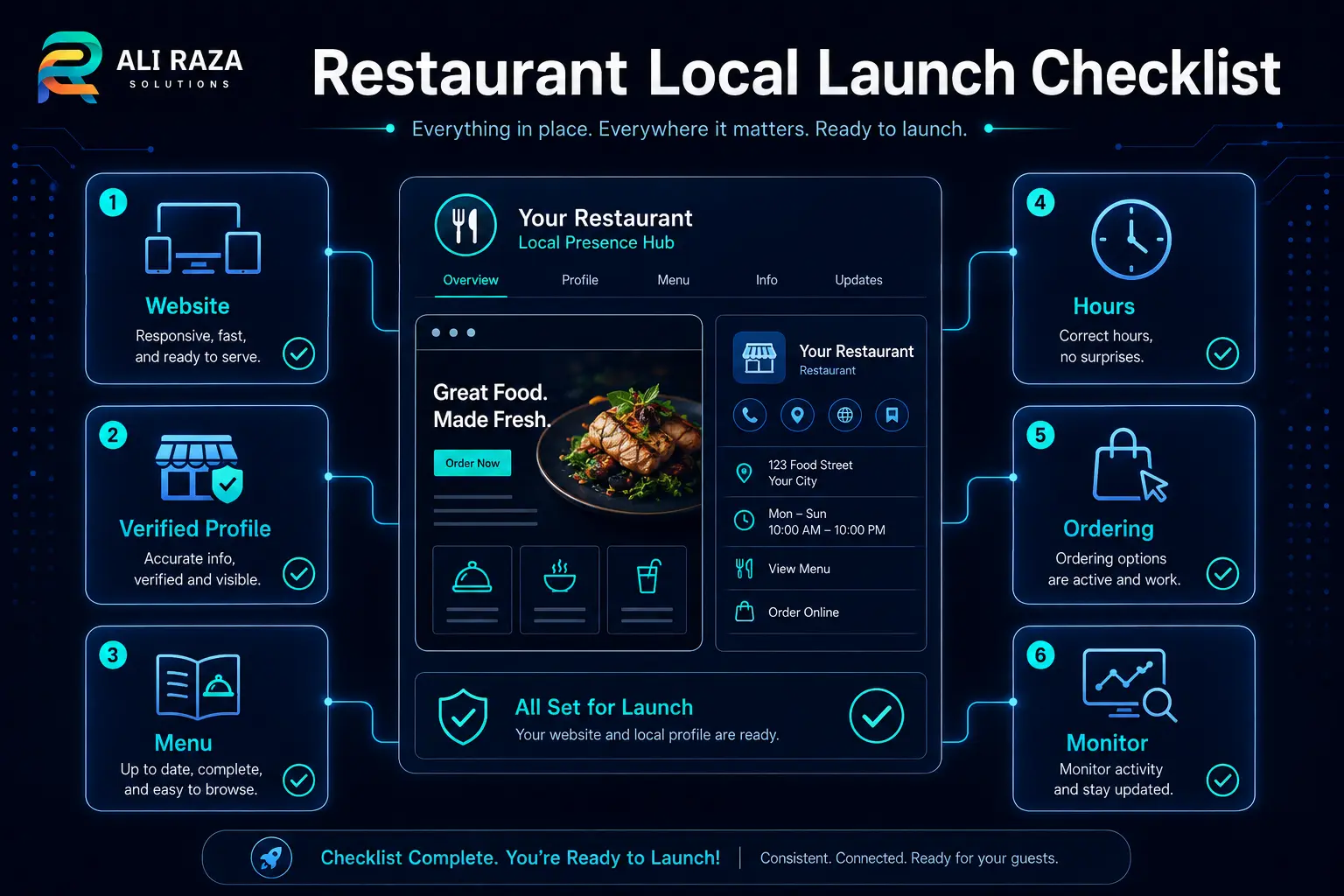
Before promoting a new restaurant website and Google Business Profile, test the experience as a customer rather than only checking the admin screens. Use a phone, open the profile from search, move to the website, view the menu and complete each important action far enough to confirm the destination is correct.
- Website works cleanly on common mobile screen sizes.
- Business Profile ownership and verification are complete.
- Name, address, phone and regular hours are accurate.
- Special or holiday hours are planned where relevant.
- Menu page or menu URL loads correctly without sign-in.
- Ordering, pickup, delivery and reservation links reach the intended provider and location.
- Website analytics and conversion tracking are configured where appropriate.
- Restaurant structured data reflects visible, accurate business information.
- A named person or provider owns ongoing website and profile updates.
If the site or local profile needs a coordinated rebuild, use the Ali Raza Solutions contact page to share the restaurant location, current website, menu system, ordering providers and the actions customers need to complete.
Frequently Asked Questions About Restaurant Website and Google Business Profile Setup
These answers cover the most common implementation decisions when a restaurant is connecting its website with its Google presence.
Does a restaurant need both a website and Google Business Profile?
A restaurant can benefit from both because they serve different roles. Google Business Profile supports local discovery and quick business actions, while the restaurant website provides more space for menus, brand information, location content, reservations, ordering and other customer details.
How do I set up Google Business Profile for a restaurant?
Add or claim the eligible business, complete the verification method Google offers, then review the restaurant name, category, address, phone, website, regular hours, special hours and any restaurant-specific menu, ordering or booking features available to the profile.
Can I add my restaurant menu to Google?
Google provides restaurant menu features, including menu URLs and, for eligible food and drink businesses, menu editing options. Available controls can vary, so use the current Business Profile interface and Google restaurant documentation.
How do I add an online-ordering link to Google Business Profile?
Eligible restaurants can manage food-ordering providers or links in Business Profile and can set preferred providers for pickup or delivery when those options are supported. Test the public link after saving it.
Does Google Business Profile help restaurant SEO?
A complete and accurate profile helps Google understand the business and supports local discovery, but it does not guarantee rankings. Google states that local results are mainly based on relevance, distance and popularity.
Should my restaurant menu be a webpage or PDF?
A mobile-friendly webpage is often easier to navigate, update and connect with the rest of the site. A PDF can still be useful in some workflows, but it should be readable on mobile, current and not the only practical path to essential menu information when a webpage can serve customers better.
What information should match between my restaurant website and Google profile?
The business identity, customer-facing location, primary phone, regular and special hours, menu destination and important ordering or booking paths should stay accurate and logically consistent across the website and profile.
Can a restaurant website improve local search visibility?
A useful restaurant website can provide relevant location, menu and service information and support technical SEO, internal linking and crawlability. It can strengthen the overall local presence, but no website platform or optimization step can guarantee a specific Google local ranking.

About Ali Raza Solutions
Ali Raza Solutions provides WordPress development, website maintenance, SEO and digital marketing services for small businesses in the United States, United Kingdom and international markets.
Google Business Profile features and provider integrations can vary by business, category and market and may change over time. Confirm the current options available in your profile before relying on a particular menu, ordering or booking feature.