Facebook Pixel Not Tracking WordPress? 9 Critical Fixes
A structured diagnostic guide for missing, delayed or duplicated Meta events on WordPress websites.
Published: August 6, 2026 · Approximate reading time: 12 minutes
Start the diagnostic flow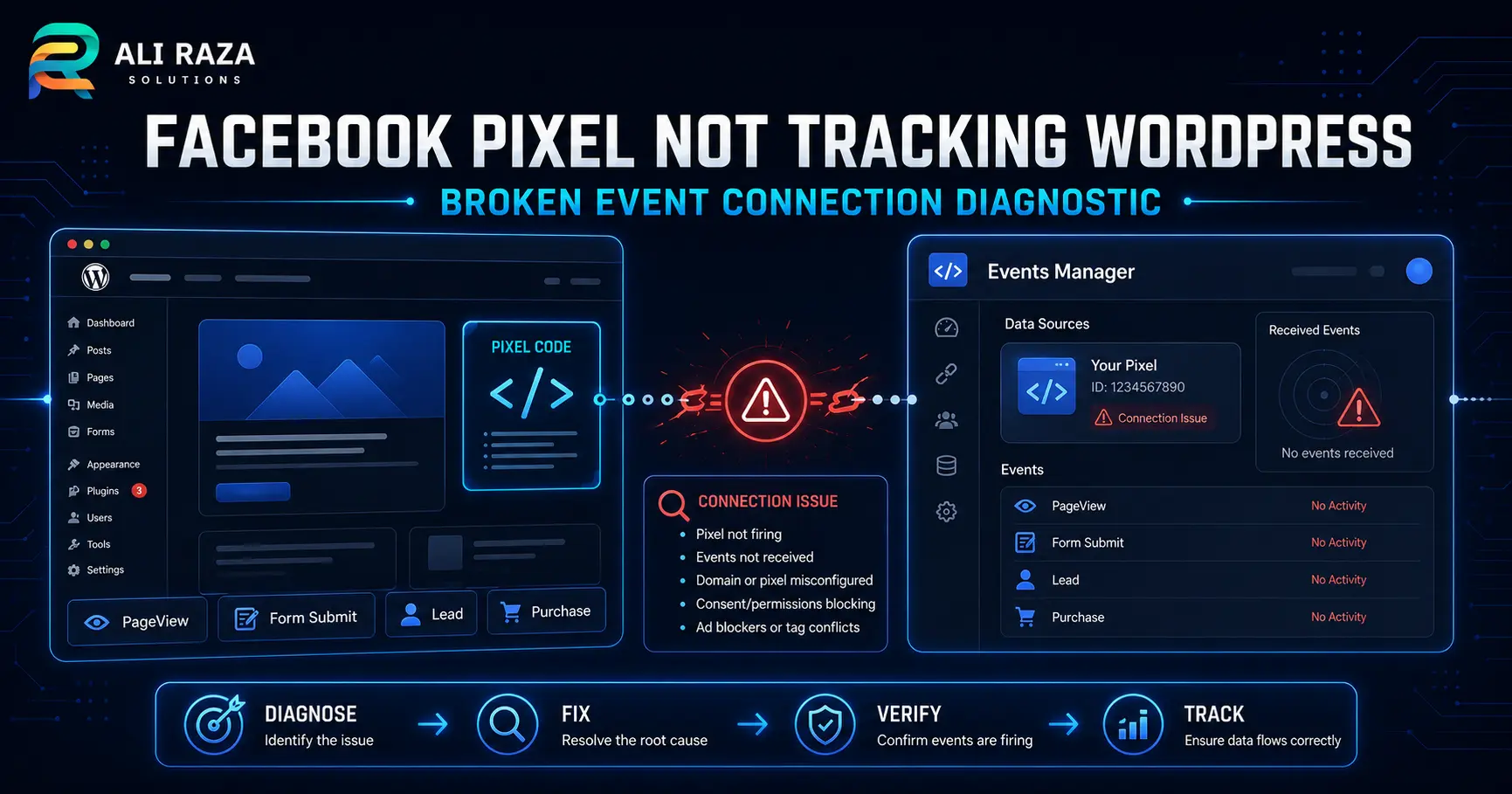
Facebook Pixel not tracking WordPress usually means the event is missing at one of five layers: installation, browser execution, consent, event triggering or Meta reporting.
Do not replace the entire setup after one failed test. A Facebook Pixel not tracking WordPress investigation should first confirm the intended data source, reproduce the problem, inspect the browser request and compare that evidence with Meta Test Events and Diagnostics. This sequence separates a real installation failure from a reporting delay or an incorrectly configured conversion.
How Meta Event Tracking Works on WordPress
The base Meta Pixel loads in the visitor’s browser and can send a PageView when the page opens. Standard events such as Lead, AddToCart, InitiateCheckout and Purchase need an additional trigger tied to a meaningful action. Meta documents both standard events and partner or manual setup routes in its current business help material.
Conversions API sends event data from a server or another connected source. Browser and server events can run together, but corresponding events need appropriate deduplication. When Facebook Pixel not tracking WordPress is reported, identify whether the missing signal is browser-side, server-side or only absent from a specific report.
Test Events, Events Manager and Ads Manager answer different questions. A browser request can be sent without being attributed to an advertisement, while an attributed result can appear later than the live diagnostic test.
Facebook Pixel Not Tracking WordPress: Quick Diagnostic Sequence
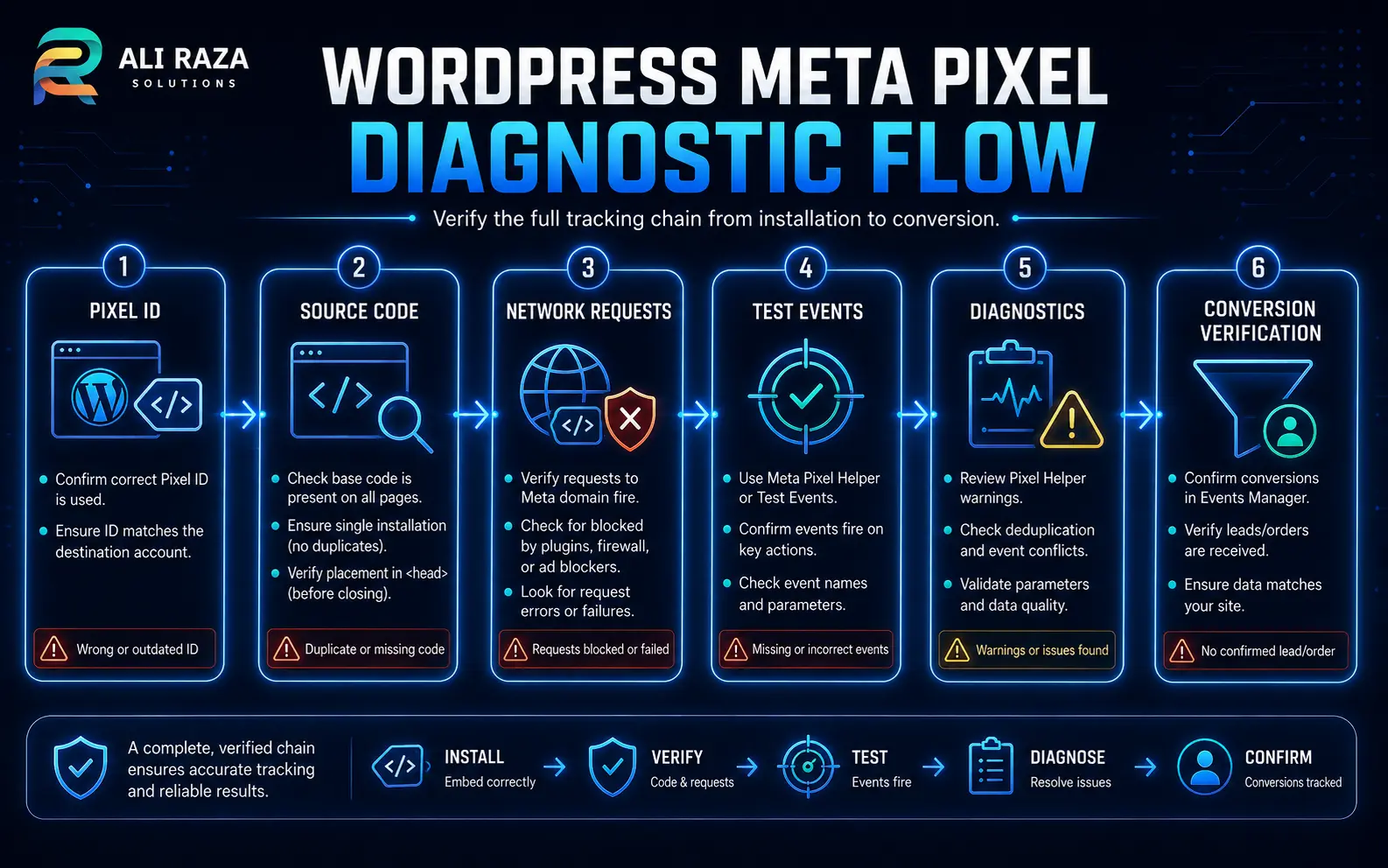
Use the steps in order and record each result. For Facebook Pixel not tracking WordPress, changing several plugins, tags and triggers at once destroys the evidence needed to identify the actual fault.
Confirm the data source
Compare the intended pixel or dataset ID with the ID configured in WordPress, Google Tag Manager and the delivered page source.
Open Test Events
Use Meta’s Test Events guidance and keep the selected data source visible while reproducing the journey.
Inspect the browser
Check the console and network activity for blocked scripts, failed requests, consent-state differences and the expected event name.
Review Diagnostics
Look for duplicate events, invalid parameters, coverage gaps or other active warnings before assuming the setup is healthy.
Test the real conversion
Complete a valid form, booking or test transaction. A button click alone does not prove that the business action succeeded.
Reconcile the result
Compare the test event with the CRM, order record or booking confirmation so marketing data is tied to a real outcome.
9 Critical Fixes for Missing or Unreliable Events
1. Correct the pixel or dataset ID
A copied ID from another business, test site or old account can make the code look valid while sending data to the wrong destination. Search the delivered source and tag-manager configuration, then compare every occurrence with the data source selected in Events Manager. This is the first check whenever Facebook Pixel not tracking WordPress appears after a migration or agency handover.
2. Repair a disconnected installation method
Meta supports partner integrations, manual setup and Google Tag Manager. WordPress may also contain theme code or a specialist plugin. When Facebook Pixel not tracking WordPress follows a redesign, document the intended owner of the base code and verify that it is enabled on the affected template. Meta’s setup and installation guide provides the current starting point for the platform-side configuration.
3. Remove unplanned duplicate installations
The same event can fire through a plugin, theme header, code-snippet plugin and tag manager. In some reports, Facebook Pixel not tracking WordPress is actually a duplicate-event problem rather than a missing-event problem. Do not delete code at random. Inventory every route, preserve the configuration and deactivate one route at a time in a controlled test.
4. Test caching, minification and delayed JavaScript
WordPress performance tools can cache pages, combine JavaScript, minify files or delay selected scripts. WordPress’s official optimization documentation explains how caching and minification change delivered assets. Purge the plugin, host and CDN caches, then temporarily exclude the tracking script from delay or combination rules. If Facebook Pixel not tracking WordPress begins only after a speed change, compare the executed network activity before and after that rule.
5. Verify consent behavior
A consent-management system may correctly withhold advertising scripts until the visitor makes the relevant choice. A Facebook Pixel not tracking WordPress test must compare a fresh session before consent, after acceptance and after rejection. The goal is not to bypass privacy controls; it is to verify that the implementation behaves as intended. Obtain qualified privacy guidance for the countries and audiences involved.
6. Compare a clean browser session
Extensions, browser privacy settings, DNS filters or corporate networks can block requests. When Facebook Pixel not tracking WordPress occurs on one device, retest in a clean browser profile without extensions while preserving the website’s normal consent flow. A difference between sessions is useful diagnostic evidence, but it does not prove that every visitor will be tracked.
7. Tie the event to a real success condition
AJAX forms, popup forms, booking widgets and single-page interfaces may never load a traditional thank-you page. Trigger Lead after the form confirms success, not merely when someone presses Submit. When Facebook Pixel not tracking WordPress affects only form events, validate errors, successful submissions, CRM delivery and repeated clicks separately.
8. Correct event names and parameters
Use Meta’s current standard-event specifications for event names and supported parameters. Check value, currency, content identifiers and trigger conditions. A syntactically valid request can still provide weak or misleading data when the event represents the wrong action.
9. Deduplicate browser and server events
Meta recommends using browser and server signals together in suitable implementations. Matching events require a deduplication strategy so one action is not counted twice. Review Meta’s deduplication guidance, confirm corresponding event names and identifiers, and recheck Diagnostics. If Facebook Pixel not tracking WordPress actually means events are doubled, the remedy is controlled matching rather than adding another plugin.
Use Evidence From More Than One Tool
No single screen proves the entire system. A Facebook Pixel not tracking WordPress diagnosis should combine browser evidence, Meta diagnostics and the business record.
| Evidence source | What it can confirm | What it cannot prove alone |
|---|---|---|
| Delivered page source | The base code or expected ID appears in the HTML response. | The script executed or the request reached Meta. |
| Browser network activity | A request left that browser with an event name and parameters. | The event was processed without warnings or attributed to an ad. |
| Test Events | Test activity is reaching the selected data source during the session. | Historical Ads Manager attribution is complete. |
| Events Manager Diagnostics | Meta has identified specific implementation warnings or errors. | No other issue exists outside the listed warnings. |
| Ads Manager | Attributed results appear under the selected reporting settings. | Every website action was captured. |
| CRM, booking or order system | A real lead, appointment or transaction exists. | The advertising event was sent correctly. |
Choose One Controlled WordPress Installation Path
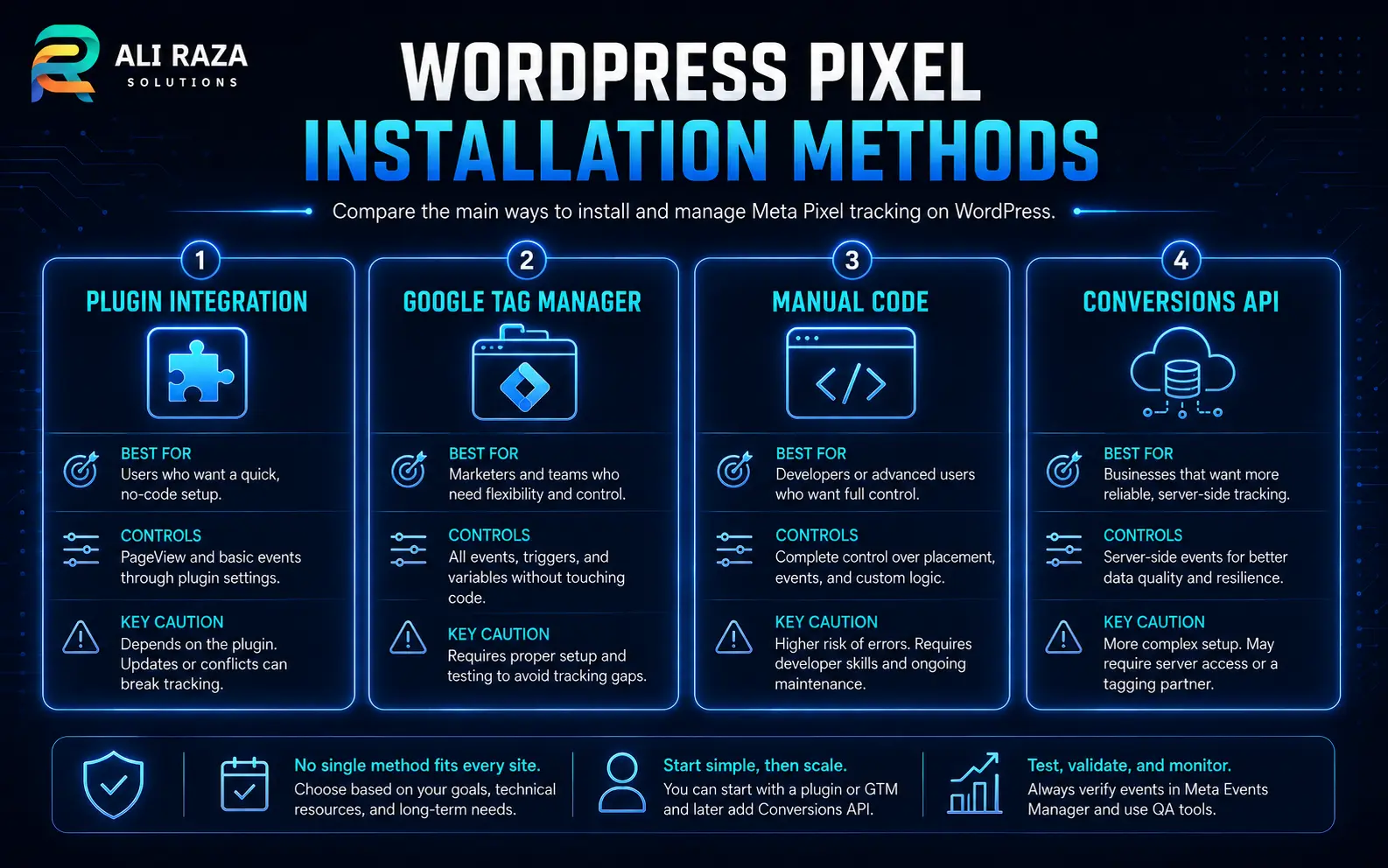
A working implementation has clear ownership. A partner integration can reduce manual code, Google Tag Manager can centralize tags, manual code can offer direct control, and a browser-pixel-plus-Conversions-API setup can add server events. The correct choice depends on the site, team and maintenance process.
The dangerous pattern is overlap without documentation. If Facebook Pixel not tracking WordPress follows a plugin change, list the old and new installation routes before adding anything else.
WordPress integration
Useful when the supported integration matches the site’s platform and the team wants guided configuration. Confirm which events it creates automatically.
Google Tag Manager
Useful for centralized triggers and version history. Publish status, container placement and trigger conditions must still be checked.
Manual code
Offers direct control but requires disciplined theme or snippet management. Child-theme and template changes can affect placement.
Pixel plus Conversions API
Adds a server-side signal where appropriate, but raises implementation, parameter and deduplication requirements.
Validate Lead, Booking and Ecommerce Events
For a lead form, confirm the form accepted valid data, displayed a success state and delivered the record to the intended inbox or CRM. Then confirm the Lead event once. For a booking widget, test the final confirmed appointment rather than the first calendar click.
For ecommerce, validate AddToCart, InitiateCheckout and Purchase separately. Check value and currency only where those parameters are accurate. Test redirected checkout domains and payment-return pages. When Facebook Pixel not tracking WordPress affects Purchase, compare the order ID, thank-you page, server event and browser event without exposing customer information.
Optimize advertising around an event only after it consistently represents the intended business outcome. A convenient click is not a substitute for a confirmed lead, booking or order.
What Not to Do During Pixel Troubleshooting
When Facebook Pixel not tracking WordPress, preserve the current configuration and change one variable at a time.
Do not install several plugins
Multiple new implementations create more variables and can duplicate the same event.
Do not change everything at once
Make one controlled change, clear the relevant cache and repeat the same test journey.
Do not trust one extension alone
Use the helper as one signal, then compare source, network activity, Test Events and Diagnostics.
Do not optimize on an unverified event
A campaign can learn from the wrong action when the event fires too early or duplicates.
Do not erase the old configuration first
Record IDs, triggers, plugins, snippets and versions before removing a route that may contain useful evidence.
Do not assume a reporting delay
Delay is possible, but a missing request, wrong ID or failed trigger needs correction rather than patience.
Pre-Launch Meta Pixel Verification Gate
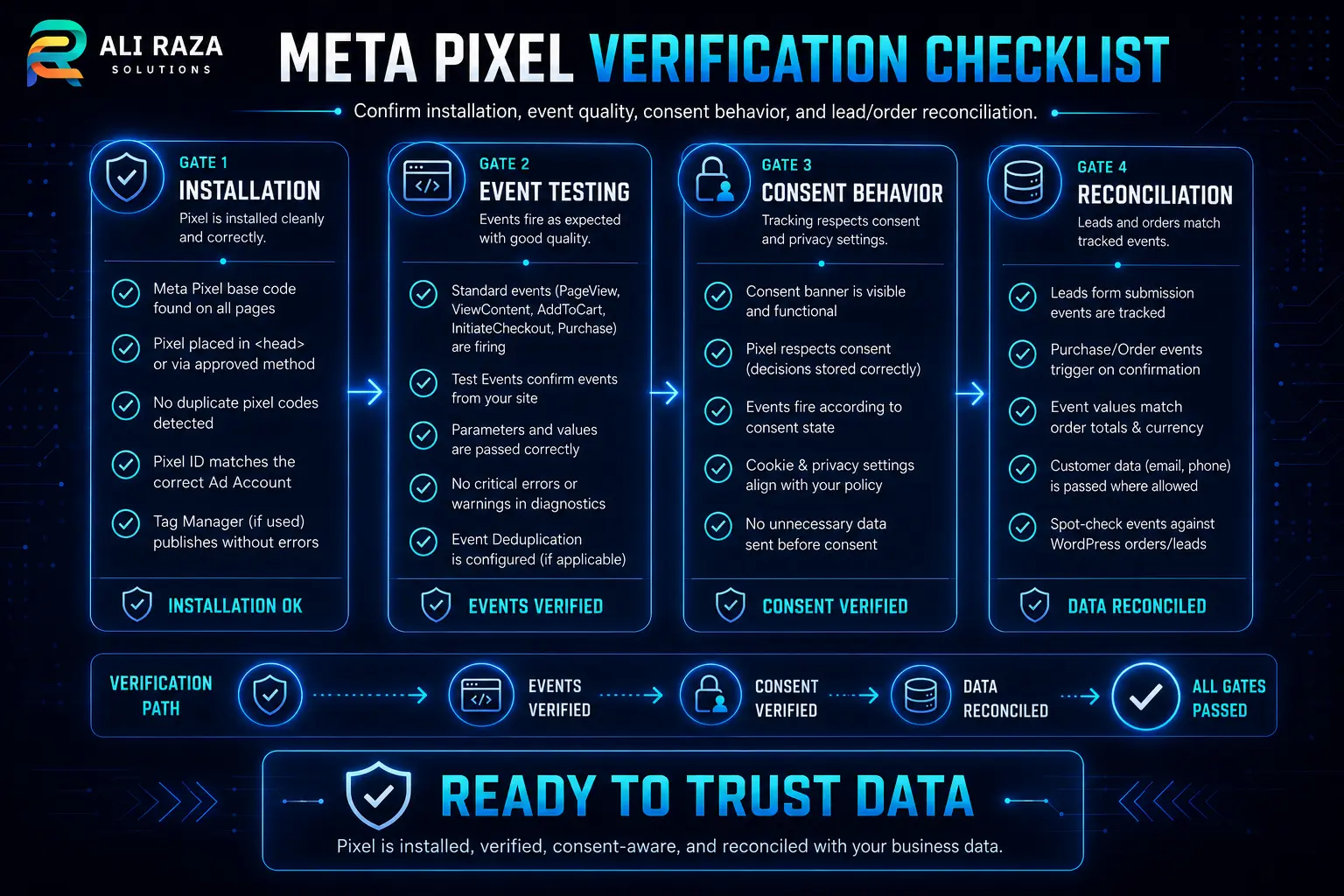
Before using the event for campaign decisions, verify the installation, event meaning, consent behavior and business result. This gate turns Facebook Pixel not tracking WordPress from a vague complaint into a documented release decision.
Installation
Correct data source, one intended base implementation, expected templates covered and caches cleared.
Events
PageView and the priority conversion tested, parameters reviewed and duplicate behavior checked.
Consent and browsers
Expected behavior reviewed in fresh sessions, on mobile and desktop, before and after the relevant consent choice.
Reconciliation
The event matches a real CRM lead, booking or test order and the completed changes are documented.
When Specialist Troubleshooting Is Safer
Escalate when several plugins and tag-manager containers overlap, checkout occurs on another domain, Conversions API is involved, consent behavior is unclear or campaign decisions depend on unreliable purchase values. Preserve screenshots, test times, IDs, plugin names, tag versions and Diagnostics messages.
Ali Raza Solutions can review WordPress code, event triggers, cache behavior and advertising setup through its Meta Ads management and WordPress development services. Ongoing changes can also be controlled through website maintenance. If Facebook Pixel not tracking WordPress is affecting live campaign decisions, send the affected URL, data-source ID, test journey and current installation method through the contact page.
Frequently Asked Questions About WordPress Pixel Tracking
These answers cover the most common installation, event and reporting questions.
Why is Meta Pixel Helper showing no pixel on WordPress?
The extension may be checking a page where the base code did not load, where consent blocked it, or where an optimization rule delayed it. Compare the extension result with page source, browser network activity and Meta Test Events before deciding that the implementation is absent.
Why does PageView work but the Lead event does not fire?
PageView usually runs when the page loads, while Lead depends on a separate trigger. Check whether the form submits through AJAX, whether the event is tied to a real success message or thank-you page, and whether the trigger fires only after a valid submission.
Why is the Meta Pixel firing twice on my WordPress website?
Duplicate events commonly appear when the same pixel is installed through more than one route, such as a plugin, theme code and Google Tag Manager. Inventory every installation path, keep one controlled owner and retest before removing production code.
Can a WordPress cache plugin stop Meta Pixel tracking?
Caching, script delay, combination or minification can change when JavaScript is delivered or executed. Purge every cache layer and temporarily exclude the tracking script from optimization to compare behavior, then restore settings carefully.
Does a cookie-consent plugin block the Meta Pixel?
It can, depending on configuration and the visitor’s consent choice. Test the page before and after the appropriate consent action, confirm the expected behavior and obtain qualified privacy guidance for the jurisdictions you serve.
Why do Test Events and Ads Manager show different numbers?
They answer different questions. Test Events helps verify incoming test activity, while Ads Manager reports attributed campaign results under its reporting settings. A successful test does not guarantee that every historical conversion will appear in the same report.
Should I install the Meta Pixel with a plugin or Google Tag Manager?
Either can be appropriate. Choose the method your team can maintain, document and test. The main risk is unplanned overlap, so avoid leaving old theme code or another plugin active after changing the implementation route.
How do I test a form that submits without opening a thank-you page?
Use the form’s confirmed success state rather than the button click alone. Test a valid submission, inspect the browser request and verify the event in Test Events. A click can occur even when validation fails or the form never reaches the CRM.
Can Meta Pixel and Conversions API run together?
Yes. Meta documents using browser and server events together, but corresponding events need suitable deduplication so the same action is not counted twice. Review event names, event identifiers and Diagnostics after implementation.

About Ali Raza Solutions
Ali Raza Solutions provides WordPress development, technical maintenance, SEO and paid-advertising services for businesses in the United States and international markets.
Platform interfaces, browser behavior and privacy requirements can change. Verify current Meta documentation and obtain appropriate privacy or legal advice for the jurisdictions you serve.