Contact Form Emails Going to Spam? 9 Critical WordPress Fixes
A practical troubleshooting sequence for separating form failures, WordPress mail problems, SMTP errors, DNS authentication gaps and recipient-side spam filtering.
Updated: August 6, 2026 · Approximate reading time: 14 minutes
Start the diagnostic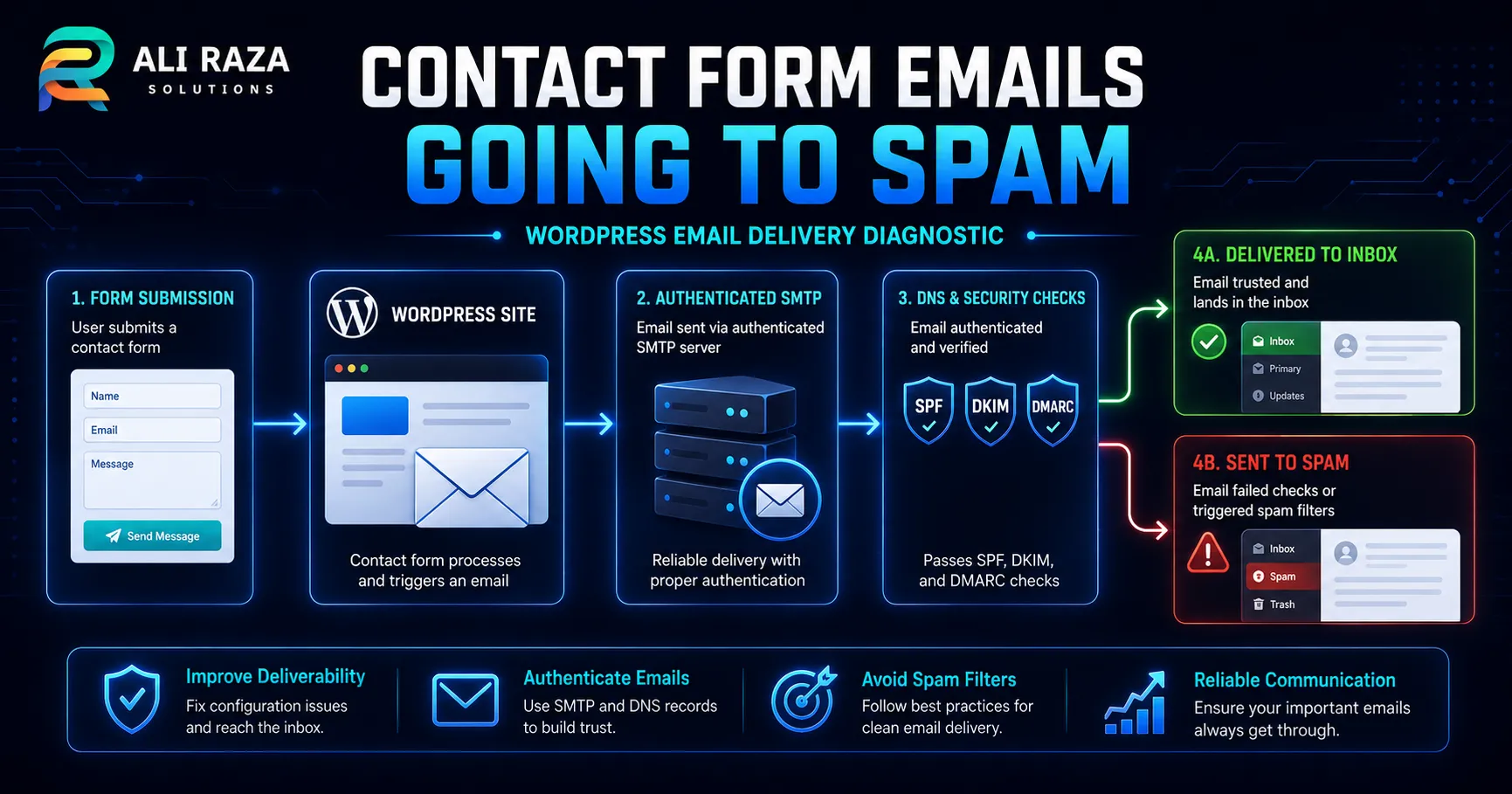
Contact form emails going to spam usually means the form, WordPress, the sending service and the receiving mailbox are not being evaluated separately. First confirm that the submission was stored and a notification was generated. Then inspect the sender identity, SMTP or API logs, SPF, DKIM, DMARC alignment and the final mailbox headers.
A successful form message on the website does not prove that the notification reached the inbox. WordPress explains that a successful wp_mail() result only means the chosen method processed the request without an immediate error; it does not confirm receipt. Review the official WordPress wp_mail() documentation.
Contact Form Emails Going to Spam: Quick Diagnostic
Use one controlled test submission from the form to the mailbox. Record the time, recipient and expected subject. Avoid changing multiple plugins or DNS records before collecting the existing evidence.
Confirm the entry
Check whether the form stored a database entry or sent the data to the approved CRM.
Confirm the notification
Verify the recipient, subject, From address, Reply-To address and trigger rules.
Review the send log
Look for a provider message ID, accepted response, rejection code or connection error.
Inspect authentication
Check SPF, DKIM and DMARC results in the received message headers.
Compare mailboxes
Test an approved Gmail, Microsoft 365 and business-domain mailbox without sending bulk messages.
Reconcile the result
Confirm that the stored enquiry, provider log and received message refer to the same test.
Why Contact Form Emails Going to Spam Requires a Full Delivery-Chain Check
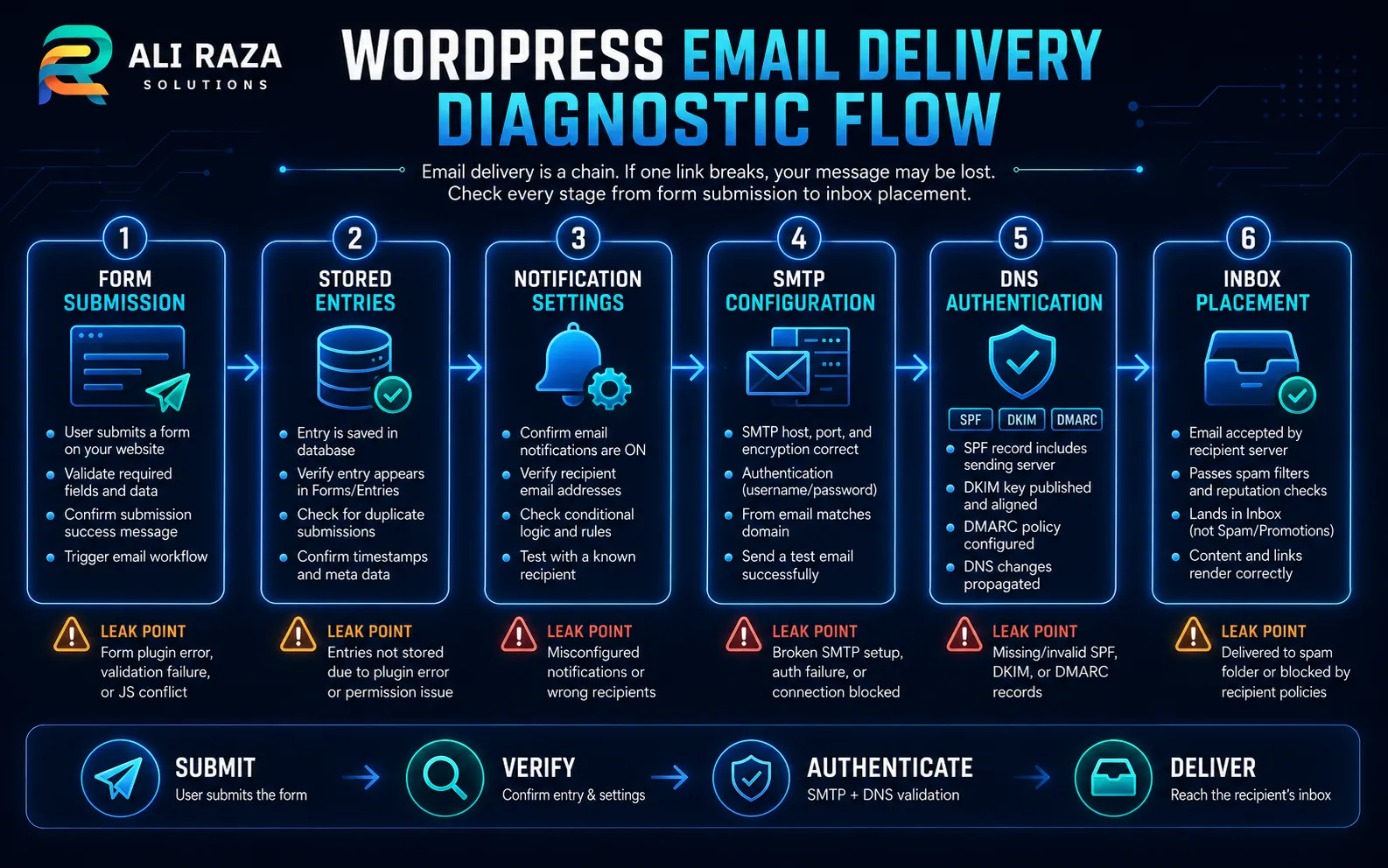
When contact form emails going to spam affect only one destination, the form may be working correctly. The delivery chain has several independent stages: browser submission, form validation, entry storage, notification creation, WordPress mail processing, SMTP or API delivery, recipient-server acceptance and mailbox classification.
Each stage leaves different evidence. The form may store an entry while conditional logic skips the notification; the sender may be rejected; or the recipient may accept the message and place it in junk or quarantine.
| Stage | Evidence | What success proves |
|---|---|---|
| Form submission | Success message and network response | The browser received a successful response |
| Entry storage | WordPress or CRM record | The submitted data was retained |
| Notification | Form configuration or email log | A message was prepared for a recipient |
| Sending service | SMTP response or provider message ID | The provider accepted or attempted the message |
| Recipient server | Delivery response or message trace | The receiving system accepted the message |
| Mailbox placement | Inbox, junk, quarantine and headers | The provider classified the accepted message |
9 Critical Fixes When Contact Form Emails Going to Spam
Confirm the form entry
Verify that the form completed and stored the test data before troubleshooting email delivery.
Check routing
Review recipients, conditional notifications, forwarding rules and mailbox aliases.
Correct From and Reply-To
Send from an authenticated domain address and place the visitor’s address in Reply-To.
Use authenticated delivery
Route WordPress through one controlled SMTP or transactional email integration.
Validate SPF
Authorize the actual service without publishing conflicting SPF records.
Enable DKIM
Publish the provider-specific records and confirm that outgoing messages are signed.
Review DMARC
Check alignment and strengthen policy only after legitimate senders are documented.
Inspect headers and logs
Use the exact test message to identify authentication, rejection and filtering evidence.
Test and monitor
Repeat an end-to-end test after each controlled change and monitor future failures.
Correct Headers When Contact Form Emails Going to Spam
One of the most common reasons for contact form emails going to spam is an unsafe sender pattern. A form may place the visitor’s email address in the visible From field even though the WordPress site is not authorized to send for that person’s domain.
Use a legitimate sender on the website’s authenticated domain, such as [email protected]. Put the visitor’s submitted address in Reply-To. WordPress specifically recommends matching the From domain to the website and notes that some hosts require a real mailbox. See the official wp_mail_from guidance.
From: Website Enquiries <[email protected]>
Reply-To: Visitor Name <[email protected]>
To: Business Inbox <[email protected]>
The domain and addresses above are examples. Use the actual authenticated domain and approved business mailbox for the website.
Use Authenticated Delivery When Contact Form Emails Going to Spam
Default hosting mail can work, but it may provide limited authentication, reputation control and logging. When contact form emails going to spam cannot be diagnosed from the server, route WordPress through one owned SMTP or transactional email integration.
WordPress documents SMTP plugins as a way to override the default mail configuration and use an external service. Choose one implementation path, document its owner and avoid running several mail plugins or custom transports at the same time. Read the WordPress mail administration guidance.
| Method | Useful strength | Common risk |
|---|---|---|
| Hosting or local mail | Minimal setup | Limited logs, shared reputation or weak authentication |
| Authenticated SMTP | Familiar mailbox-based delivery | Credential, port, encryption or sender restrictions |
| Transactional email API | Detailed events and scalable delivery | DNS, API and webhook configuration must be correct |
| Workspace or tenant relay | Uses the organization’s mail environment | Tenant permissions and relay rules can reject the sender |
Never publish SMTP passwords, OAuth tokens or API keys. Store them in the approved secrets system and remove obsolete access.
Verify SPF, DKIM and DMARC When Contact Form Emails Going to Spam
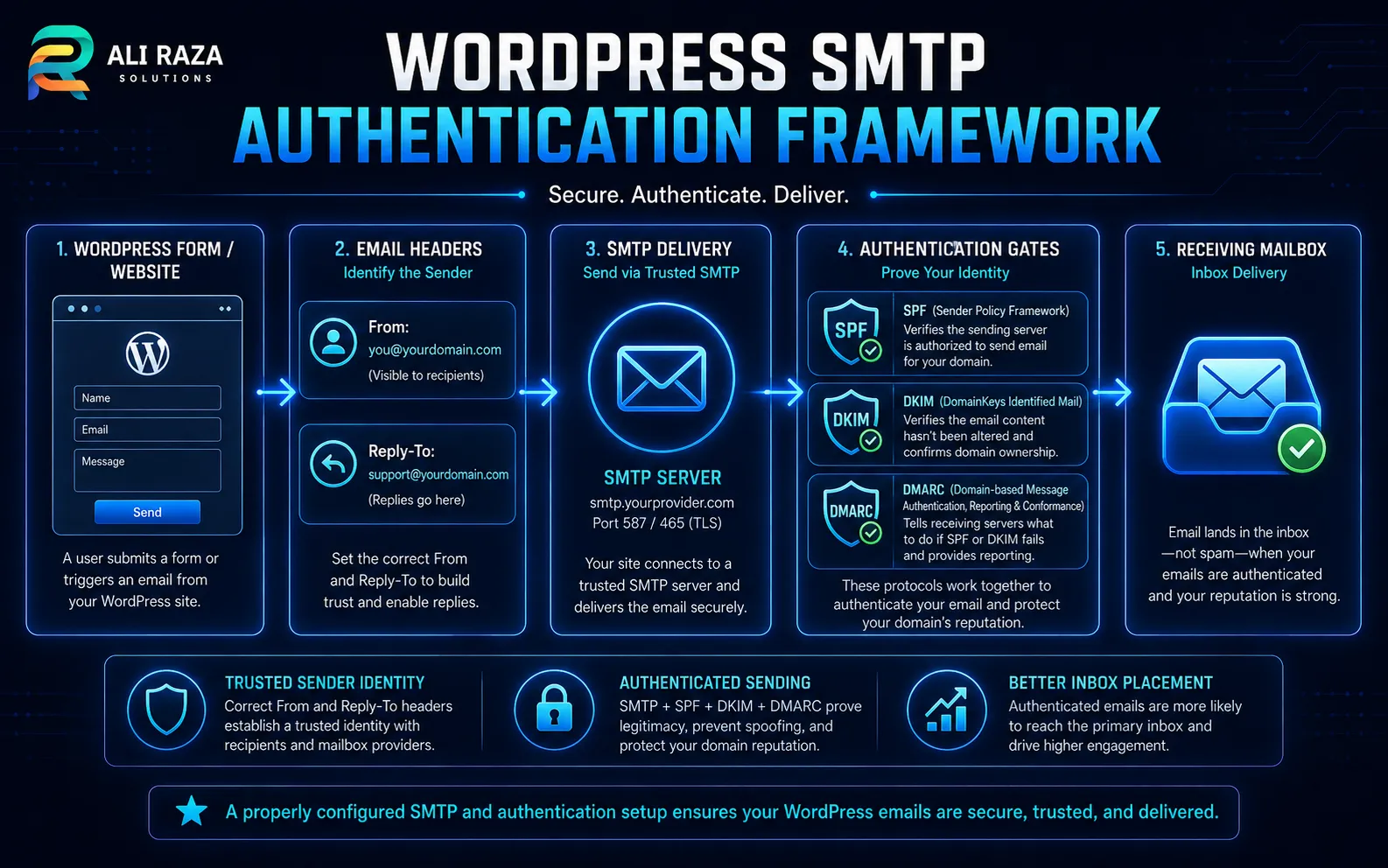
Authentication is essential when contact form emails going to spam reach Gmail, Microsoft 365 or another managed mailbox. The records must describe the service that actually sends the message, not a generic example copied from another website.
SPF: authorize the sending source
SPF tells the receiver which systems may send for the envelope domain. Inventory every legitimate service before editing it. Avoid multiple independent SPF records for the same hostname; combine the authorized sources into the intended policy with help from the relevant provider.
DKIM: verify the signature
DKIM adds a cryptographic signature tied to a domain. Publish the selector and public key supplied by the sending service, enable signing and confirm that a received message reports a passing result. Do not copy another domain’s selector or key.
DMARC: evaluate domain alignment
DMARC checks whether an authenticated SPF or DKIM domain aligns with the visible From domain. Google’s sender guidance explains this alignment requirement. Review Gmail’s current sender guidelines.
Strengthen DMARC only after legitimate website, mailbox, CRM and marketing senders pass. Microsoft explains that authentication is combined with reputation, history and behavioral signals, so a pass does not guarantee inbox placement. See Microsoft’s email-authentication overview.
Read the Received Message Headers
When contact form emails going to spam are accepted by the provider, the received copy is one of the best diagnostic records. Save the original message or headers privately and inspect the fields without posting addresses, identifiers or routing data publicly.
- Authentication-Results: SPF, DKIM and DMARC outcomes reported by the receiver.
- From: the identity visible to the recipient.
- Return-Path: the envelope sender commonly evaluated by SPF.
- DKIM-Signature: the signing domain and selector.
- Received: the route and timestamps across mail systems.
- Message-ID: a useful identifier for logs and message traces.
- Spam or filtering headers: provider-specific classification evidence where available.
Why Authenticated Messages Can Still Reach Spam
Authentication helps receivers identify the sender, but it does not grant automatic inbox placement. Contact form emails going to spam can also reflect sending reputation, previous complaint patterns, shared infrastructure, unusual volume, recipient interaction or message construction.
Keep the notification operational: identify the website and form, use a clear subject, avoid unnecessary attachments and unrelated links, and validate the HTML.
Use a clear subject
Include the website or form name without excessive punctuation, deceptive urgency or unrelated marketing language.
Keep links relevant
Use the expected domain and remove tracking links that add no value to the internal notification.
Control attachments
Where uploads are necessary, validate them and consider secure storage links rather than forwarding risky files.
Monitor sending patterns
Investigate sudden volume, repeated submissions and compromised forms before they damage the domain’s reputation.
Separate Form Spam From Email Spam Placement
These are different problems. Form spam occurs when bots or abusive users submit unwanted content through the website. Spam placement occurs when a legitimate notification is classified as junk by the receiving mailbox. The two can interact, but they require different controls.
Use server-side validation, rate limiting, a honeypot and an appropriate challenge. These controls reduce abuse but do not replace SMTP, SPF, DKIM or DMARC.
When contact form emails going to spam started after a surge in bot submissions, investigate both the form and sender reputation. Preserve legitimate entries, quarantine suspicious uploads and avoid blocking broad groups of genuine visitors without evidence.
Troubleshoot Contact Form Emails Going to Spam by Symptom
| Symptom | Likely area | First evidence |
|---|---|---|
| No form confirmation | Browser or form validation | Browser console, network response and server log |
| Entry stored but no email log | Notification configuration | Recipient, condition and trigger settings |
| SMTP reports rejection | Connection or sender policy | Exact SMTP response code and provider log |
| Accepted but missing from inbox | Recipient filtering | Spam, quarantine and message trace |
| SPF passes but DMARC fails | Domain alignment | From, Return-Path and DKIM signing domains |
| Only one provider filters it | Provider-specific signals | Authentication results and recipient trace |
| Two copies arrive | Duplicate send paths | Form notifications, plugins, hooks and automations |
| Replies return to the website | Missing Reply-To | Notification header configuration |
Verify Contact Form Emails Going to Spam End to End
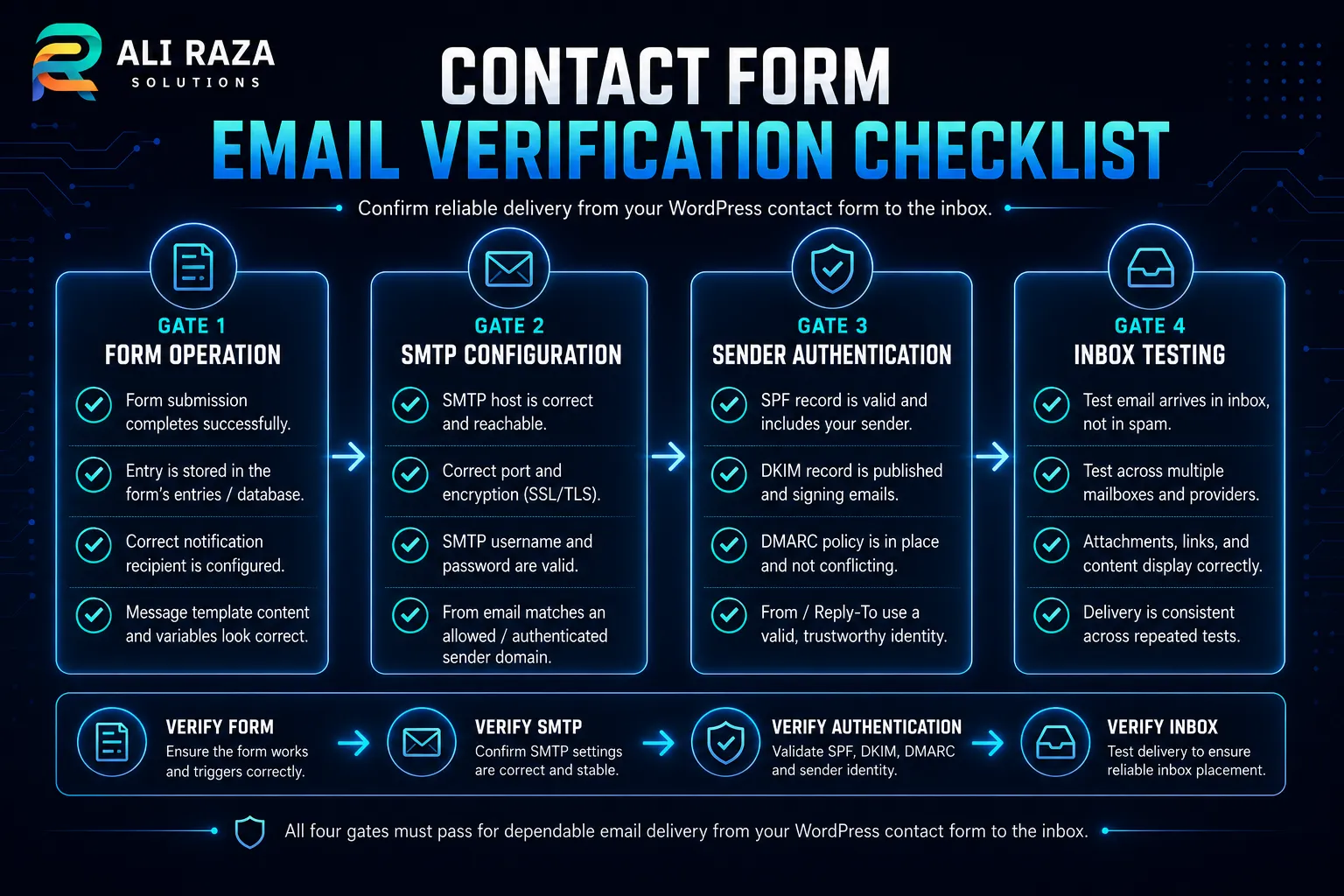
After each controlled change, test the production form with a unique subject marker. Compare the WordPress entry, send log and received message; a test-email button alone does not verify form logic.
Form
Submit on desktop and mobile, confirm validation and verify the stored entry.
Notification
Confirm recipient, From, Reply-To, subject and conditional routing.
Transport
Confirm the intended SMTP or API service accepted the same test message.
Authentication
Check SPF, DKIM and DMARC in the received message, not only in DNS.
Mailbox
Review inbox, junk and quarantine across the approved recipient systems.
Reply and monitor
Test Reply-To, document the final setup and monitor failures or unusual volume.
Frequently Asked Questions About Contact Form Emails Going to Spam
These answers cover the most common WordPress sender, SMTP, authentication and mailbox questions.
Why are WordPress contact form emails going to spam?
WordPress can generate a notification successfully while the receiving mailbox still classifies it as junk. Common causes include an unauthenticated sender, a From address that does not align with the sending domain, missing SPF or DKIM, poor sender reputation, malformed headers, or recipient-specific filtering.
Does WordPress send email through SMTP by default?
Not necessarily. WordPress uses the wp_mail function, which relies on the server’s configured mail transport unless a plugin or custom integration routes messages through authenticated SMTP or an email API. The exact behavior depends on the hosting environment and site configuration.
What should the From address be on a contact form?
Use a legitimate address on the website’s authenticated sending domain, such as [email protected]. Put the visitor’s submitted address in Reply-To so the business can reply without pretending that the website is authorized to send mail for the visitor’s domain.
Should the visitor’s email be placed in From or Reply-To?
Place the visitor’s address in Reply-To, not From. Using an arbitrary visitor address in From can break SPF, DKIM, or DMARC alignment because the website’s mail service usually cannot authenticate the visitor’s domain.
Will an SMTP plugin guarantee inbox delivery?
No. Authenticated SMTP can improve identity, reliability, and logging, but it cannot guarantee inbox placement. Receiving providers also evaluate reputation, message quality, recipient behavior, and their own filtering systems.
Do contact-form emails need SPF, DKIM and DMARC?
These records are strongly recommended for domains that send website notifications. SPF identifies permitted senders, DKIM signs messages, and DMARC checks alignment and defines a policy for failures. The records must match the actual sending service.
Why does SPF pass while DMARC fails?
SPF can pass for the envelope sender while the visible From domain is different. DMARC requires alignment between the visible From domain and an authenticated SPF or DKIM domain, so a message can pass SPF yet fail DMARC.
Why do emails reach Gmail but not Microsoft 365?
Mailbox providers use different filtering systems and reputation signals. Compare the accepted or rejected SMTP response, quarantine, message trace, and authentication results rather than assuming the same message will be classified identically everywhere.
Can a contact-form plugin cause duplicate emails?
Yes. Duplicate notifications can occur when several form notifications, SMTP routes, automations, theme hooks, or plugins send the same event. Document every sending path and disable only the unintended duplicate.
How can I avoid losing enquiries when notifications fail?
Store legitimate form entries in WordPress, a CRM, or another approved system and monitor notification failures. Email should be treated as an alert channel, not the only copy of a valuable enquiry.

About Ali Raza Solutions
Ali Raza Solutions provides WordPress development, website maintenance, SEO and digital services for businesses in the United States and international markets.
This article provides general technical information. Email authentication, privacy, retention and security requirements vary by organization and jurisdiction. Use provider-specific records, protect credentials and obtain qualified assistance before enforcing a restrictive policy on a production domain.