
Website Design for HVAC Companies
A practical blueprint for building a fast, trustworthy HVAC website that helps local customers choose the right service, call quickly and request a booked appointment.
Published: August 6, 2026 · Approximate reading time: 17 minutes
See the lead-generation framework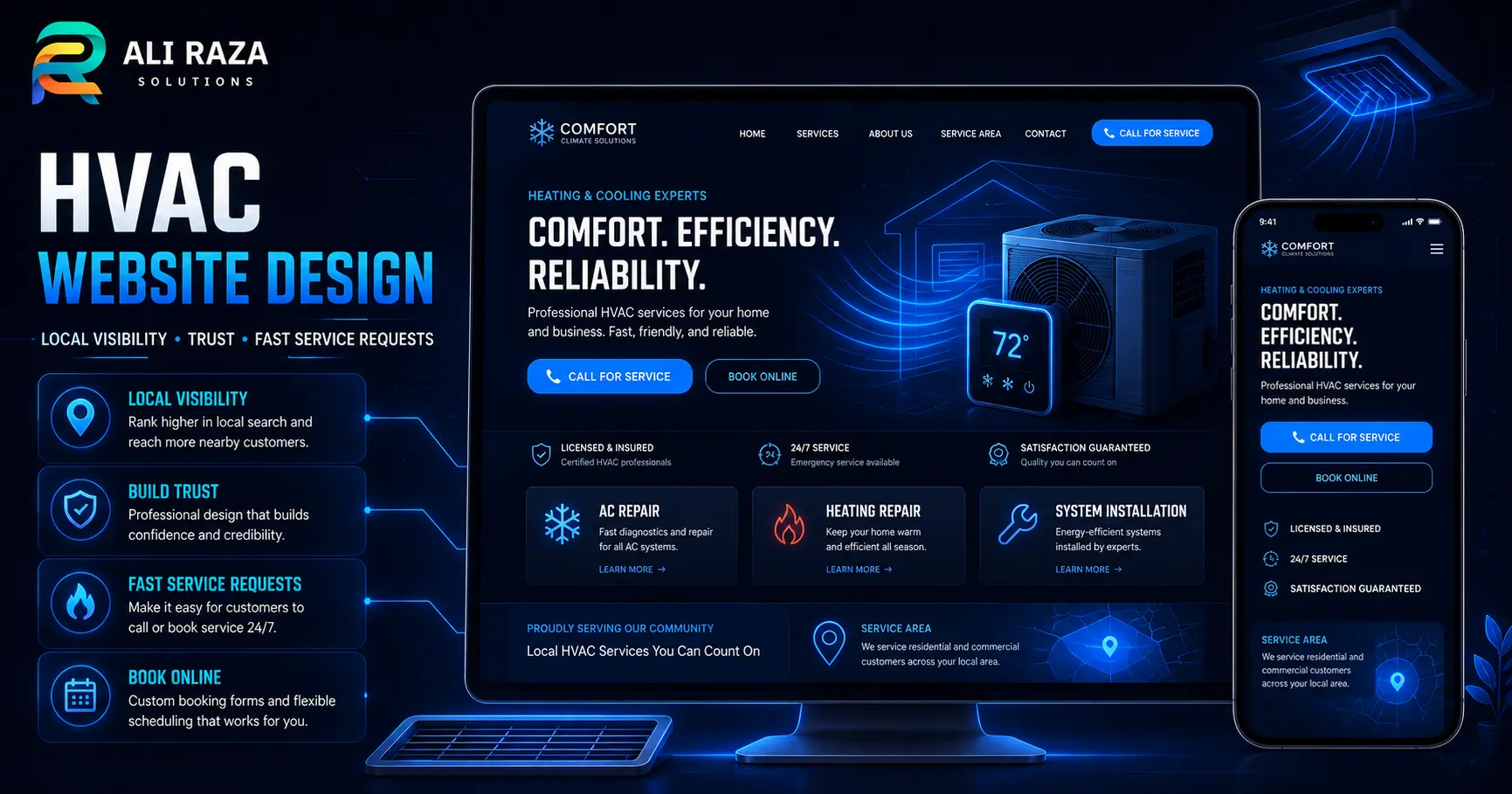
Effective website design for HVAC companies makes it easy for a homeowner or property manager to confirm that you serve their area, understand the service they need, trust your company and contact you without friction. The strongest sites combine clear service pages, prominent phone and booking actions, accurate service-area information, fast mobile performance, proof of expertise and reliable lead tracking.
An HVAC website is not only an online brochure. It is the central destination for organic search, Google Business Profile traffic, Local Services Ads, paid search, referrals and repeat customers. Every page should help the visitor take the next sensible step—call, request service, ask for an estimate or learn enough to choose confidently.
Quick Answer: What Makes an HVAC Website Generate Leads?
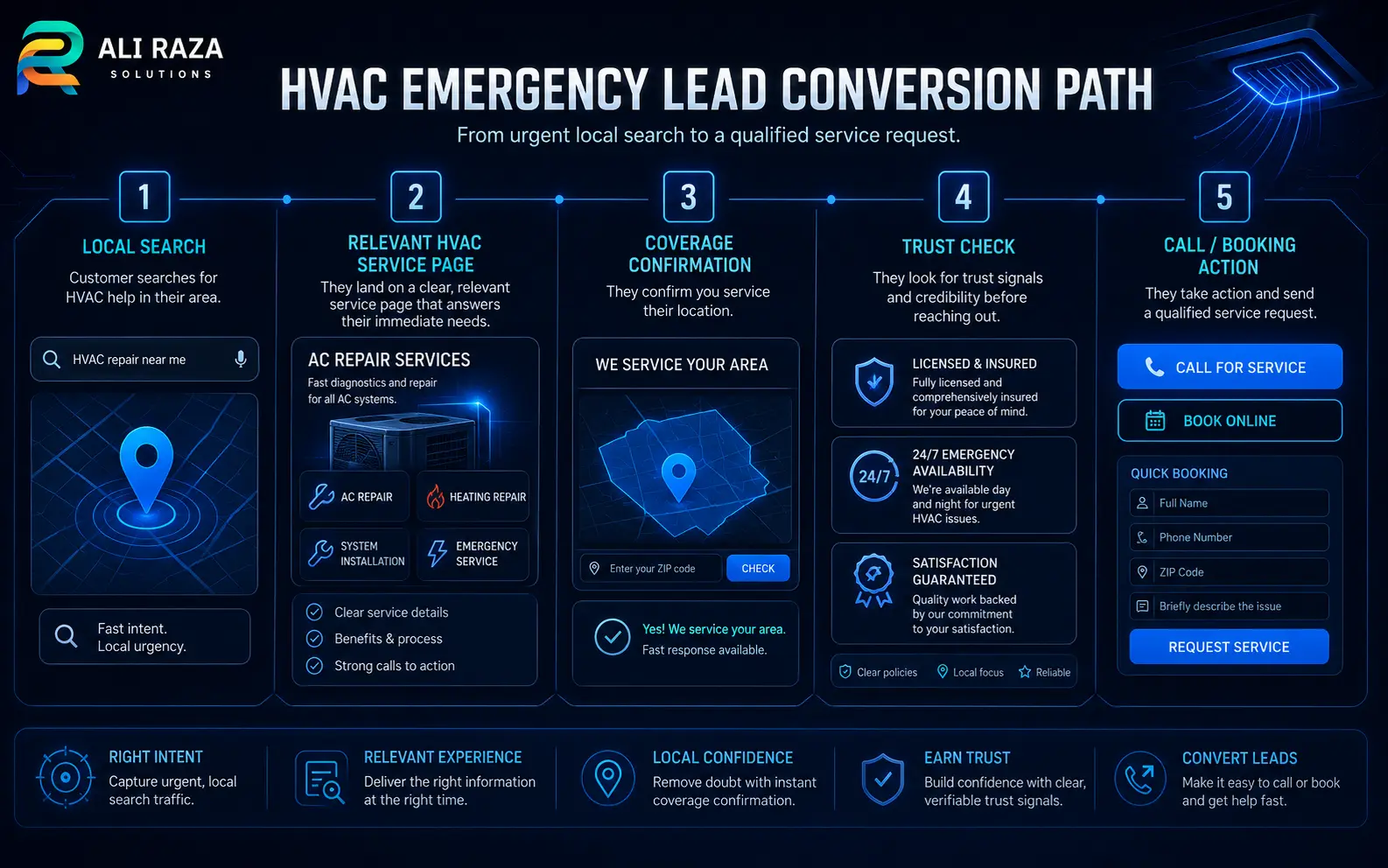
A lead-generating HVAC website answers four questions immediately: What do you fix or install? Where do you work? Why should the customer trust you? How can they contact you now?
| Visitor need | Website response | Primary action |
|---|---|---|
| Urgent repair | Emergency message, service availability, visible phone number and short request form | Call now or request urgent service |
| Planned replacement | System options, process, financing information, warranties and estimate expectations | Request an estimate |
| Routine maintenance | Tune-up details, maintenance-plan benefits and scheduling path | Book maintenance |
| Local confidence | Service areas, licenses where applicable, reviews, team information and real project photos | Confirm coverage and contact |
| Research and comparison | Clear educational content, FAQs and service-specific proof without exaggerated claims | Choose a service or ask a question |
What an HVAC Company Website Must Accomplish
The visual design matters, but its purpose is to make the business easier to understand and easier to hire. Build the experience around these four outcomes.
Capture high-intent demand
Present repair, installation, maintenance and emergency options in the language customers use. Give every service a clear route to a call or request.
Establish local relevance
Show the real cities, neighborhoods or postal areas served. Connect location information with accurate business details and useful local content.
Reduce risk for the customer
Explain qualifications, process, warranties, financing availability and what happens after a request. Use verifiable proof instead of generic claims.
Create measurable enquiries
Track calls, forms, bookings and campaign sources so the company can evaluate lead quality—not only page views or rankings.
Essential Pages for an HVAC Company Website
A single services page rarely provides enough context for customers or search engines. A useful site structure gives each major service and decision type an appropriate destination.
| Page type | Purpose | Recommended content |
|---|---|---|
| Homepage | Orient visitors and route demand | Primary services, coverage area, emergency path, trust signals and contact options |
| AC repair | Serve cooling-repair intent | Symptoms, equipment types, response process, coverage and booking action |
| Heating or furnace repair | Serve heating-repair intent | Common issues, supported systems, safety boundaries and service request |
| Installation and replacement | Support a higher-consideration purchase | Assessment process, system options, efficiency considerations, warranties and estimates |
| Maintenance and tune-ups | Generate recurring and seasonal work | What is included, recommended timing, plan options and scheduling |
| Additional specialties | Represent real capabilities | Ductless systems, heat pumps, indoor air quality, commercial HVAC or other verified services |
| Emergency service | Handle urgent intent | Availability, qualifying situations, expected response process and prominent phone action |
| Service-area pages | Help local customers confirm coverage | Area-specific service information, travel boundaries, local proof and relevant contact details |
| About and team | Build confidence | Company story, real team, qualifications, operating standards and community involvement |
| Reviews or case studies | Provide verifiable proof | Permission-based testimonials, project context and outcomes without invented claims |
| Financing | Answer affordability questions | Available programs, eligibility caveats, application path and current terms source |
| Contact or booking | Convert the visit | Phone, short form, business hours, service area and what happens next |
How to Design the HVAC Homepage for Fast Decisions
The homepage should work as a routing page, not an attempt to explain every service. Visitors arriving from branded search, referrals or offline advertising need a quick summary and an obvious next step.
Above the fold
State the service and market
Use a clear headline such as “Heating and cooling service for [real service area].” Avoid vague slogans that do not identify the work.
Show phone and booking options
Keep the phone number visible, make it tappable on mobile and pair it with a short service-request action.
Clarify emergency availability
Only advertise 24/7 or same-day service when it is operationally accurate. Otherwise explain hours and after-hours handling.
Place proof near the decision
Use real ratings, review counts, licenses, years in business or guarantees only when each item is current and verifiable.
Recommended homepage sequence
- Hero: service, area, availability and two contact paths.
- Trust strip: verified credentials, review source and relevant guarantees.
- Service cards: repair, installation, maintenance and genuine specialties.
- Why choose the company: specific operating differences rather than “best service” language.
- Service area: clear geographic coverage linked to useful area pages.
- Process: what happens after the customer calls or submits a request.
- Proof: real customer feedback, team imagery and permission-based project examples.
- Financing or maintenance plan: where relevant to the business model.
- FAQ and final CTA: resolve common objections and repeat the next step.
Keep the first request simple
Ask only for the information needed to respond: name, contact method, service type, location and a brief description. Long diagnostic forms can discourage urgent enquiries. Additional details can be collected after the initial contact.
Website Design for HVAC Companies: Local SEO Architecture
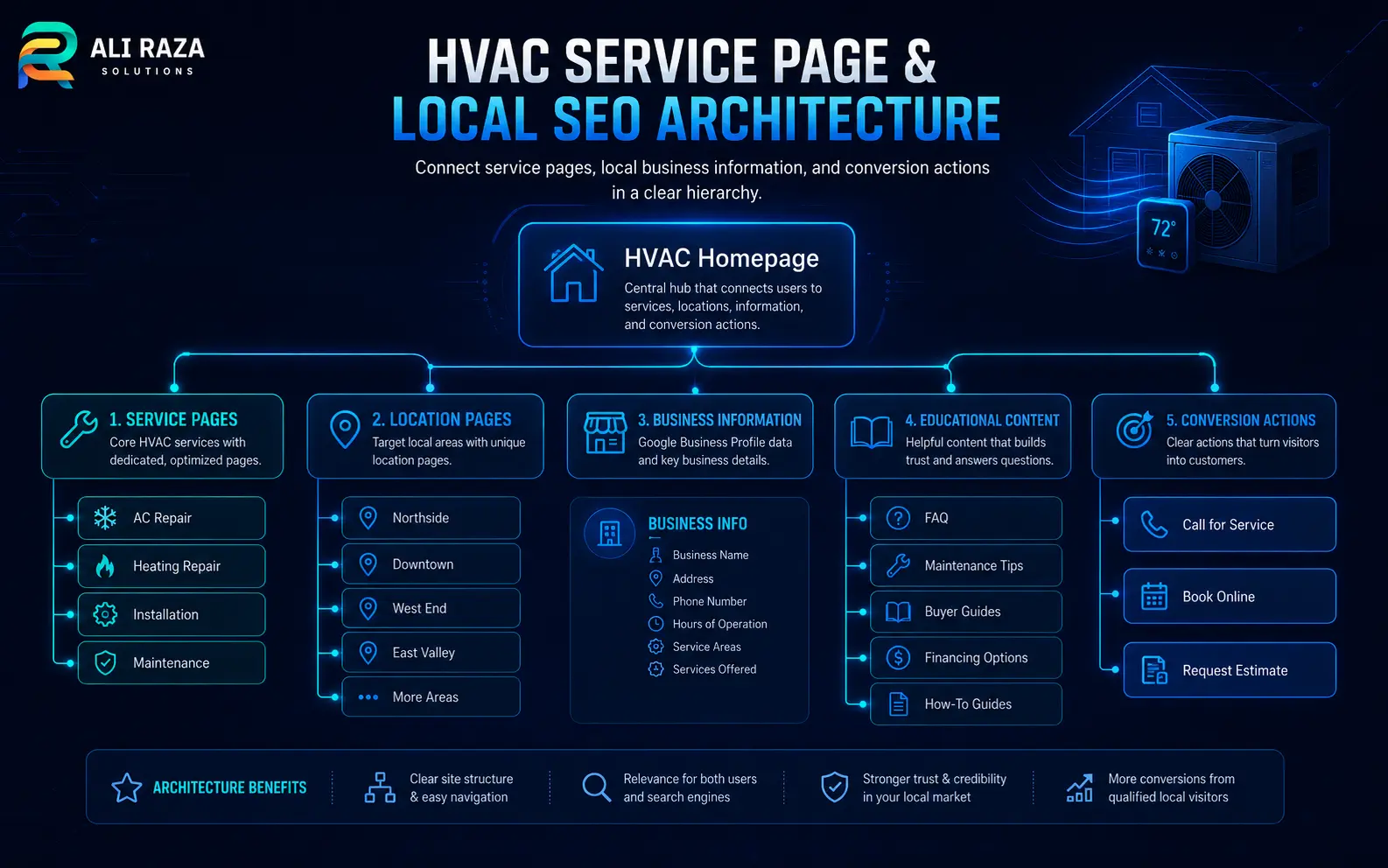
Local SEO should shape the site structure from the beginning. The goal is not to create hundreds of near-identical city pages. It is to connect real services, real coverage areas and useful content in a logical hierarchy.
Build around service intent
Give core services their own well-developed pages. An air-conditioning repair page should explain the service, supported systems, common reasons to call, the service process, coverage and a clear enquiry action. It should not be a short paragraph repeated across many cities.
Use location pages selectively
Create a location page when the business genuinely serves that area and can provide area-specific value. Include useful coverage details, relevant services, locally applicable proof, operating information and internal links. Google’s spam policies define doorway abuse as pages made to rank for similar queries without adding meaningful value, so cloned city pages are a poor foundation.
Align the website with Google Business Profile
Keep the company name, phone, website, operating hours and service model accurate. Google distinguishes storefront, service-area and hybrid businesses. Its guidance says a service-area business that does not receive customers at its address should remove the public address and specify the actual service area instead. Review the official service-area guidance and Business Profile representation guidelines before publishing location information.
Add relevant structured data
Use accurate Organization or LocalBusiness structured data for the company entity, along with page-level schema where appropriate. Google’s Local Business structured-data documentation explains the supported business details. Markup must describe visible, truthful information; it does not replace complete pages or an accurate Business Profile.
Trust Elements HVAC Customers Need Before They Contact You
Heating and cooling work can involve cost, disruption and access to a customer’s property. The design should make the company feel transparent without relying on unsupported superlatives.
Real business identity
Show the company name, phone, service area, operating hours, team and physical location only where customers are genuinely received.
Qualifications and licensing
Display applicable licenses, certifications and insurance statements with enough context to verify them. Requirements vary by jurisdiction.
Review transparency
Identify the review source and avoid static rating claims that become outdated. Use permission-based testimonials and link to the live profile when suitable.
Service process
Explain scheduling, arrival communication, diagnosis, estimate approval, work completion and follow-up so the customer knows what to expect.
Pricing context
Explain service-call policies, estimate practices and financing availability without publishing misleading “from” prices or outdated terms.
Real photography
Use branded vehicles, technicians, equipment and completed work with permission. Stock imagery should support the layout, not impersonate the team.
A strong About page should connect the company’s history and standards to the customer’s decision. Instead of saying “we care about quality,” explain how technicians are selected, how estimates are approved, how homes are protected during work and how callbacks are handled.
Mobile Website Design for HVAC Companies: Speed, Calls and Usability
Design the mobile experience first because an urgent customer may be outside, away from Wi-Fi or comparing several contractors quickly. The page should remain useful on a smaller screen and a slower connection.
| Requirement | Implementation | Avoid |
|---|---|---|
| Easy contact | Persistent but unobtrusive tap-to-call or request-service action | Phone numbers embedded only in images or hidden in a menu |
| Fast first view | Compressed WebP images, limited scripts and correctly sized media | Autoplay video, oversized sliders and several tracking scripts before consent |
| Readable content | Comfortable type, short paragraphs, clear headings and accessible contrast | Tiny text, dense blocks and low-contrast labels |
| Stable layout | Explicit image dimensions and reserved space for embedded elements | Buttons that move while the visitor tries to tap |
| Simple forms | Large fields, correct input types, useful error messages and minimal required data | Long forms, unclear validation and forced account creation |
| Accessible navigation | Keyboard support, visible focus, descriptive labels and logical heading order | Hover-only controls or icon buttons without accessible names |
Google defines Core Web Vitals as real-world measurements of loading performance, responsiveness and visual stability. Its current guidance recommends good experiences across Largest Contentful Paint, Interaction to Next Paint and Cumulative Layout Shift. Use the official Core Web Vitals documentation, PageSpeed Insights and Search Console field data to diagnose performance rather than relying on a single laboratory score.
Why WordPress Works for HVAC Company Websites
WordPress can support service pages, location content, FAQs, booking connections, analytics and ongoing updates without locking every change behind a developer. The platform is only part of the solution: theme architecture, plugin selection, hosting, content governance and maintenance determine whether the site remains fast and dependable.
Flexible service content
Build reusable layouts for service and location pages while preserving unique, useful copy and proof on each page.
Editable seasonal campaigns
Publish heating, cooling and maintenance campaigns without rebuilding the core website.
CRM and scheduling connections
Connect forms or booking actions to the company’s approved field-service, email or customer-management workflow.
SEO and schema control
Manage titles, descriptions, canonical URLs, XML sitemaps and structured data with a controlled technical setup.
Recommended integration plan
- Call tracking: Use dynamic number insertion carefully so the primary business number remains consistent for users and local profiles.
- Forms: Route leads to a monitored inbox or CRM, add spam protection and test every notification path.
- Scheduling: Show only time slots and service types the dispatch team can actually support.
- Analytics: Record form completions, qualified calls, booking starts and campaign sources with appropriate consent controls.
- Local Services Ads: Where eligible, connect campaign landing experiences to the same accurate service and coverage information. Google lists HVAC among eligible home-service categories and describes the format as pay-per-lead for verified providers in supported markets.
- Maintenance: Plan updates, backups, uptime checks, security reviews and form testing after launch.
Ali Raza Solutions provides web development services, professional WordPress development and ongoing website maintenance for service businesses that need design, performance and lead-generation systems managed together.
Common Mistakes in Website Design for HVAC Companies
One generic services page
Customers cannot quickly confirm the exact service, and the site has weak destinations for specific search and advertising intent.
Cloned city pages
Swapping city names in identical copy creates a poor experience and can resemble doorway abuse rather than useful local content.
Hidden phone number
An urgent customer should not have to open several screens or scroll to the footer to call.
Unverified trust claims
Unsupported ratings, awards, response times or “licensed everywhere” language can damage credibility and create compliance risk.
Slow visual effects
Large video, sliders and animation can delay the content and actions customers came to use.
No lead-quality tracking
Counting every form and call equally hides which pages and campaigns generate suitable jobs.
Weak form operations
A beautiful form has no value if notifications fail, spam fills the inbox or nobody owns the response process.
Launching without maintenance
Outdated plugins, broken integrations, expired offers and stale hours gradually reduce trust and reliability.
A Practical HVAC Website Launch Roadmap
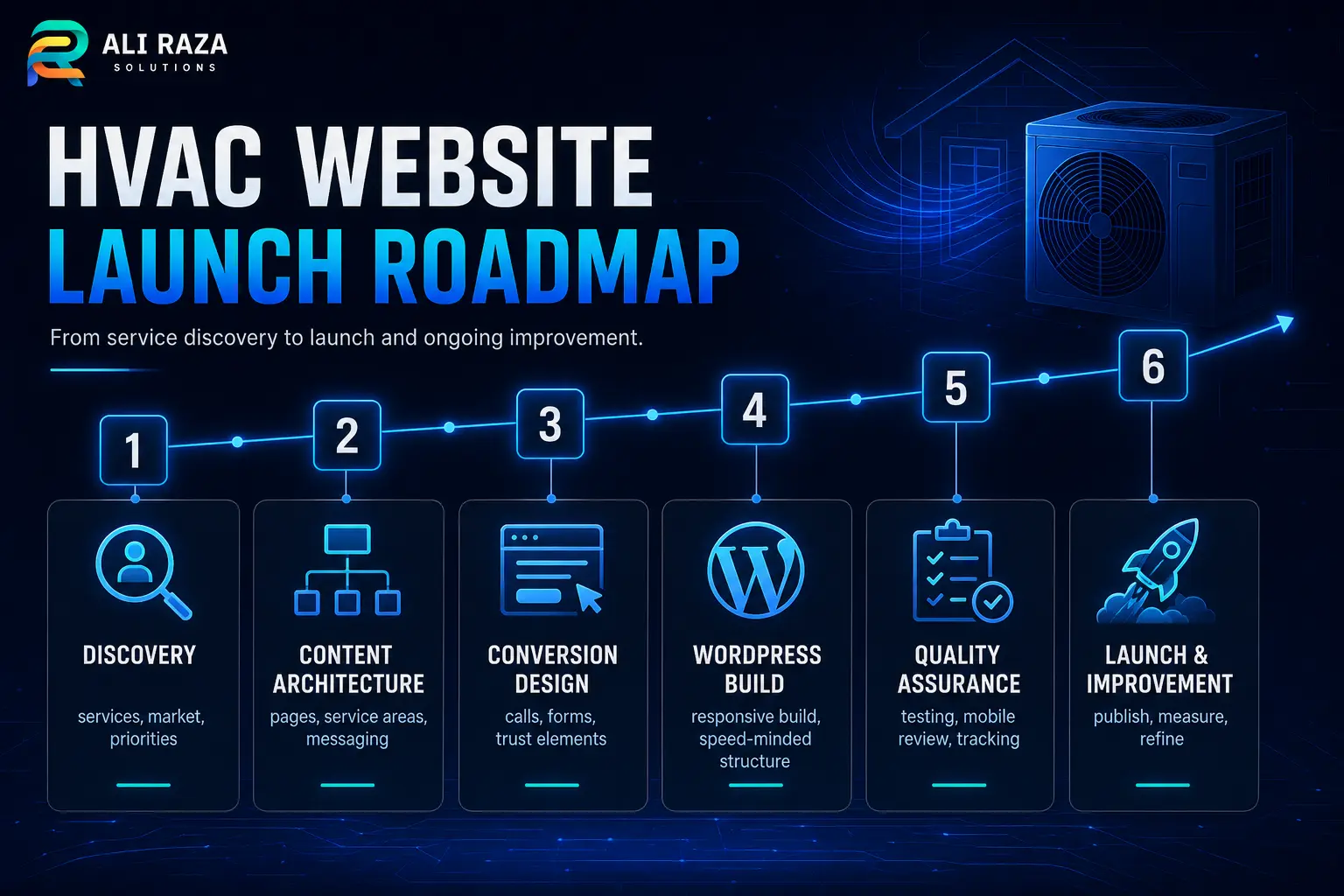
A successful build starts with business operations and search intent, then moves into design. This sequence reduces rework and makes approvals more objective.
Discovery
Confirm services, real service areas, hours, emergency availability, seasonal demand, differentiators and lead-handling capacity.
Content architecture
Map service, location, trust, financing, maintenance and contact pages to customer questions and search intent.
Conversion design
Prototype mobile calls, forms, booking paths, emergency messaging and proof placement before decorative details.
WordPress build
Create reusable components, clean templates, responsive behavior, schema, analytics and approved integrations.
Quality assurance
Test content, links, forms, phone actions, browser widths, accessibility, performance, tracking and notification delivery.
Launch and improve
Monitor real enquiries, search visibility, user behavior and operational feedback; prioritize changes by lead quality.
Information to prepare before design begins
- Confirmed service list and priority job types
- Real service areas and operating boundaries
- Business hours and emergency-service policy
- Licenses, certifications, insurance statements and warranty language approved for publication
- Team, vehicle, equipment and project photography with permission
- Review sources and permission-based testimonials
- Financing, rebate and maintenance-plan information with responsible owners for updates
- Phone, form, scheduling and CRM workflows
- Access to domain, hosting, analytics, Search Console and Business Profile
How to Measure Whether the HVAC Website Is Working
Traffic alone does not show whether the website supports the business. Create a measurement plan that connects the digital action to an operational outcome.
| Measure | What it indicates | Review question |
|---|---|---|
| Qualified calls | Phone enquiries matching service and coverage criteria | Which pages and campaigns produce bookable work? |
| Completed forms | Visitors willing to provide request details | Are forms short, reliable and routed correctly? |
| Booked appointments | Leads that move into the operating schedule | Where do leads drop between enquiry and booking? |
| Service-page conversion rate | How well a specific page turns relevant visits into enquiries | Does the page answer the decision questions? |
| Local organic visibility | Discovery for service-and-location searches | Are priority services and real areas represented well? |
| Mobile field performance | Real-user speed, responsiveness and stability | Do urgent mobile visitors receive a usable page? |
| Lead quality by source | Operational value of organic, paid, referral and profile traffic | Which sources create suitable jobs rather than noise? |
Review the data with dispatch or sales staff. A page may produce many calls but few suitable jobs because its service area, availability or service description is unclear. Use that feedback to improve the page instead of simply increasing advertising spend.
FAQs: Website Design for HVAC Companies
These answers address the decisions HVAC companies commonly face when planning or rebuilding a lead-generation website.
What should an HVAC company website include?
It should include clear heating and cooling service pages, real service-area information, visible phone and booking actions, trust details, reviews or project proof, an About page, contact information, mobile-friendly forms and accurate business hours.
How many pages does an HVAC website need?
There is no universal number. The site needs enough pages to represent each important service, genuine service area and major customer decision without creating thin or duplicated pages.
Should every city have its own HVAC service page?
No. Create a city or service-area page only when the company genuinely serves that area and the page can provide useful, distinct information. Avoid cloning the same page and changing only the location name.
What is the best call to action for an HVAC website?
Use the action that matches the visitor’s urgency: “Call for service” for immediate repair, “Request an estimate” for replacement work and “Schedule maintenance” for routine service. Keep a secondary option for visitors who cannot call.
Should an HVAC website show prices?
Show pricing only when the company can keep it accurate and the service is defined clearly. Otherwise explain diagnostic fees, estimate policies, financing availability and the factors that affect a final quote.
Is WordPress suitable for an HVAC company website?
Yes. A properly built and maintained WordPress site can support service pages, local content, forms, booking connections, analytics and SEO. Performance depends on the theme, plugins, hosting and ongoing maintenance.
How does an HVAC website support local SEO?
It gives each real service and selected location a useful destination, keeps business details consistent, uses logical internal links, supports accurate structured data and connects visitors from Search or Business Profile to the right action.
How often should an HVAC website be updated?
Review operational details whenever services, hours, coverage, financing or staff change. Test forms, calls, integrations, software updates, backups and performance on a regular maintenance schedule.

About Ali Raza Solutions
Ali Raza Solutions provides WordPress development, website maintenance, SEO and digital services for home-service companies and other growth-focused businesses.
This article provides general website and marketing guidance. Licensing, advertising, financing, accessibility, privacy and consumer-disclosure requirements vary by location and business model. Confirm applicable requirements with qualified local professionals.