
Website Redesign Traffic Loss: 9 Critical SEO Fixes to Recover Safely
A practical post-launch diagnosis for redirects, indexing, canonicals, lost content, internal links and migration issues that can reduce organic search visibility after a redesign.
Published: August 17, 2026 · Approximate reading time: 13 minutes
Start the diagnosis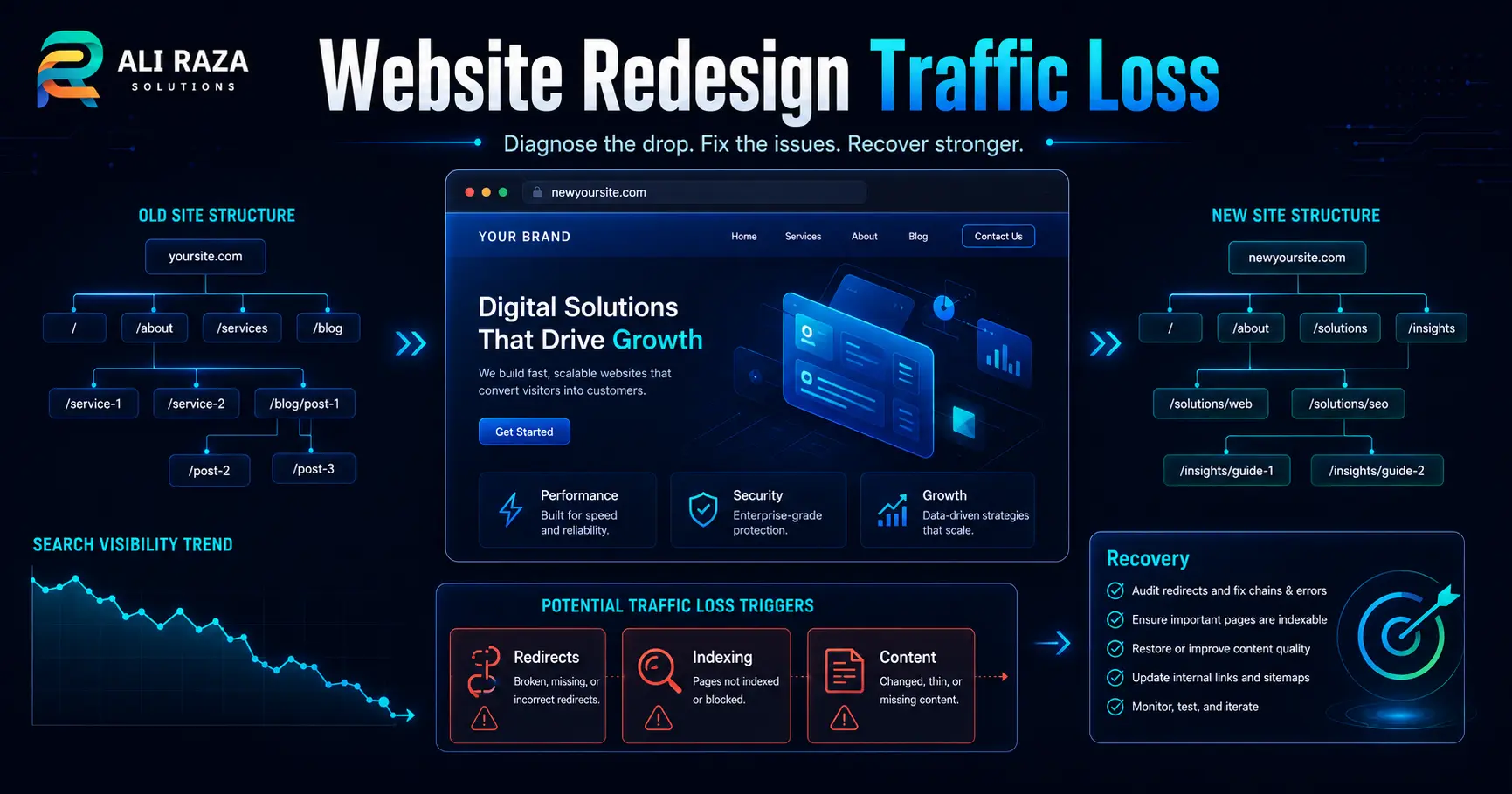
Website Redesign Traffic Loss: The Short Answer
Website redesign traffic loss should be treated as a diagnosis problem, not proof that the new design itself is bad. First confirm the drop in Google Search Console, line it up with the launch date, and determine whether the change affected impressions, clicks, rankings, indexation or only analytics tracking. Then audit redirects, indexability, canonicals, content, internal links and sitemap discovery.
Google notes that organic Search traffic can fall for many reasons, so the redesign date is a clue rather than a complete explanation. If the decline starts exactly when URLs, templates, navigation or content changed, those launch changes deserve immediate investigation.
9 Critical Checks for Website Redesign Traffic Loss
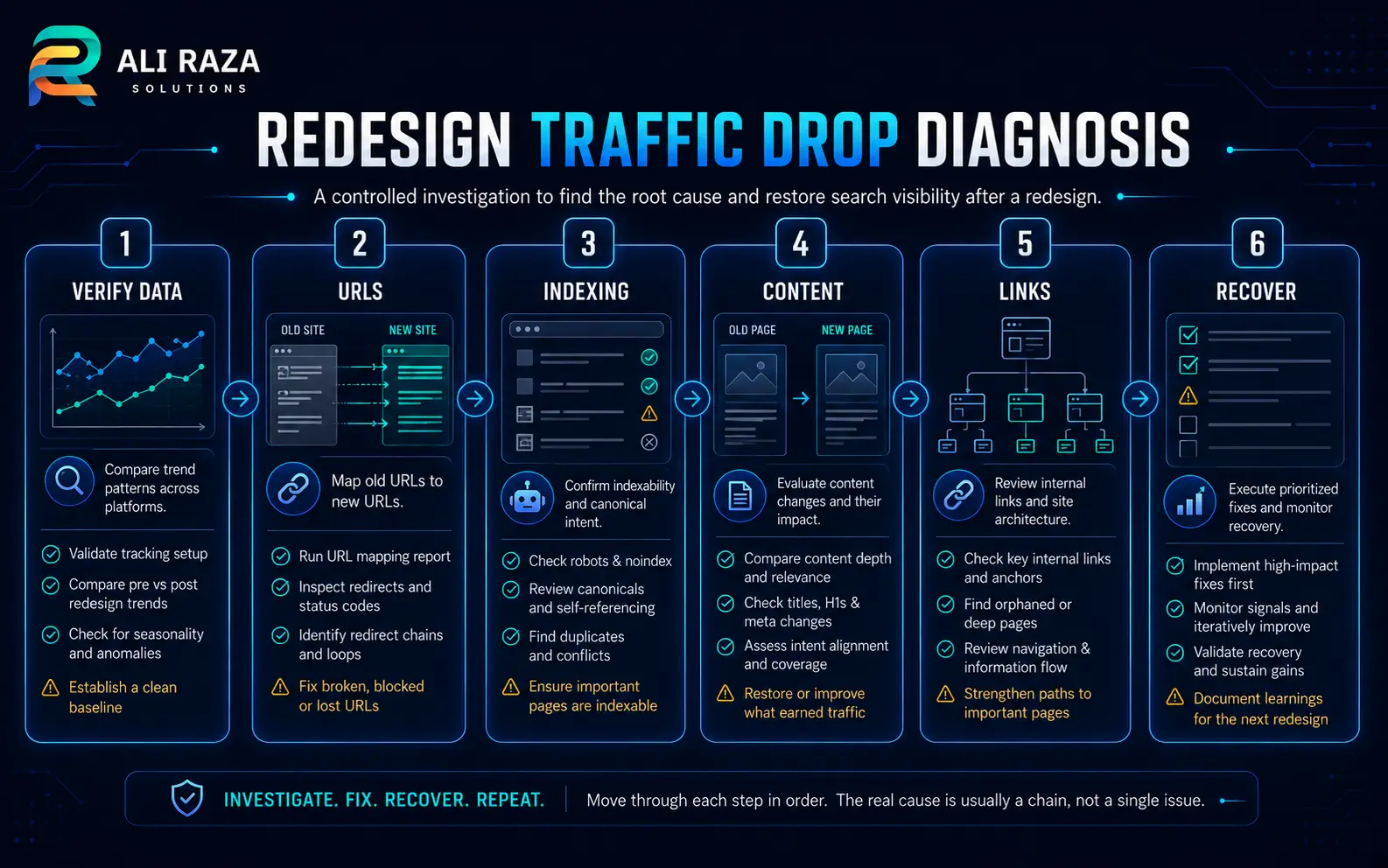
For website redesign traffic loss, work from the easiest high-impact failures toward more interpretive content work. That order helps prevent an accidental `noindex`, broken redirect map or wrong canonical from being overlooked while the team debates headlines and copy.
Verify the data
Compare Search Console clicks and impressions before and after launch. Confirm analytics tags still fire so a tracking break is not mistaken for an SEO collapse.
Map old and new URLs
Identify valuable old landing pages and confirm each changed URL reaches the closest relevant new destination.
Check indexability
Look for accidental `noindex`, password protection, staging controls or crawl restrictions that should not be present on production.
Review canonicals
Confirm canonical tags point to the intended live URLs rather than staging, retired addresses or unrelated pages.
Compare content
Find high-performing pages whose purpose, useful copy, FAQs, headings or service details were substantially reduced.
Audit internal links
Check navigation, contextual links, breadcrumbs and category paths for orphaned pages or unnecessary redirect hops.
Inspect the sitemap
Make sure the current XML sitemap lists canonical, indexable URLs rather than staging pages, redirects or retired addresses.
Review templates
Compare mobile content, metadata, rendered links and important page elements that may have changed at template level.
Prioritize lost pages
Start with pages and queries that lost the most qualified Search traffic rather than fixing every URL with equal urgency.
Audit Redirects Before You Rewrite More Content
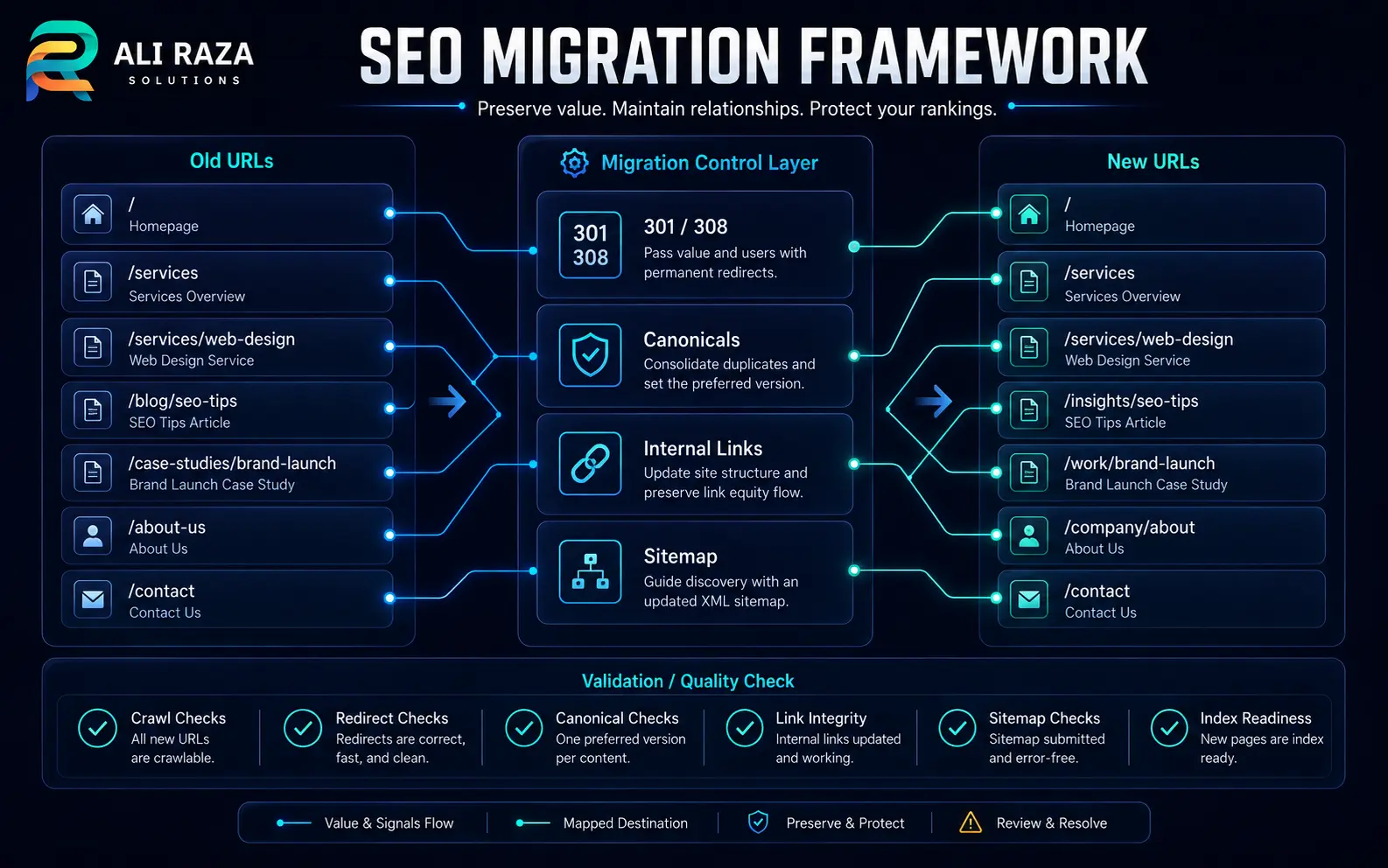
A major source of website redesign traffic loss is a URL structure change without a reliable old-to-new redirect map. Google recommends permanent server-side redirects such as 301 or 308 when a move is permanent. Each important old URL should normally point to the closest relevant new destination rather than being sent to a generic homepage.
For website redesign traffic loss, export or recover the old URL list from a pre-launch crawl, XML sitemap, analytics, Search Console, CMS export or server records. Then test the highest-value URLs directly. Look for 404 responses, redirect loops, long chains and redirects to pages whose topic no longer matches the original.
Google’s current site-move guidance and redirect documentation are the appropriate references when the redesign changed URLs or domains.
Check Indexing, Noindex, Robots and Canonicals
When website redesign traffic loss affects many pages at once, indexability deserves immediate attention. Staging sites are often protected with `noindex`, password controls or crawl restrictions. The problem begins when one of those settings follows the redesign into production.
Google documents `noindex` as a directive that prevents a page from appearing in Search. It also explains that `robots.txt` controls crawler access and is not the correct mechanism for keeping an otherwise indexable page out of Google.
When diagnosing website redesign traffic loss, inspect the rendered HTML and Search Console URL Inspection data for priority pages. Confirm the page returns a successful status, is not blocked by an unintended directive, and names the intended live URL as canonical. Google treats both redirects and `rel=”canonical”` as strong canonicalization signals, while sitemap inclusion is weaker.
Use Google’s noindex guidance and canonical documentation to validate the final implementation.
Compare the Old and New High-Performing Pages
Not every website redesign traffic loss problem is a technical directive. A visual redesign can also change the page’s purpose. Service details may be shortened, location information removed, useful FAQs deleted, headings generalized or several focused landing pages compressed into one broad page.
For website redesign traffic loss, start with pages that previously earned meaningful impressions, clicks or conversions. Compare the old version with the redesign and identify substantive information that disappeared. Restore what remains useful to the reader rather than copying every old paragraph back simply because the page once ranked.
| Change | Potential SEO effect | Recovery question |
|---|---|---|
| Service detail removed | Page may answer the query less completely. | Was useful decision-making information lost? |
| Location page consolidated | Local intent and unique context may be weakened. | Does the replacement genuinely serve that location intent? |
| FAQs deleted | Helpful supporting answers and internal context may disappear. | Which questions still matter to the customer? |
| Title/H1 changed broadly | Topical focus can shift. | Does the new page still clearly describe its primary purpose? |
| Multiple pages merged | Distinct intents may compete inside one page. | Should separate useful destinations still exist? |
Restore Internal Links and Site Architecture
A redesign can preserve every URL and still damage discovery if navigation and contextual linking change heavily. For website redesign traffic loss, compare how important landing pages were linked before and after launch. A page that moved several clicks deeper or lost all contextual links may now receive less internal prominence.
Update internal links so they point directly to final destination URLs instead of passing through redirect chains. Restore useful contextual links from related services, categories, guides and location pages. Check breadcrumbs and mobile navigation too; the mobile experience should not hide important primary content or navigation that is available on desktop.
Clean the Sitemap and Help Google Discover the New Site
In website redesign traffic loss recovery, a sitemap does not repair a broken migration, but it helps search engines discover the URLs you consider important. After a redesign, the sitemap should contain current canonical, indexable URLs—not old redirects, 404s, `noindex` pages or staging addresses.
Google allows sitemaps to be submitted in Search Console and recommends URL Inspection or recrawl requests for selected changed URLs. Requesting recrawling does not guarantee immediate indexing, so use it after the technical issue is fixed rather than as a substitute for fixing the issue.
See Google’s sitemap guidance and recrawling documentation.
Use Search Console to Find What Actually Fell
The fastest way to make website redesign traffic loss actionable is to break the total decline into pages and queries. Compare a representative pre-launch period with the post-launch period, allowing for seasonality and other major events.
- Find pages with the largest losses in clicks and impressions.
- Compare query groups to see whether specific services or locations were hit harder.
- Check devices and countries for unusual patterns.
- Inspect important URLs for indexing and canonical status.
- Compare the launch date with the beginning of the decline.
- Confirm whether analytics sessions fell in the same pattern as Search Console clicks.
Google’s own traffic-drop debugging guide recommends Search Console performance data as a core part of diagnosis because organic declines can have several possible causes.
Prioritize Website Redesign Traffic Loss Recovery
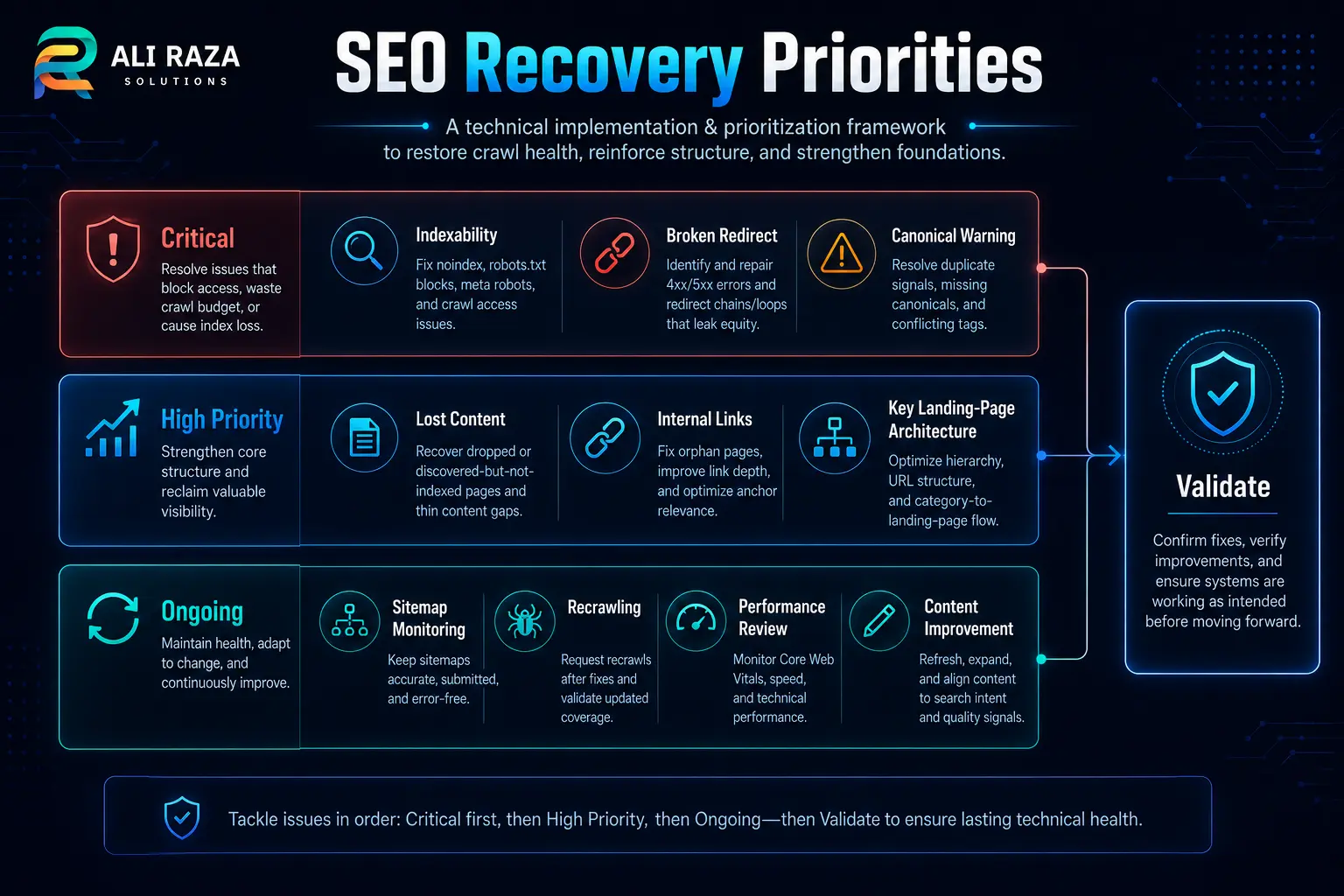
In website redesign traffic loss recovery, not every finding deserves the same urgency. A production-wide `noindex` or bad canonical pattern is a blocking issue. A weaker paragraph on one secondary page is not. Use a simple severity model so the team fixes structural problems before polishing lower-impact details.
Critical
Production `noindex`, incorrect canonicals, broken high-value redirects, widespread 404s, staging URLs in production or a domain migration without functioning redirects.
High priority
Previously valuable landing pages removed, important internal links lost, changed service/location architecture or canonical pages missing from navigation and sitemap discovery.
Medium
Metadata inconsistencies, weaker headings, page-level content gaps and redirect hops that are not blocking access.
Ongoing
Recrawl monitoring, content improvement, internal-link refinement, performance work and continued comparison of queries and landing pages.
If the migration is business-critical or the cause is unclear, Ali Raza Solutions can review the technical setup through its SEO services and coordinate fixes with WordPress development when the recovery requires code, templates or redirect changes.
Prevent Website Redesign Traffic Loss Next Time
The best website redesign traffic loss recovery plan is a migration plan prepared before launch. Crawl the old site, export valuable URLs, record metadata and canonicals, identify important landing pages, and decide which URLs must remain unchanged.
If URLs need to change, build the redirect map before launch. Test staging carefully, but remove staging-only index controls when production goes live. Crawl the new site before DNS or final launch where possible, then crawl it again after launch to confirm response codes, canonicals, internal links and sitemap URLs.
Finally, monitor Search Console closely after a major migration. Google says Search Console helps site owners understand how Google crawls, indexes and serves their pages, making it one of the most useful post-launch monitoring tools.
Frequently Asked Questions About Website Redesign Traffic Loss
These answers cover common decisions after a redesign or migration appears to reduce organic Search visibility.
Why did my traffic drop after a website redesign?
The decline may come from changed URLs, missing redirects, indexing directives, canonical errors, lost content, weaker internal linking, template changes, analytics tracking problems or an unrelated search trend. Compare the timing and Search Console data before deciding on the cause.
How long does SEO recovery take after a redesign?
There is no guaranteed recovery timeline. The time depends on the cause, scale of the migration, crawl and indexing activity, how quickly errors are corrected, and whether the redesigned pages still satisfy the relevant search intent.
Do I need 301 redirects after redesigning my website?
If permanent page URLs changed, permanent server-side redirects such as 301 or 308 are typically appropriate. Map each important old URL to the closest relevant new destination instead of sending unrelated pages to one generic page.
Can changing URLs hurt SEO?
Changing URLs creates a migration that search engines and users need to follow. Proper redirects, updated internal links, correct canonicals and clean sitemap discovery can reduce migration risk, but URL changes should still have a clear reason.
Can an accidental noindex cause traffic loss?
Yes. Google documents `noindex` as a directive that prevents a page from appearing in Search. If a staging noindex setting reaches production, important pages can disappear from search results until the issue is corrected and processed.
Should old pages redirect to the homepage?
Not as a blanket migration strategy. Old URLs should normally redirect to the most relevant replacement page when one exists. Unrelated homepage redirects can create a poor user experience and do not preserve the original page intent.
How do I find which pages lost traffic after a redesign?
Use Search Console Performance data to compare periods before and after launch, then sort or filter by pages and queries. Prioritize landing pages with meaningful losses in clicks or impressions and inspect their current indexing and migration setup.
Should I restore the old website if traffic drops?
Not automatically. First identify whether the problem is a fixable redirect, indexing, canonical, content or linking issue. A rushed rollback can introduce another migration and erase useful diagnostic evidence.
Can I recover SEO traffic after a failed website migration?
Recovery is possible in many cases when the underlying migration problems are identified and corrected, but no one can guarantee that previous traffic or rankings will return exactly. Measure recovery by important pages, queries and business outcomes over time.

About Ali Raza Solutions
Ali Raza Solutions provides SEO, WordPress development, website maintenance and digital marketing services for businesses in the United States, United Kingdom and international markets.
This guide provides general SEO migration information. Search visibility can change for many reasons, and recovery cannot be guaranteed. Diagnose the actual cause before making another large website change.